
⚠️Not updated in over a year
Description
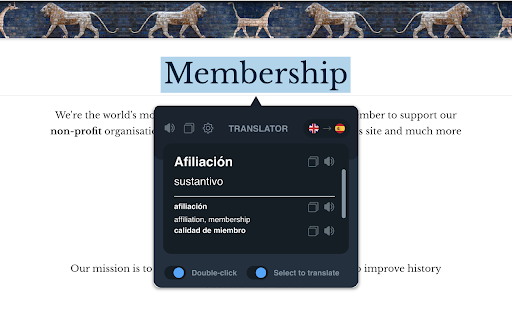
Language Translator is a Chrome extension that translates text and entire web pages. Highlight or right-click on any text and use the translation icon to see it in your language. To translate a full page, click the browser toolbar icon and select "Translate this page."
Need to enter text manually? Open the extension pop-up next to the address bar and translate into 100+ languages. Built-in text-to-speech helps with pronunciation, showing phonetic transcription and transliteration.
Full-page translation works in one click, converting entire web pages into your chosen language.
Key Features:
► Translate selected text or use the context menu.
► Translate custom text in the browser pop-up.
► Text-to-speech with pronunciation, transcription, synonyms, antonyms, and definitions.
► Supports over 100 languages.
► Automatically saves translation history in local storage.
► Free real-time translation tool.
Language Translator is a professional translation extension designed for reading, writing, and language learning. Download now and break language barriers.


Reviews (2 cached)
★☆☆☆☆2023-12-06
Ikiam P.
generic basic app
★☆☆☆☆2023-01-01
Dario Laurelli
don't work...
Permissions (7)
Permissions
activeTabℹ Can access the current tab when you click the extension contextMenusℹ Can add items to the right-click menu declarativeNetRequestℹ Can block or redirect network requests scriptingℹ Can inject scripts into web pages storageℹ Can store data locally in your browser system.display tabsℹ Can see your open tabs and their URLs
Details
| Version | 1.0.6 |
| Updated | Feb 23, 2025 |
| Size | 1.98MiB |
| First Seen | Mar 26, 2026 |
More by Peta Sittek

Volume Master
by Peta Sittek
6M
★ 4.81
accessibility
6M
★ 4.81
accessibility

Webtime Tracker
by Peta Sittek
90K
★ 4.75
workflow
90K
★ 4.75
workflow

Dark Mode Everywhere
by Peta Sittek
30K
★ 4.46
accessibility
30K
★ 4.46
accessibility

Site Inspector
by Peta Sittek
10K
★ 4.83
developer
10K
★ 4.83
developer

Simple screenshot
by Peta Sittek
8K
★ 4.61
workflow
8K
★ 4.61
workflow
Popular in accessibility

Read&Write for Google Chrome™
by Texthelp
17M
★ 3.44
accessibility
17M
★ 3.44
accessibility

360 Internet Protection
by qihoosafe
17M
★ 4.54
accessibility
17M
★ 4.54
accessibility

Screenshot reader™
by Texthelp
7M
★ 2.57
accessibility
7M
★ 2.57
accessibility

OrbitNote
by Texthelp
7M
★ 2.95
accessibility
7M
★ 2.95
accessibility
Volume Master
by Peta Sittek
6M
★ 4.81
accessibility
6M
★ 4.81
accessibility
Popular Extensions

Adobe Acrobat: PDF edit, convert, sign tools
by Adobe Inc.
331M
★ 4.40
workflow
331M
★ 4.40
workflow

AdBlock — block ads across the web
by AdBlock
62M
★ 4.48
workflow
62M
★ 4.48
workflow

迅雷下载支持
by Shenzhen Xunlei Network Technology Co., Ltd.
59M
★ 2.77
workflow
59M
★ 2.77
workflow

Grammarly: AI Writing Assistant and Grammar Checker App
by Grammarly
42M
★ 4.50
communication
42M
★ 4.50
communication

Adblock Plus - free ad blocker
by eyeo GmbH
41M
★ 4.39
workflow
41M
★ 4.39
workflow