
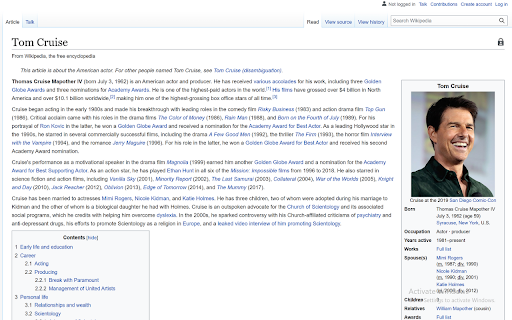
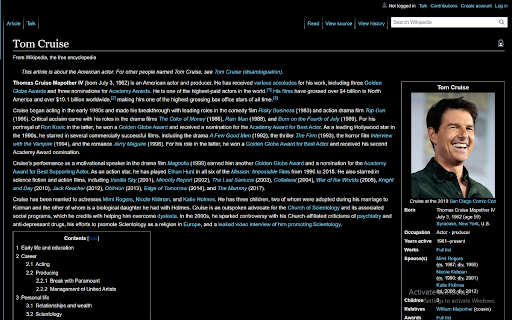
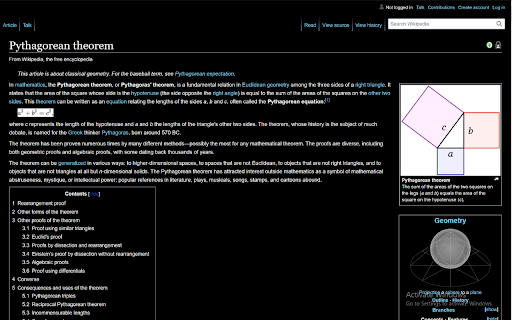
Description

Reviews (7 cached)
Needs to be updated to support the new UI for Wikipedia.
How I can start it??? I doesnt work
You have to click the extension button everytime you change to a new page rather than it automatically changing the page to dark mode, makes this app a bit pointless.
It's a straight black background, which 1) is too much contrast to make for easy reading, and 2) prevents certain text elements like notifications from being visible at all. It also doesn't stick when opening new tabs, making it basically useless.
Can you remoove inverting text color, and add black background for hyperlinks
Not bad, colour is okay. Sucks that I had to click the extension every time and also that the text colour for equations don't change colour so they can't be read. So I can't use it for that reason alone
it should give wikipedia the dark mode eve without having to click everytime on the icon
Details
| Version | 1.0.3 |
| Updated | Sep 22, 2021 |
| Size | 8.52KiB |
| First Seen | Mar 26, 2026 |
Popular in accessibility





Popular Extensions




