
Description


Reviews (24 cached)
very low limit in free version (7), makes it practically unusable. each link need to be confirmed. selected folder not saved between links from the same downloads.
How to download files from a list of direct URLs? Not search and download, not save html files, not extract but just download.
Was good until it became paid with a pathetically low limit for free downloads
Wouldn't pick up simple links in basic page.
has a pro version. The simplest tool ever. Should be free
It doesnt Work, Downloads the HTML of the website not the Files within the page. Useless
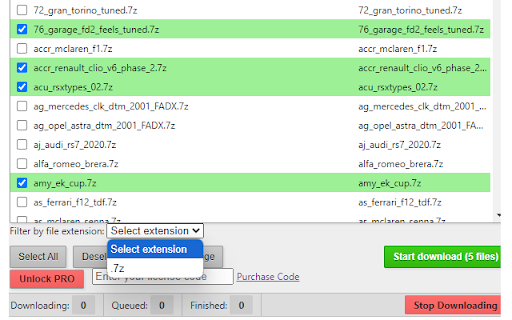
It let me download seven files before aborting and displaying the message that I had reached my download limit, prompting me to purchase the pro version. That is not sufficient to allow me to assess the product before purchase. Avoid unless you are happy to suffer crippling restrictions before purchasing.
Shocking that this pretends to be free: It is really just a demo. You are limited to a small number of downloads before being forced to buy the PRO version. Also, it locks you into keeping that tab open and as soon as you use another tab, it doesn't continue with further downloads. Glad though because I found JDownloader 2 which does the job perfectly by itself.
Bad, so bad. It is not even free, as all extensions are. :(
I don't usually write reviews on this kinda stuff. I'm not miffed by the 3-file limit on the non-paid version. The problem is is that the app DOESN'T MENTION WHY that is why I can only download 3-files. I mean, I don't mind paying for apps. But a lot of people are going to think the extension is just broken. But after seeing how the developer responds to such criticism, calling everything a "fake review", nah, that's a one star from me, my guy.
What the developer - ONOVIS VION - claims is a "fake review" for only downloading 3 - and only 3 - files is actually true. What the developer ONOVIS VION requires you to do is UPGRADE TO PRO in order to get anything done. Otherwise, this is an awful downloader - will not follow links or handle directory structures. Or maybe the PRO version does - I won't spend the money to find out. Avoid avoid avoid.
The interface is easy to use, it found and selected all the links with the extension I selected... Then downloaded exactly three of them. Tried again, same thing. Reload the page, same thing. Restart the browser, same thing. It will find and select all the files, if there's 50 or 75 or 175, and when I hit the button it downloads exactly three of them. So this is useless to me.
You have to press "return" for each file you download when it prompts for location. If it's 300 files, you're pressing return 300 times. Not very well thought out, is it?
I really have a need for this but I can't get it to work. It grabs everything and its a pain to filter. Can't clear it once the screen is loaded once. Keeps coming back with the last capture. NO HELP ANYWHERE.
Clear rip off of Batch Link Downloader, but also asks for a premium code ? Contacted author
Not sure why its not working for me - downloads 3 files then stops ??
Could not get it to work. Did not identify any links.
Works, but I picked up Pro and It fails constantly. I have it set to download a file every 65 seconds, and it fails constantly after 1 or 2 files. I regret grabbing pro. Works besides that, but my main purpose the timer seems to be broken. It will forget URLs I give it, and forget them after a few minutes.
It downloaded 11 files then just stopped working.
5 free downloads then I have to purchase a code for the Pro version, no thank you
seems alright, but can't get very far with the free limit, at which point i'm drawn towards alternatives lol
Got to try it only ONCE with a few pics before it demanded payment. Could not even try if the different options work as expected. I wanted to give it a try anyway so I went to the purchase site, but it doesn't mention ANYWHERE if this is a one-time payment, monthly or yearly recurring, for one computer, one account, nothing! I don't mind paying for good software, but I expect to be able to test what I am going to pay for and I want to know if this is a one-time "investment" or if I am going to be taken in the behind every month like most things are subscription-based these days.
The extension is good, but it stopped me after downloading ~6 files and asking for a one-time payment. Then I open my cursor and describe my requirements, it provided a workable version within about 30 minutes. I then added more requirements and open-sourced it here: https://github.com/koenzhao/free_link_downloader
Okay, a fair review of this product and some things to know before you buy it. I have purchased the full version because I'm having to download over 2000 documents, now the process itself for downloading is fine, no issues - however a big issue are smaller sites that have server request limits by user, so I find that I am being blocked a lot on this for downloads, now this isn't the apps fault, this is a server side issue. HOWEVER, what is my critique is the inability to do several key things: Resubmit requests at a set interval instead of the default - I'd happily walk away and let it request a document every 5 - 10 seconds based on the site so I don't have to manually redownload from the downloads list. Duplication file checks - the software assumes that it has downloaded the documents on these bounce backs and it's annoying, why is there no option for me to resubmit my request again on the page, but skip already downloaded files so they don't redownload with a (1) beside them. Losing itself on the page - let me anchor this extension, if you go off the tab and come back it sometimes loses itself and what I had ticked previously, so I can't even resume where I downloaded from if I choose to do say 20 or so at time. I think this app is a great concept, but does need some quality of life changes to compensate for server side things.
Permissions (5)
Permissions
Details
| Version | 4.1.0 |
| Updated | Feb 11, 2026 |
| Size | 178KiB |
| First Seen | Mar 24, 2026 |
More by webservice2t



Popular in tools





Popular Extensions




