
✅Recently updated
Description
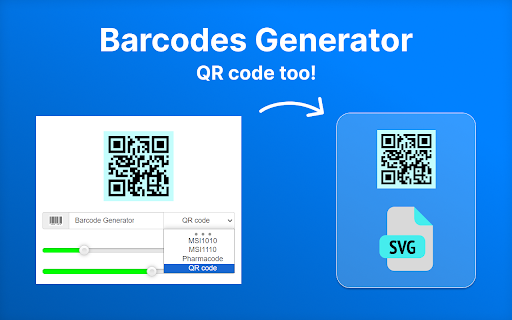
✅ Barcode Generator is a fast browser extension, you can use it as a barcode maker and a QR code maker in one tool.
✅ It helps you obtain clear, scalable results in seconds from selected text, page URLs, or manual input. It's especially handy as a QR code generator.
💡 How to generate your label
🚀 Create a QR code from the current page
Click on the Barcode Generator icon while 'QR code' is selected, and the extension will instantly create it for the page URL you are viewing.
🚀 Generate from selected text
1. Highlight text on any webpage.
2. Click on the extension icon.
3. If the selected format matches the content, the code will be generated automatically.
🚀 Enter data manually
1. Click on the Barcode Generator icon.
2. Choose the required format: QR code, UPC, Code 128, etc.
3. Enter the data you want to encode.
4. Change the settings if needed – they are saved automatically.
📥 Your label is copied to the clipboard and saved to file automatically.
👉 To reset the settings, click the small barcode icon next to the input field.
✨ Whether you need to create a QR code for a website, generate barcode labels for products, or make them for internal tracking, Barcode Generator gives you a quick workflow directly in the browser. It can be used for inventory work, shipping labels, and digital sharing.
📌 Why choose Barcode Generator
🔹 Fast to use: Open the extension, pick a format, and generate your tag right away.
🔹 Practical format support: Use it as a UPC barcode generator, UPC generator, or any other linear type, or 2D code creator depending on your task.
🔹 Scalable output: Create barcode and QR code images that stay sharp for print, packaging, documents, and screen display.
🔹 Convenient workflow: Settings are remembered automatically.
👌 No complicated setup and no long learning curve.
🌐 Suitable for retailers, warehouses, creators, teachers, offices, and small teams.
🔐 Privacy & transparency
This is not an online barcode generator. If you’re tired of barcode maker tools that require uploading your content, this one works locally: the selected text or page URL is processed on your device. So, it is private by design and easy to use for both personal and business needs.
👉 Important note
Barcode Generator is meant to encode data. The generated image will contain the value you chose (selected text or URL). If you share the image, others may be able to decode it – that’s the intended function.
📌 Typical Barcode Generator use cases
📦 Retail: Generate UPC labels for pricing, packaging, and stock control.
🚚 Logistics: Create labels with Code128 for shipping, warehouse locations, and package tracking.
🛒 E-commerce: Make bar and QR codes for product cards, inserts, and order workflows.
📚 Education: Create a QR code for course materials, forms, and instructions.
💠 More ways to use Barcode Generator
🎟️ Events: Create a QR code for tickets, check-in pages, access passes, and visitor information.
🏥 Clinics and offices: Generate your tag references for forms, records, and internal workflows.
🏗️ Manufacturing: Mark parts, boxes, and finished items with clear labels.
🌐 Marketing: Use a QR code maker for websites, landing pages, videos, and contact pages.
🔧 Tips for better results when using Barcode Generator
✓ Use SVG when you need scalable output for printing or professional layouts.
✓ Keep enough size and contrast so the label scans more reliably.
✓ Choose the right format: UPC for retail, Code128 for logistics, QR for links and mobile access.
✓ Keep your preferred settings and generate barcode with fewer manual steps.
🌍 Real-world examples
🌟 A shop owner can use this barcode generator to make UPC labels for new products.
🌟 A warehouse team can create labels for shelves, bins, and outgoing packages.
🌟 A teacher can create a QR code that opens study materials or quizzes.
🌟 A creator can use a QR code generator for a website, donation page, or special offer.
📌 FAQ
❓ What is Barcode Generator?
It is a browser extension that helps you create barcode and QR code images quickly, with support for common formats and scalable output.
❓ Can I create a QR code for my website or page?
Yes. You can use the current page URL, selected text, or manual input to create a QR code in a few clicks.
❓ Is my data private?
Yes. The extension processes data locally on your device.
🎯 Get started now
Install Barcode Generator to create QR codes, and to generate barcode labels. Make scalable tags whenever you need them.
✨ Whether you are looking for a barcode generator, QR code generator, or way to create barcode and QR code assets in your browser, this extension will be at hand.

Reviews
Loading reviews...
Permissions (4)
Permissions
activeTabℹ Can access the current tab when you click the extension downloadsℹ Can manage and monitor downloads scriptingℹ Can inject scripts into web pages storageℹ Can store data locally in your browser
Details
| Version | 1.0.8 |
| Updated | Mar 16, 2026 |
| Size | 233KiB |
| First Seen | Mar 24, 2026 |
More by hisettler

Popular in tools

Browsec VPN - Free VPN for Chrome
by Browsec
7M
★ 4.44
tools
7M
★ 4.44
tools

Microsoft Bing Homepage & Search for Chrome
by Microsoft Corporation
4M
★ 3.72
tools
4M
★ 3.72
tools

Monica: All-In-One AI Assist & Smartest AI Agent
by Monica Team
3M
★ 4.89
tools
3M
★ 4.89
tools

Ad Blocker: Stands AdBlocker
by Stands
3M
★ 4.79
tools
3M
★ 4.79
tools

Google Dictionary (by Google)
by dictionary-extension-dev
3M
★ 4.36
tools
3M
★ 4.36
tools
Popular Extensions

Adobe Acrobat: PDF edit, convert, sign tools
by Adobe Inc.
330M
★ 4.40
workflow
330M
★ 4.40
workflow

Chrome Remote Desktop
by Chrome Remote Desktop Release Managers
38M
★ 3.14
workflow
38M
★ 3.14
workflow

Cisco Webex Extension
by cisco.chromestore
24M
★ 2.34
social
24M
★ 2.34
social

Kami for Google Chrome™
by Kami
17M
★ 4.56
education
17M
★ 4.56
education

Read&Write for Google Chrome™
by Texthelp
17M
★ 3.44
accessibility
17M
★ 3.44
accessibility