
Followers Exporter for Threads
v1.5.0 Updated Mar 18, 2026 264KiB
⚠️Requests 1 sensitive permission ✅Recently updated
Description
🚀 Threads Followers Exporter – Export Followers & Following from Threads.com Instantly!
Threads Followers Exporter is the ultimate Chrome extension that helps you export any Threads.com user’s followers and following lists in just one click. Whether you’re a digital marketer 📈, a social media strategist 🤳, a data analyst 📊, or just a curious user 👀 — this tool makes data extraction from Threads easy, fast, and powerful.
🧩 What Does It Do?
With Threads Followers Exporter, you can:
• 📤 Export followers or following lists of any public Threads account
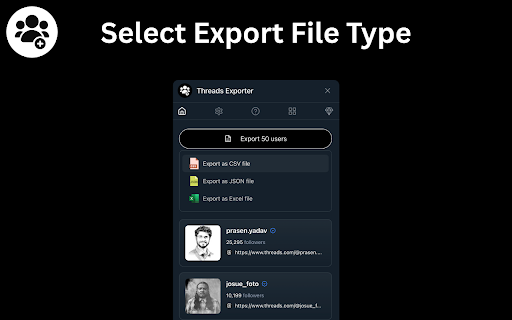
• 📁 Download the data in CSV, JSON, or Excel (XLSX) formats
• 🧠 Access detailed user info like username, full name, follower count, and more
• 🔍 Analyze audience demographics, behavior, and growth potential
• 🤝 Build prospect lists, find influencers, or manage community growth
✨ Core Features
✅ 1. One-Click Export
Just enter the username, choose followers or following, and hit Export. That’s it! No complicated setup, no login required.
📦 2. Multiple File Format Support
Export data in your preferred format:
• 📄 CSV – Open with Google Sheets or Excel
• 📊 XLSX – Ideal for large spreadsheets
• 🧬 JSON – Great for developers or automation tools
📋 3. Rich User Data Fields
Each exported record includes:
• 🆔 User ID (pk)
• 🔗 Username
• 🧾 Full Name
• 🖼️ Profile Picture URL
• 🧑💼 Bio Info
• ✅ Verification Status
• 📣 Follower Count
⚡ 4. High-Speed Extraction
Data fetching begins instantly after you initiate. Extraction is fast and smooth—even for accounts with thousands of users.
🔒 5. 100% Privacy Safe
All data processing is done locally on your browser.
🚫 We do not store, transmit, or access any of your data.
Your activity is never logged, and no credentials are required.
🛠️ How to Use It
1. 🔍 Click on the Threads Followers Exporter extension icon.
2. 👤 Enter the Threads.com username you want to analyze.
3. 🔄 Toggle between “Followers” and “Following” to select the type of data.
4. 🚀 Hit Start Extraction to fetch data in real-time.
5. 💾 Once completed, click Export to download your data.
💼 Who Is This For?
This tool is ideal for:
• 🧠 Researchers gathering public data for academic or journalistic purposes
• 📊 Marketers doing competitor research and audience segmentation
• 🔍 Influencer managers tracking growth and reach
• 📈 SaaS startups scraping social signals for AI tools or CRMs
• 🤖 Developers needing JSON-formatted user metadata
• 💡 Founders & solopreneurs building growth-hacking strategies
⚠️ Limitations & Tips
• ⚠️ Some Threads accounts may return fewer than 100 entries due to their privacy settings or rate limits.
• 🔁 For larger accounts, you may need to run multiple exports.
• 🔧 Works best on Chrome or Chromium-based browsers (e.g., Edge, Brave).
🔐 Your Privacy Matters
We built Threads Followers Exporter with privacy and transparency in mind:
✅ No login or Threads credentials needed
✅ No external API calls to our servers
✅ All data stays within your browser session
✅ Fully client-side extraction
📝 Disclaimer
Threads Followers Exporter is an independently developed tool by BrowserAgents.
We are not affiliated with Threads.net, Meta Inc., or Instagram in any way.
All trademarks and logos belong to their respective owners.
📥 Get Started Now!
Ready to take control of Threads data?
Download Threads Followers Exporter today and unlock a whole new world of insights, leads, and strategic growth opportunities. 🚀📊




Reviews
Loading reviews...
Permissions (4)
Permissions
activeTabℹ Can access the current tab when you click the extension storageℹ Can store data locally in your browser tabsℹ Can see your open tabs and their URLs webRequestℹ Can observe and analyze network traffic
Details
| Version | 1.5.0 |
| Updated | Mar 18, 2026 |
| Size | 264KiB |
| First Seen | Mar 24, 2026 |
More by Browser Agents

Instagram Saved Posts Exporter
by Browser Agents
864
★ 3.91
tools
864
★ 3.91
tools

X Post Exporter - Download X / Twitter Posts
by Browser Agents
598
★ 3.60
tools
598
★ 3.60
tools

Amazon Review Scraper
by Browser Agents
330
★ 4.00
tools
330
★ 4.00
tools

Threads Media Downloader
by Browser Agents
285
★ 5.00
tools
285
★ 5.00
tools

Telegram Images Downloader - TG Downloader
by Browser Agents
116
★ 5.00
tools
116
★ 5.00
tools
Popular in tools

Browsec VPN - Free VPN for Chrome
by Browsec
7M
★ 4.44
tools
7M
★ 4.44
tools

AnyDoc Translator - Translate Web and PDF
by www.wps.com
7M
★ 4.59
tools
7M
★ 4.59
tools

Microsoft Bing Homepage & Search for Chrome
by Microsoft Corporation
4M
★ 3.72
tools
4M
★ 3.72
tools

IE Tab
by Blackfish Software
4M
★ 4.31
tools
4M
★ 4.31
tools

Monica: All-In-One AI Assist & Smartest AI Agent
by Monica Team
3M
★ 4.89
tools
3M
★ 4.89
tools
Popular Extensions

Adobe Acrobat: PDF edit, convert, sign tools
by Adobe Inc.
331M
★ 4.40
workflow
331M
★ 4.40
workflow

Chrome Remote Desktop
by Chrome Remote Desktop Release Managers
38M
★ 3.14
workflow
38M
★ 3.14
workflow

Microsoft Single Sign On
by Microsoft
36M
★ 2.27
workflow
36M
★ 2.27
workflow

Cisco Webex Extension
by cisco.chromestore
24M
★ 2.34
social
24M
★ 2.34
social

Kami for Google Chrome™
by Kami
19M
★ 4.56
education
19M
★ 4.56
education