
Meeting Timer - for Google Meet
v3.2.12 Updated Oct 27, 2025 1.63MiB
Description
Meeting Timer is a lightweight timer for Google Meet with Google Calendar Sync, a Mini SubTimer for agenda items, and a shareable timer that stays visible when you present.
Why it’s better:
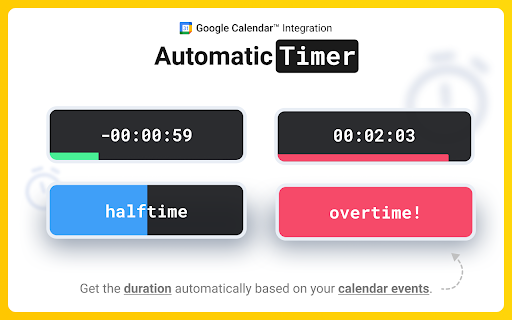
• Automatic countdown from your Calendar – join a Meet, and the Google Meet countdown timer starts with the correct duration.
• Mini SubTimer (new) – time tasks, speaking turns, or agenda points without touching the main timer.
• Share across tabs – show the timer on every tab so it appears on your shared screen.
• Stay on track – halftime/overtime color cues, optional sound alerts, and overlap warnings.
• Drag & drop – place the timer where you want; we remember the position.
• Quick access to upcoming events – open the extension popup to see and join your next meetings.
Two ways to use it:
• Automatic: Connect Google Calendar once. The timer counts down for any Meet that matches your event.
• Manual: Set a duration yourself. Great when there’s no calendar event, or an event couldn't be matched.
Core features:
• 🕒 Automatic Timer (Calendar matched)
• ⏰ Manual Timer (Calendar event not matched) (set duration, see progress/halftime/overtime)
•➕ Mini SubTimer for topics, Q&A, exercises
• 🤝 Shareable timer (visible while screen sharing)
• 🎛️ Drag & drop + saved position
• 🌈 Progress, halftime & overtime color states
• 🚨 Overlap alerts for back-to-back meetings
• 🔊 Sound alerts (optional; configurable volume)
• 📍 Favicon badge before a meeting starts
• 📅 See all upcoming meetings from your Google Calendar in the popup
How it works:
1. Install the extension.
2. (Optional) Connect Google Calendar.
3. Join a Google Meet. The meeting timer overlay appears automatically.
4. Click the SubTimer icon to add a mini countdown for agenda items or controlling speaking time.
5. Click Share to mirror timers across tabs so they appear on your shared screen.
Settings:
• Open settings from the gear icon on the timer.
Requirements & notes:
• Works best in Google Chrome.
• Authorization may not work in some Chromium browsers (e.g., Brave, Arc).
Help:
📋 Timer's controls Cheat Sheet: https://www.meetingtimer.io/cheatsheet
❓Troubleshooting & FAQ: https://www.meetingtimer.io/troubleshooting
Contact Us:
🚀 Request a feature: https://forms.gle/U4MyETCPCxv8cozm7
🐛 Report a bug: https://forms.gle/GfipS5TGyVUZgx1V6
Privacy:
We don’t store data on our servers. Your settings and meeting data stay in your browser.
Legal Info:
Google Meet Meeting Timer's use and transfer of information received from Google APIs to any other app will adhere to Google API Services User Data Policy, including the Limited Use requirements.
Google Calendar is a trademark of Google LLC. Use of this trademark is subject to Google Permissions.
Google Meet is a trademark of Google LLC. Use of this trademark is subject to Google Permissions.


Reviews (2 cached)
★★☆☆☆2026-03-24
CONNIE AYE @CAYCO EFFEX LLC
Been using the timer for a while and I like that it keeps the time during live video chats. However, it will not connect to my calendar. I've tried all of the troubleshooting suggestions, but nothing seems to be working.
★★☆☆☆2025-03-05
Kimball M
Seems pretty good but it freezes up and offers a clear cache button which doesn't do anything. Deleted and redownloaded. Same thing. Whats up?
Permissions (7)
Permissions
alarmsℹ Can schedule periodic background tasks identityℹ Can use your Google account identity identity.email idleℹ Can detect when you're away from the computer scriptingℹ Can inject scripts into web pages storageℹ Can store data locally in your browser tabsℹ Can see your open tabs and their URLs
Details
| Version | 3.2.12 |
| Updated | Oct 27, 2025 |
| Size | 1.63MiB |
| First Seen | Mar 25, 2026 |
Popular in tools

Browsec VPN - Free VPN for Chrome
by Browsec
7M
★ 4.44
tools
7M
★ 4.44
tools

Microsoft Bing Homepage & Search for Chrome
by Microsoft Corporation
4M
★ 3.72
tools
4M
★ 3.72
tools

Monica: All-In-One AI Assist & Smartest AI Agent
by Monica Team
3M
★ 4.89
tools
3M
★ 4.89
tools

Ad Blocker: Stands AdBlocker
by Stands
3M
★ 4.79
tools
3M
★ 4.79
tools

Google Dictionary (by Google)
by dictionary-extension-dev
3M
★ 4.36
tools
3M
★ 4.36
tools
Popular Extensions

Adobe Acrobat: PDF edit, convert, sign tools
by Adobe Inc.
330M
★ 4.40
workflow
330M
★ 4.40
workflow

Chrome Remote Desktop
by Chrome Remote Desktop Release Managers
38M
★ 3.14
workflow
38M
★ 3.14
workflow

Cisco Webex Extension
by cisco.chromestore
24M
★ 2.34
social
24M
★ 2.34
social

Kami for Google Chrome™
by Kami
17M
★ 4.56
education
17M
★ 4.56
education

Read&Write for Google Chrome™
by Texthelp
17M
★ 3.44
accessibility
17M
★ 3.44
accessibility