
Grok / GPT Prompt Saver
v1.0.2 Updated Apr 21, 2025 64.14KiB
Description
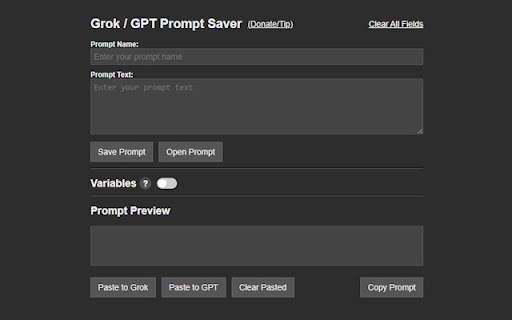
Whether you’re a power user, educator, or creative, this extension streamlines your workflow by letting you save and reuse prompts with ease. Say goodbye to repetitive typing and hello to efficiency!
With Grok / GPT Prompt Saver, you can create prompts with dynamic variables—perfect for tailoring responses without rewriting from scratch. Add single-line or multi-line variables like [name] or [topic], and watch them seamlessly integrate into your prompts. The real-time preview shows exactly how your final text will look, with resolved variables highlighted for clarity. Save your prompts in a customizable folder system with drag-and-drop organization, making it simple to keep everything tidy.
Need to deploy a prompt? One click pastes it directly into Grok or ChatGPT’s input field—or copy it to your clipboard for use anywhere. Clear pasted prompts effortlessly to reset your workspace. Worried about losing your work? Backup your prompts as a JSON file or import them later to merge or overwrite existing ones.
Designed for simplicity and power, this extension requires minimal permissions: activeTab to paste prompts, downloads for backups, storage to save your data, and host permissions for grok.com and chatgpt.com integration. No remote code, no fuss—just a clean, local solution built for AI enthusiasts.
Perfect for brainstorming, coding, teaching, or chatting, Grok / GPT Prompt Saver puts your prompts at your fingertips. Download now and take control of your AI conversations!
Any donations or tips are greatly appreciated! (via Venmo QR code)
Change Log
1.0.2
-fixed prompt preview to now show characters inputted in the prompt text field
-fixed issue where characters were not pasting into the chatgpt.com prompt field
-fixed issue where the variable switch turns off the first time when reopening the extension after loading a saved prompt with variables
-added a 10 variable max limit due to performance issues
-added character restrictions on prompt names to prevent corrupt saves (only letters, numbers, spaces, underscores, and hyphens are allowed)
1.0.1
-fixed .json save files not saving prompt text/variable data
-fixed import issues when not selecting parent folders/prompts
-updated file structure tree format on backup/import/delete
-increased prompt save limit to 200
-added save alert on new prompt saves
-minor code clean up


Reviews
Loading reviews...
Permissions (3)
Permissions
activeTabℹ Can access the current tab when you click the extension downloadsℹ Can manage and monitor downloads storageℹ Can store data locally in your browser
Details
| Version | 1.0.2 |
| Updated | Apr 21, 2025 |
| Size | 64.14KiB |
| First Seen | Mar 25, 2026 |
Popular in tools

Browsec VPN - Free VPN for Chrome
by Browsec
7M
★ 4.44
tools
7M
★ 4.44
tools

Microsoft Bing Homepage & Search for Chrome
by Microsoft Corporation
4M
★ 3.72
tools
4M
★ 3.72
tools

Monica: All-In-One AI Assist & Smartest AI Agent
by Monica Team
3M
★ 4.89
tools
3M
★ 4.89
tools

Ad Blocker: Stands AdBlocker
by Stands
3M
★ 4.79
tools
3M
★ 4.79
tools

Google Dictionary (by Google)
by dictionary-extension-dev
3M
★ 4.36
tools
3M
★ 4.36
tools
Popular Extensions

Adobe Acrobat: PDF edit, convert, sign tools
by Adobe Inc.
330M
★ 4.40
workflow
330M
★ 4.40
workflow

Chrome Remote Desktop
by Chrome Remote Desktop Release Managers
38M
★ 3.14
workflow
38M
★ 3.14
workflow

Cisco Webex Extension
by cisco.chromestore
24M
★ 2.34
social
24M
★ 2.34
social

Kami for Google Chrome™
by Kami
17M
★ 4.56
education
17M
★ 4.56
education

Read&Write for Google Chrome™
by Texthelp
17M
★ 3.44
accessibility
17M
★ 3.44
accessibility