
Description

Reviews (5 cached)
reinstalled, removed other extensions, reinstalled chrome still not working. 'We couldn't find any spaces, please login to your Jira site and refresh the page;. There seems to be a bug with this.
Beside the fact that it does not work it is a great add on for displaying error message "We could't find any projects, please login to your Jira site and refresh the page"
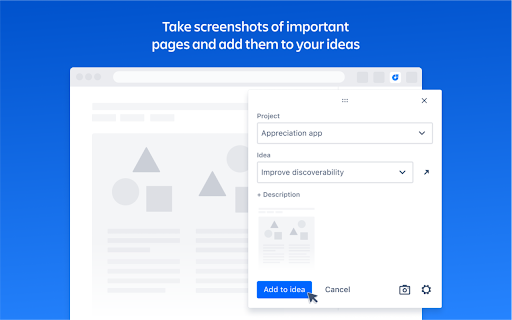
This is great for JPD, but JPD is very limited. Can we please allow this Atlassian-official Chrome Extension to allow us to create Issues in Jira Cloud (like the extension we had for Jira Work Management) and attach the current web page as both a screenshot and URL in the Issue? This would help us create Jira Issues with important context far more easily, quickly, and efficiently—and without posing Intellectual Property issues whereby we'd have to have our teammates download a 3rd party Chrome Extension, and grant access to our Jira Site(s) and/or Project(s). **Please do not limit this to JPD only!** 🙏 🙏 🙏 👇 It'd be a blessing to be able to do #1 and #2 below (via this Chrome Extension) when on a web page: GOAL #1) Create a "Draft" Issue in any Project (e.g. in all our Workflows, we have a ~"Draft" status before ~"Ready") with: — a) screenshot(s) of the current web page ➡️ into the Description and/or as Attachment(s) — b) its URL ➡️ into the Description (like the official Slack-Jira integration) — c) any selected text or elements on the page ➡️ into the Description — d) some additional context we can provide and type ➡️ into the Description or as a Jira comment GOAL #2) Comment on any existing Issue with: — a) screenshot(s) of the current web page — b) its URL — c) any selected text or elements on the page — d) some additional context we can provide and type
There's definitely a bug that prevents existing ideas from appearing in the extension. The only work-around is to remove and re-add the extension which isn't very practical for using internally. I love the idea, just needs reliability.
I have huge issue. I can't use the extension if there is already a pop up opened ( like when you open an issue in trello ( Atlassian). You can't select value in dropdown or put my focus in the description fields i use chrome
Permissions (9)
Permissions
Details
| Version | 1.1.7 |
| Updated | Jan 29, 2026 |
| Size | 15.82MiB |
| First Seen | Mar 25, 2026 |
More by Atlassian

Popular in workflow




Popular Extensions
