Snippet Highlighter - Web & PDF icon

Snippet Highlighter - Web & PDF

by Adolix

v6.0.5 Updated Jul 23, 2025 5.38MiB
CWS
10K
Users
★ 4.22
136 reviews
#5382
of 207.1K
education
#144 of 6.7K

Description

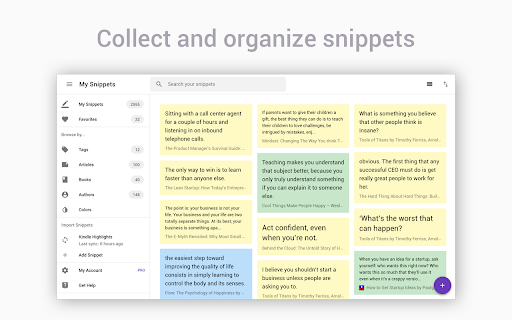
Get all your highlights in one place, instantly searchable, available wherever you go. All your highlights are synchronized and backed up in the cloud. The extension requires a FREE account you can create immediately after the installation. Some functionality requires upgrade to a Snippet PRO account. HOW DOES HIGHLIGHTING WORK? ✓ Simply use your mouse to select and highlight text snippets on any website or PDF ✓ Click the "Add" button on any image to highlight and save charts, graphs or other images from all around the web. You can disable the "Add" button from the extension Options page. You can still highlight images by right-clicking on the image and choose "Add to Snippet". ✓ Highlight screen regions by capturing screenshots directly from the extension ORGANIZE, SEARCH AND REVIEW HIGHLIGHTS ✓ browse highlights by books and authors ✓ organize highlights with folders and subfolders ✓ tag highlights and assign colors ✓ bookmark and return to source articles with a click ✓ add personal notes ✓ powerful text search EXPORT AND SHARE YOUR HIGHLIGHTS ✓ Download highlights and notes as PDF or editable text files. ✓ Download highlights as Word or Excel files (coming soon) ✓ Use various citation systems for all your highlights ✓ Share individual highlights and collections of highlights via email or social media (Twitter, Facebook) ✓ Export collections of highlights as slideshows ✓ Connect your highlights to apps like Evernote, OneNote and more (coming soon) ENHANCE YOUR KINDLE READING EXPERIENCE ✓ Make use of all those important highlights and notes you took on your Kindle ✓ Works with highlights made on any Kindle device ✓ Review and edit all the highlights and notes that you have made on your Kindle ✓ Export Kindle highlights and notes as PDF, Word, Excel or text files SNIPPET PRO Get the most out of Snippet with features like unlimited number of folders, export options, PDF upload and more. *** Limited time offer — Save 50% with our yearly plan! *** FREQUENTLY ASKED QUESTIONS https://blog.gosnippet.com/help-center/ TRUSTED BY THOUSAND OF USERS Snippet is trusted by passionate readers, writers, students, business professionals, researchers, quotes collectors, bloggers, and many people who want to enhance their learning and reading experience. GIVE US A REVIEW ★★★★★ Do you like Snippet? Support us by giving a review! By installing the extension, you agree to Snippet’s Terms and Conditions (www.gosnippet.com/terms) and Privacy Policy (www.gosnippet.com/privacy). Any question? Drop us a line at hi@gosnippet.com
Snippet Highlighter - Web & PDF screenshot 1Snippet Highlighter - Web & PDF screenshot 2Snippet Highlighter - Web & PDF screenshot 3Snippet Highlighter - Web & PDF screenshot 4Snippet Highlighter - Web & PDF screenshot 5

Reviews (18 cached)

★☆☆☆☆2023-08-01
rstefan250

I need to sign up for something so simple. Great!

★☆☆☆☆2022-10-01
TiMERS

i'm always hate with an extension who need login required!

★☆☆☆☆2022-09-25
Abdur Rahman

Poor quality, very irritating

★☆☆☆☆2022-04-10
Madame Minty

Excuse me? Even making simple NOTES is $4/month?

★☆☆☆☆2021-12-10
Somto O

literal trash

★☆☆☆☆2019-04-29
Expert In statu nascendi

Chrome extension (and Opera one since 27.4.19 as well) does not work.

★★☆☆☆2023-03-04
Aarjvi Jain

Was extremely promising until it wasn't, the snippets do not save in real-time on the sidebar as they mentioned. I tried it on two browsers- chrome and brave. It seemed to work better on chrome, however, after just 1-2 highlights made to a page, the rest do not show up on the dashboard or the sidebar. Somehow, web highlighters stop working for me after a short while. Disappointed :(

★★☆☆☆2022-09-03
Васил Василев

not working in a useful way

★★☆☆☆2022-08-06
Kadin F

Perhaps one of the few apps with a really easy PDF viewing setup, it falls flat when after waking your computer next, it fails to instantly show more than 3 pages of highlighted text, when the 4th page appears empty I need to play round until itll finally work again for the next 3 pages. Admittedly my PDF file is 22 pages, the length isnt uncommon for uni so this fails to deliver

★★☆☆☆2020-01-27
Mojtaba Vahdati

I just started using the free version, and I've highlighted 7 parts of a page, but when I return to it, although the number of highlights is correct(7) and the highlights exist in the right panel as well, 5 of them are not highlighted on the page. I have very few other extensions so I'm almost sure nothing's interfering its functionality. This can be a very useful extension but this was a buzzkill for me to see it not working in my first experience.

★★☆☆☆2019-12-20
Dan Valentine

The purple pull out bar always gets in the way. The apps I use have pull out bars and the x is on the top right corner. I have to disable the extension just to use my web site properly. Slows me down. Other than that. This has worked out really well. I think it's soo cool that it pulls all my underlines from kindle.

★★★☆☆2025-09-25
Maria FGR

Its nice i just wish that my highlighting didn't dissapear all of a sudden

★★★☆☆2023-12-14
Deodato Porter

Doesn't maintain the formatting of highlighted text. The line breaks get removed and make the highlights an unreadable mess. Please solve this bug. Other highlighters can do that.

★★★☆☆2023-10-15
Alex selone

very sneaky that there isn't an option to hide add button even when you don't need it. I dont want to see that when I want to a view an Image

★★★☆☆2023-05-22
车桑

The support for Chinese is too poor

★★★☆☆2022-11-10
Elinor J

It works well, except it won't let me delete notes?

★★★☆☆2021-06-06
FNBTKRZ5

just wish it's free.. but it's better than any extension that i am used before.. i can say it is the best extension for highlighting text so far that i know:D

★★★☆☆2019-07-19
Dj M

It's a nice extension but it could use a lot more options in it's settings menu. Two things I would like to see is an option to not have the highlight options pop-up display when only selecting a single word(To only display the pop-up when selecting multiple word sentences), as well as an option to only display the pop up when selecting words and holding a key like the Ctrl key or Shift key.

Permissions (4)

Permissions

contextMenus Can add items to the right-click menu scripting Can inject scripts into web pages storage Can store data locally in your browser tabs Can see your open tabs and their URLs

Details

Version 6.0.5
Updated Jul 23, 2025
Size 5.38MiB
First Seen Mar 26, 2026


