
User Count Trend
Loading...
Description
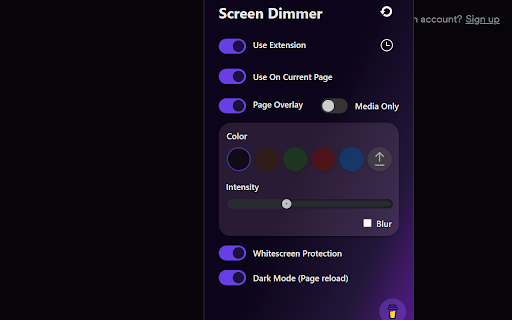
Screen Dimmer is an extension that helps you quickly change your browser screen to a dark or shaded theme. Applies screen shading across chrome tabs with a variety of colors and modes. You are also free to choose shader color intensity from 0 to 100. Provides comprehensive instructions on how to enable Dark Theme on popular sites
- Whitescreen Protection will help you to get rid of the annoying white screen that pops up on any page load causing considerable discomfort.
- Exclude white-list which allows disabling extension changes across selected domains.
- Media-only mode apply screen dimmer only to media files while browsing sites with a native dark theme enabled.
- Instructions on how to enable Dark mode on popular sites
How to use:
1. Install the extension and go to any other tab in your browser (The Web Store is blocking content-changing extensions)
2. Click on the Screen Dimmer icon in your extensions list
3. Setup preferred settings
4. Optionally: pin extension for easy access
New in Version 0.7.5:
Fixed a style overriding issue that caused page elements to shift. Fixed a single site exclution button and updated it's name to "Use On This Site" for better representation
New in Version 0.7.2:
Fixed a bug when screen starts to glimmer after extension update (reload the page if you experience such bug on previous versions)
New in Version 0.7.1:
Fix minor bugs including alert message in Chome Store
New in Version 0.7.0:
Added Spanish localization.
Added "Use Extension" button; when turned off, the extension will be removed from all pages.
Added Blur checkbox for the overlay feature (both page and media).
Updated overlay animation to decrease flickering.
New in Version 0.6.0:
Added Ukrainian and Japanese localization
Please contact me if you want to improve the localization or add your language
New in Version 0.5.1:
Patch notes
1. Updated dark theme text color to more neutral shade so it's not too bright when reading at night
2. Updated Custom Overlay apply to cover the entire screen for specific sites
New in Version 0.5.0:
Dimmer settings are now unique to each site to improve the surfing experience. If no settings are provided the default overlay will be displayed
Added Scheduler functionality. Now the dimmer can be put on hold before dusk. Always On is a default value for this option
Added Custom Overlay option, upload your custom image instead of default page overlay (up to 5MB). Please, be aware that this functionality is currently in the experimental stage
Updated Media Only apply strategy
Fixed Whitescreen Protector closing issue
Updated UI
Updated Dark Mode color scheme
Updated extension logo
Added Animation button to Whitescreen Protector screen, click on toggle to disable the animation
Added close functionality to the Whitescreen Protector page, press C to force-close the page
Added support button
New in Version 0.3.3:
Fixed issue for not applying overlay for already opened tabs on extension install/enable
New in Version 0.3.2:
Added hint when the extension is blocked by the site (ex: Chrome Web Store)
New in Version 0.3.0:
Introduced Dark Mode Instructions. This feature will assist you to go through the steps of how to enable the Dark theme for popular sites if you currently using a light theme. To see the instruction page click a hint link at the bottom of the extension menu
New in Version 0.2.3:
Whitescreen protector is now tied to the initial tab and will close together with the tab
Added timer that will close Whitescreen protector if it takes too long to load the tab
Minor layout changes in transition and extension windows
New in Version 0.2.2:
Bug fix for Color Reset and Dark theme page reload
Whitescreen protector is now more reactive to page content
Whitescreen protector is now tied to Page Overlay, but still can be used by itself
Changed colors with high contrast
Minor Interface changes



Reviews
Loading reviews...
Permissions (4)
Permissions
browsingDataℹ Can delete browsing history and data scriptingℹ Can inject scripts into web pages storageℹ Can store data locally in your browser tabsℹ Can see your open tabs and their URLs
Details
| Version | 0.7.5 |
| Updated | Nov 24, 2025 |
| Size | 866KiB |
| First Seen | Mar 21, 2026 |
Ad space
Popular in accessibility

Screenshot Tool - Screen Capture & Editor
by screenshot-tool.app
1M
★ 4.70
accessibility
1M
★ 4.70
accessibility

Copyfish 🐟 Free OCR Software
by Ui.Vision / a9t9 software GmbH
800K
★ 4.03
accessibility
800K
★ 4.03
accessibility

Reader View
by yokris.dev
300K
★ 4.69
accessibility
300K
★ 4.69
accessibility

I still don't care about cookies
by Guus
200K
★ 4.36
accessibility
200K
★ 4.36
accessibility

Chrome Browser Lockdown
by Castle Learning
100K
★ 1.25
accessibility
100K
★ 1.25
accessibility
Popular Extensions

Adobe Acrobat: PDF edit, convert, sign tools
by Adobe Inc.
330M
★ 4.40
workflow
330M
★ 4.40
workflow

Cisco Webex Extension
by cisco.chromestore
24M
★ 2.34
social
24M
★ 2.34
social

Kami for Google Chrome™
by Kami
17M
★ 4.56
education
17M
★ 4.56
education

uBlock Origin
by Raymond Hill (gorhill)
15M
★ 4.70
privacy
15M
★ 4.70
privacy

Custom Cursor for Chrome™
by BLife Team LLC
5M
★ 4.67
fun
5M
★ 4.67
fun