
⚠️Not updated in over a year
Description
Fire Meetings provides a real time visual representation of time and money spent during a meeting, as well as a dashboard for macro trends. Fire Meetings also tracks when participants join and leave a meeting, rather than relying on expected attendance from a calendar invite.
Fire Meetings came about due to our own collective frustration with meeting time waste. We would often wonder, how much did this meeting cost us? How much does this client cost us in meeting time? How much does a certain team or department spend in meeting time? So we set out to make a product to use internally and decided to share it with the world whilst we continued to improve it.
CORE FEATURES
Real-Time Financial Impact Visualization:
Watch the cost of your meeting unfold in real time. Fire Meetings calculates the financial impact of your meeting by tracking the actual time spent by each participant and multiplying it by their hourly wage, which can be input manually or estimated by role. This live metric offers an unprecedented level of awareness and accountability.
Seamless Integration with Google Meet:
Our beta plugin integrates with Google Meet making it user-friendly and efficient. Other video conferencing platforms like Zoom are on our roadmap, with compatibility updates coming soon.
Individual Time Tracking:
Get detailed insights into the cost of each participant you add to your meeting. Empower your decisions with critical data on meeting costs to improve the cost/benefit relationship of your meetings.
How It Works:
1. Install the Fire Meetings Plugin in Chrome
2. Start / join a Google Meet and the plugin will begin tracking the attendance of everyone in it
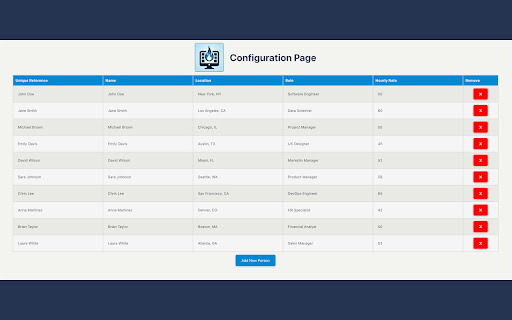
3. Open the configuration page to assign hourly rates to attendees to get an accurate monetary burn rate
Maximize Efficiency, Minimize Time Waste -- By seeing the monetary value of time spent in meetings, your team can prioritize efficiency and productivity.
Make Every Meeting Matter -- With individual time tracking, encourage full participation and engagement in every meeting.

Reviews
Loading reviews...
Permissions (3)
Permissions
activeTabℹ Can access the current tab when you click the extension storageℹ Can store data locally in your browser tabsℹ Can see your open tabs and their URLs
Details
| Version | 0.0.1 |
| Updated | Jul 12, 2024 |
| Size | 496KiB |
| First Seen | Mar 27, 2026 |
Popular in tools

Browsec VPN - Free VPN for Chrome
by Browsec
7M
★ 4.44
tools
7M
★ 4.44
tools

AnyDoc Translator - Translate Web and PDF
by www.wps.com
7M
★ 4.59
tools
7M
★ 4.59
tools

Microsoft Bing Homepage & Search for Chrome
by Microsoft Corporation
4M
★ 3.72
tools
4M
★ 3.72
tools

IE Tab
by Blackfish Software
4M
★ 4.31
tools
4M
★ 4.31
tools

Monica: All-In-One AI Assist & Smartest AI Agent
by Monica Team
3M
★ 4.89
tools
3M
★ 4.89
tools
Popular Extensions

Adobe Acrobat: PDF edit, convert, sign tools
by Adobe Inc.
331M
★ 4.40
workflow
331M
★ 4.40
workflow

Chrome Remote Desktop
by Chrome Remote Desktop Release Managers
38M
★ 3.14
workflow
38M
★ 3.14
workflow

Microsoft Single Sign On
by Microsoft
36M
★ 2.27
workflow
36M
★ 2.27
workflow

Cisco Webex Extension
by cisco.chromestore
24M
★ 2.34
social
24M
★ 2.34
social

Kami for Google Chrome™
by Kami
19M
★ 4.56
education
19M
★ 4.56
education