Zoho Annotator icon

Zoho Annotator

by Zoho Corporation

v2.3.2 Updated Mar 14, 2026 22.83MiB
CWS
20K
Users
★ 4.73
128 reviews
#2277
of 109.9K
workflow
#704 of 16.9K
⚠️Requests 1 sensitive permission Highly rated Recently updated

Description

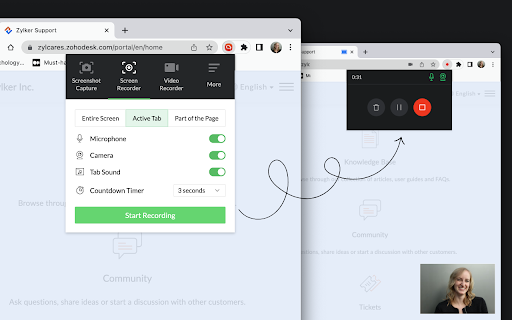
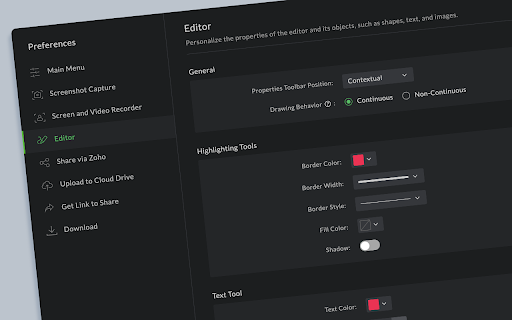
Capture screenshots or recordings of your web page or desktop screen. Add annotations to the captured screenshot of your web pages or images on your desktop, such as design mockups, illustrations, and diagrams, by uploading the respective image. Check out the features below. SCREENSHOT CAPTURE - Capture the full page, the visible area of a page, or only part of the page.. - Capture the whole desktop screen or an application window. - Use delayed capture to screenshot sections that appear only after clicking a link or button within the page. SCREEN RECORDER - Record the visible screen of a page or part of the page. - Record the whole desktop screen or an application window. VIDEO RECORDER - Record a video with your webcam to share your knowledge with your target audience. IMAGE ANNOTATION - Use square and circle shapes to mark areas to comment. - The freehand drawing tool enables you to circle portions correctly without disturbing other parts of the document. - The highlighter pen emphasizes the content that needs attention. - Add contextual comments to the highlighted areas. - Use tagging tools to number the places to comment and describe them in any of your communication apps after completion. - Blur or smudge private or confidential data. SHARING & UPLOAD TO CLOUD - Get a shareable link and share it in social media (Facebook, Twitter, and WhatsApp) and other websites/applications. - Upload the files to your Zoho WorkDrive, Google Drive, OneDrive, and Dropbox accounts. - Share the files in Zoho Cliq, Zoho Connect, Zoho Projects, and Zoho Sprints. PREFERENCES Customize the default values, such as Line Color, Font Family, Text Color, etc., as per your preference. SUPPORT For any questions or help, send an email to annotator-support@zohocorp.com.
Zoho Annotator screenshot 1Zoho Annotator screenshot 2Zoho Annotator screenshot 3Zoho Annotator screenshot 4Zoho Annotator screenshot 5

Reviews (7 cached)

★☆☆☆☆2025-01-22
Farren Maré

No longer allowed to install because it does not comply with Google best practices

★☆☆☆☆2022-07-11
Rajesh Medampudi

if there are multiple sources for Mic and cam, then only the first source is selected no matter what, even if we select the correct source. Due to which i am unable to record anything properly . But i appretiate the effort good upgrade.

★☆☆☆☆2022-04-26
Jordan Talmor

This was a 5-start extension until recently it stopped working. I now get a blank screen post capture.

★☆☆☆☆2018-06-29
zubair rafiq

very a few options

★★☆☆☆2024-12-05
Rick Powell

Inadequate compared to Awesome Screen Recorder. No blur. Full page is not full page, only partial.

★★☆☆☆2018-04-02
Max Rempel

Lightshot is better - it uploads the image to the server for free and gives you a link. Also, I would suggest - have an option to copy the image to the clipboard with the link to the original page. That would be very handy for collecting screenshots from various places and linking back to them.

★★★☆☆2020-03-30
Godslove Chinekwe

I use zoho sprint and thought zoho capture would be seamless addition. But unfortunately all the zoho anotator is doing is just to post images to the sprint as backlogs. Am dissappointed that it cannot even locate already existing items in the sprint and post within those, it just create new backlog items. It is posting images and screenshots. And everytime i tried to , the screenshot were NOT displaying in zoho sprint, so what's the point of using the zoho ecosystem Also showing screenshots or images make it hard to track the items or know what it is . Each anotation should be displayed as a text content in zoho sprint so that it can be tracked . Just having an image named screenshot is not trackable. In other tools like slack and asana, zipboard, ringcentra; glip , their anotation tools will post the anotations as texts comments with image attachments which makes more sense, can be tracked etc. Why is zoho anotator not making the anotation text in the the extension.So what if other memebers in the team need to reply to the comment, how will that happen. There is no reply function. i might as well use just save the website as a pdf and anotate in acrobat and paste the link in sprint . it is still gives me a better ability for replies, collorboration etc. Not good enough, unfortunately I had to delete the extension

Permissions (9)

Permissions

activeTab Can access the current tab when you click the extension contextMenus Can add items to the right-click menu desktopCapture Can capture screen, window, or tab content downloads Can manage and monitor downloads offscreen scripting Can inject scripts into web pages storage Can store data locally in your browser tabCapture Can capture tab audio/video tabs Can see your open tabs and their URLs

Details

Version 2.3.2
Updated Mar 14, 2026
Size 22.83MiB
First Seen Mar 27, 2026