
Description
Quickly open the most used URLs in your Salesforce Orgs.
How to use it:
1) Open the extension using the "Alt + S" keyboard shortcut ("Option + S" on macOS).
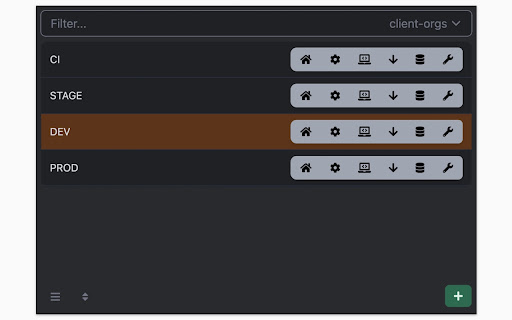
2) Select your Salesforce Org with up and down arrows
3) Press "Control + 1" to open its Home page
3.a) use "Control + 2" to open Setup, or "Control + 3" to open Developer Console
You can change the default "Alt + S" shortcut by opening the following URL in your browser: chrome://extensions/shortcuts
100% safe and private. No tracking and no permissions required to run. Also, completely free.
There is also a version of this plugin that allows changing the colour of Salesforce Favicons: https://chromewebstore.google.com/detail/salesforce-shortcuts-with/pegpfhbecbiefakehnmehoaembjmican
*** Release Notes ***
--- v1.8.0 ---
Features:
- Allow exporting and importing of settings
Fixes:
- Better handling of salesforce-setup domain
--- v1.7.0 ---
Features:
- Allow searching through shortcuts when there is more than 10 of them
--- v1.6.1 ---
Improvements:
- Ask for a review on 200th usage
--- v1.6.0 ---
Features:
- It is now possible to configure the plugin to search through all the orgs even if a tag is selected
Improvements:
- Minor styling improvements in Help page
--- v1.5.2 ---
Fixes:
- Fixed the issue where the Alt keyboard shortcuts are ignored when not using the Numeric Pad
--- v1.5.1 ---
Fixes:
- Fixed the issue where the Alt keyboard shortcuts sometimes didn't execute the correct shortcut
--- v1.5.0 ---
Improvements:
- New "Help" page with basic instructions on how to use the plugin
- New "Settings" page where a different shortcut activation key can be selected (Control vs Alt/Option)
--- v1.4.2 ---
Improvements:
- Width of the Name cell will remain constant independent of the Name length
- Improved spelling in some labels
--- v1.4.1 ---
Improvements:
- Reduced the size of the drop down icon in Tag selector
- Added more robust handling of Salesforce domains to prevent adding duplicate orgs
--- v1.4.0 ---
Features:
- Orgs can now be assigned different colors
- Holding down "CTRL" will show shortcut numbers instead of icons for easier use of keyboard shortcuts
Improvements:
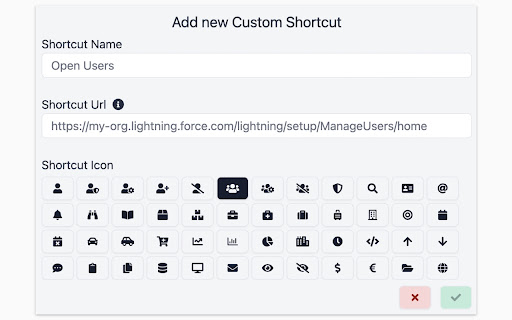
- 12 new icons are available for custom shortcuts
- When 7 or more shortcuts are displayed in the home page they are now not as narrow as before
--- v1.3.0 ---
Features:
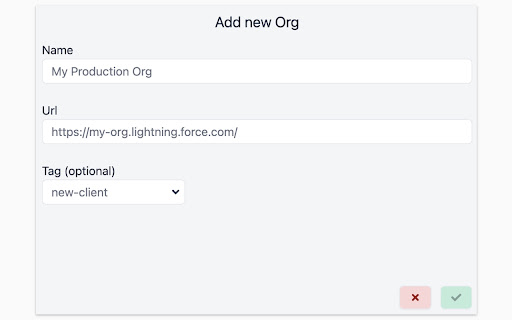
- Tags can now be added to Orgs
- Orgs can be quickly filtered by their tags
- Stored Orgs can now be edited
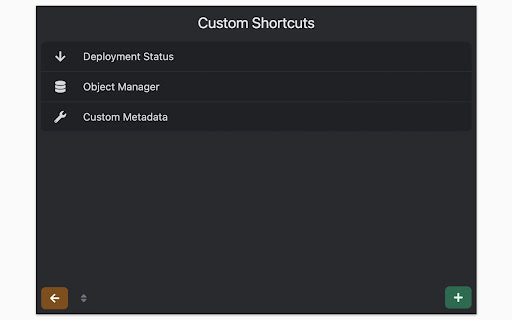
- Custom Shortcuts can now be reordered
Improvements:
- Explanation for "System" theme is provided
Fixes:
- Fixed the scrollbar look in Dark mode
--- v1.2.0 ---
Features:
- Dark mode
- Shortcuts can now store URL query parameters
Improvements:
- Moved "Delete Org" button to Reordering screen to prevent accidental deletions
- Display plugin version in Settings
- Added "Arrow Up" and "Arrow Down" icons for Custom Shortcuts
- Added help text next to "Shortcut URL" field to make it more clear how it functions
Fixes:
- Fix the flickering when opening pages
- Focused buttons couldn't be executed when pressing "Enter" key before. Now they can, but in order to open the selected Org "Ctrl + Enter" has to be pressed.
--- v1.1.0 ---
Features:
- Allow adding custom shortcuts that are applied across all Orgs
- When Org is selected, pressing the "Enter" key will execute the first action
- Allow reordering of Orgs

Reviews
Loading reviews...
Permissions (1)
Permissions
storageℹ Can store data locally in your browser
Details
| Version | 1.8.1 |
| Updated | Jan 7, 2026 |
| Size | 316KiB |
| First Seen | Mar 30, 2026 |
More by Smukov doo


Popular in workflow

Adobe Acrobat: PDF edit, convert, sign tools
by Adobe Inc.
331M
★ 4.40
workflow
331M
★ 4.40
workflow

AdBlock — block ads across the web
by AdBlock
63M
★ 4.48
workflow
63M
★ 4.48
workflow

迅雷下载支持
by Shenzhen Xunlei Network Technology Co., Ltd.
59M
★ 2.77
workflow
59M
★ 2.77
workflow

Adblock Plus - free ad blocker
by eyeo GmbH
41M
★ 4.39
workflow
41M
★ 4.39
workflow

Chrome Remote Desktop
by Chrome Remote Desktop Release Managers
38M
★ 3.14
workflow
38M
★ 3.14
workflow
Popular Extensions
Adobe Acrobat: PDF edit, convert, sign tools
by Adobe Inc.
331M
★ 4.40
workflow
331M
★ 4.40
workflow
AdBlock — block ads across the web
by AdBlock
63M
★ 4.48
workflow
63M
★ 4.48
workflow
迅雷下载支持
by Shenzhen Xunlei Network Technology Co., Ltd.
59M
★ 2.77
workflow
59M
★ 2.77
workflow

Grammarly: AI Writing Assistant and Grammar Checker App
by Grammarly
42M
★ 4.50
communication
42M
★ 4.50
communication
Adblock Plus - free ad blocker
by eyeo GmbH
41M
★ 4.39
workflow
41M
★ 4.39
workflow