
Speech to Text for ChatGPT, Gemini, etc
Description


Reviews (53 cached)
The extension sends every URL you visit back to their servers, with a persistent user ID, as long as you have the extension installed in your browser. So if you like having 100% of your web browsing tracked by some unknown company, with them getting your IP address, web page URL, and Page Title, then this is the right browser extension for you.
very suspicious after deleting it, it stayed working!!
Couldn't get it to work with Grok on windows. JUNK! removed.
Didn't work at all. Keeps complaining it cannot access the mic or the net all while both work fine.
tool doesn't work. Often it connects to the mic (you see the microphone symbol pulsating) but nothing is transcribed. Poor quality and definetly not worth the money.
Why change the button that chatgpt added and replace it with your own so that this extension can be used instead of the built-in one? Why would you do that for plus users? I understand probably wanting more people in a premium subscription to your app, but you need to understand boundaries too. As long as there was no voice input from openai, the voice input of this extension was convenient, but the ability to communicate with chatgpt why close it? You could at least put it next to each other, so that a person could choose whether to dictate into a line and send it or communicate with chatgpt.
Doesnt work. Just sits there listening and never does anything
its not work
Does not work! Paid for nothing!
The icon disappeared! It just stopped working.
Does n t work
the icon has dissappeared
Voice wave. Extension keeps. Ending my sentences and. Returning to a new line. And putting periods at each end so I end up with a whole bunch of. Broken sentences. This is annoying. And there is no options to stop this.
It doesn't working
It has disapeared
sadly, it doesn't work. Does it only work on windows and macOS?
chatgtp's english english pronunciation in this version is not natural and sounds robotic..... dissapointed
its not working on my brave browser for any English , it keeps saying "Failed to start the speech recognizer. Probably the voice control language you choose is not supported in your browser. Try changing your voice control language from settings." although its windows
didnt have any of the english inputs work
The Persian (Iran) language is read as it is Arabic and it is not understandable.
TTS won't work on Linux so the extension is useless
doesnt read aload
It cannot auto recognise languages so one cannot use it to learn a language. also it listens to its own conversations and responds and goes haywire. make it idiot proof and add the feature i said and i might come back
Everything would be fine, but the app doesn't work with Deepseek. It doesn't automatically read out the answer, no matter what settings I set.
Tested with DeepSeek, Chrome 135.0.7049.115 Speech recognition only works about 70% accurate and that is with already pronouncing everything unnaturally accurate. Reading only works for the very first sentence per message. Everything else gets completely ignored. The integration into the website looks nice tho.
After I record a message and send it , the recording should stop. Currently I have to stop it myself and it's incredibly annoying . You should record ONLY WHEN I CLICK A BUTTON.
Why I am not able to see microphone symbol to catch the voice on above the search bar. It's disabled today, I used it last night and all of a sudden it disappeared this morning. May I know the reason and how to fix it?
i found a bug you could fix, when playing native voice by chatgpt the mic does not turn off
While this app seems to have interesting features, it's practically useless if the responses are not read in full. The intermittent skipping of sentences during the read-aloud function makes it incredibly frustrating to use. If this issue is not resolved, the app fails to deliver its intended purpose.
The application is more than excellent, but what confuses me is that it has recently started requesting access permissions for all my data on all websites, and this is suspicious.
Didn't work with brave on windows or linux
No option to install TTS languages in Linux
cool but the reader voice only works for a few sentences and the cuts off so it doesnt read the entire prompt. Also it needs a button to read out chat messages with a button press as well. So I can listen to old prompts or relisten to the latest one again.
Read Aloud is not working.
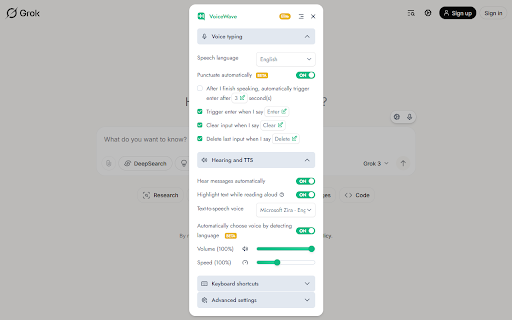
Everything is great except I cannot change the default voice. I tried to subscribe thinking maybe I had to pay for it to use the other voices but it but it says I'm already subscribed. I have never subscribed and using all of my email addresses to recover a password doesn't work because, well, I have never subscribed. It says it can use other TTS voices but there is no setting to use other TTS voices. The contact method is Facebook messenger so I left a message but there was no reply. I uninstalled and reinstalled. So disappointed! It reads my Grok replies automatically which is exactly what I wanted but it's in a voice that grates on my like fingernails on a chalkboard and I can't use any of the other voices. Bummer, I can't find another extension that will automatically read my Grok replies!
Had a prior issue with it repeating the prior response before speaking the most current, then out of nowhere it started working properly for the last few weeks. Now, it simply doesn't appear on the DeepSeek webpage anymore after working quite well. I went to the Gemini site and the app does appear, so not sure what the issue is. When it works, it works great. Hope it just needs an update. I have no way of knowing.
Currently voicewave hasn't support Read-Aloud mode with Vietnamese Voice
If possible, please increase the max TTS speech rate.
hi how are you use of chatgpt
It was working normally until around September 20, 2024, but with the update on September 24, 2024, the Japanese voice playback accent became strange. The playback speed is 150% and is Google Japanese (jaJP). Instead of speaking clearly, I started speaking in strings like in English. It's not very nice to hear.
In this update, there is a big bug. When VoiceWave is activated, the Editing of previous questions function no longer work on Chatgpt. This is really a big problem. Please fix it.
I'm not able to use it anymore. the mic icon has vanished
Microphone is available for almost every website but speaker is not available. Please add speakers that reads the text, on every website.
You mention on your website that extension is opensource yet I don't see (maybe I'm blind) where the source code is? Care to enlighten me, and I would gladly rate it 5 stars from every account my family uses. from voicewave website screenshot at imgur under /HiwACyb.png
A slight learning curve but so far enjoying it. A few things that could be fixed and/or enhanced. 1. Bug - Auto listen worked at some point when I installed, but doesn't seem to work regardless if I toggle the option on or off. I guess the only thing to try is re-install, but I have got that annoyed yet. 2. Feature - It's nice that the microphone is on and turns of when switching tables but I'd also like for it to do the same when the window is not in focus. I have multiple monitors so I switch to other chrome windows and it's annoying that it doesn't understand that it's no longer in focus.
the settings option/symbol doesn't appear above the search box in chatgpt like its shown in the web store pictures so couldn't change the settings when i needed to. hope you look into that. otherwise its fine. thank you.
Did this stop working?
Why open your wallet for a paid GPT Chrome extension when ReplyPal is here to save the day – and your money?
I like it and appreciate your work so much, but can you make it change voices for different languages? For example: If the answer on Chat GPT or Claude is displayed in English, then you will speak English. And if the answer is displayed in Vietnamese, you will speak Vietnamese aloud. This would be awesome, but for now, I have to change it manually, and it is super inconvenient. And it also don't work on Claude Ai, it would be greate if you can make it availble in Claude and Bard
Worked okay but the listen button doesnt work in other languages than English
Permissions (4)
Permissions
Details
| Version | 6.0.1 |
| Updated | Dec 11, 2025 |
| Size | 1.56MiB |
| First Seen | Mar 26, 2026 |
More by VoiceWave, LLC

Popular in tools





Popular Extensions




