Description
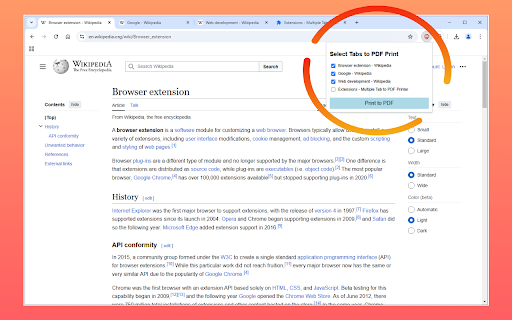
Do you often find yourself juggling multiple open tabs and needing to save them as PDFs? Multiple Tab to PDF Printer is here to make your workflow simpler and more efficient. With just a few clicks, you can save selected tabs as individual PDF files, making it perfect for students, researchers, professionals, or anyone who needs to print multiple webpages at once to PDF files.
Key Features
✨ Effortless Tab Selection: Choose tabs with Ctrl+click or use intuitive checkboxes in the UI to select the tabs you want to print.
📄 Seamless PDF Creation: Instantly convert selected tabs into individual, standard-format PDF files without leaving your browser.
🖱️ User-Friendly Interface: Simple and straightforward, so you can focus on your tasks, not the tool.
🌐 Works Across All Websites: Whether it’s articles, research papers, or online forms, you can save content from any website with ease.
How It Works
1️⃣ Open the tabs you want to save as PDFs in your browser.
2️⃣ Launch the extension by clicking the toolbar icon.
3️⃣ Select tabs with checkboxes in the extension UI or use Ctrl+click to pick them manually.
4️⃣ Click "Print to PDF" and let the extension do the rest!
Use Cases
📚 Research and Education: Save important articles or resources for offline reading.
💼 Workplace Organization: Archive meeting notes, web-based reports, or other key documents.
🗂️ Project Management: Quickly save relevant tabs for your team to reference.
⏳ Personal Productivity: Keep your browser clutter-free by saving important tabs as PDFs for later.
Why Choose Multiple Tab to PDF Printer?
Unlike other tools, this extension keeps your workflow intuitive and efficient. It works entirely within your browser, ensuring your data remains private and secure—nothing is sent to external servers.
Exceeds functionality of Print All Open Tabs. Print All Tabs to PDF is a simple yet powerful Chrome extension that allows you to save all your open browser tabs as PDF files. Our extension does that and more such as customizing print formatting!
Privacy and Security
🔒 Your privacy is our priority. This extension works entirely within your browser and does not transmit your data to any external servers. All PDFs are created locally, ensuring your content stays private and secure. We do accept contributions to support the development of the extension, but this extension only links out to an external payment provider (PayPal) we do not process any financial information directly.
Privacy Policy
You can review our full privacy policy here:
👉 Privacy Policy
Change Log
[Version 1.2.0]
Added a new UI for better access to help, contribute, and rate. Fixed gear icon positioning in UI.
[Version 1.2.0]
Bug Fixes: Added logic to account for printing a PDF from a PDF viewer directly and also for waiting for pages to load properly prior to printing.
[Version 1.1.0]
Select All Tabs: Added a “Select all” checkbox in the popup to toggle every open tab at once.
Print Options: Use the settings UI to set print options like include or exclude headers and footers from webpages.
New Settings UI: Introduced a gear icon that opens a dedicated options page where users can enable or disable headers and footers.
Refreshed Design: Updated the options page to include a sidebar (General, Help, Contribute) and a cleaner, more modern layout.
Help & Contribute Page: Added quick‐access buttons in the options page for support resources and contributions.
[Version 1.0.0]
Initial Release: Launched the extension with basic support for printing multiple open tabs to PDF.
Core Features: Users could select individual tabs (via checkboxes or Ctrl+click) and quickly generate PDFs without leaving the browser.