
Description
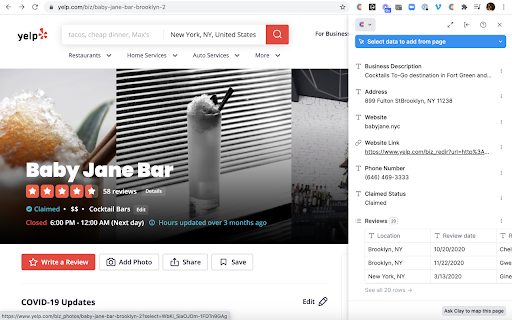
The Clay Chrome Extension lets you scrape data from any webpage directly into Clay.
For many websites, Clay automatically understands the page based on other peoples' mappings or our auto-detection. Anything we don't understand out of the box, you can select the data yourself in a few clicks and easily it right into the Clay sheet.
HOW IT WORKS
You can skip manual copy-pasting from online lists, or that same data you keep grabbing from company/people profile pages, and use our simple data selection tool to map and download the exact data points you need from any website using only a URL.
🤓 Find auto-detected lists. See a list you like on a website? Pop open the extension to check if it's been auto-detected, and add it to Clay.
🧐 Map your own lists. If a list isn't detected or you want to pull in a few more attributes, map your own lists and add it as new leads in Clay.
😲 Map page recipes. Instead of manually copy-pasting the same data from similarly structured pages into your table, pull important attributes from any website into Clay using just a URL.
Take a peek at our more extensive guide to the Chrome Extension in the Clay Library right here: https://docs.clay.com/how-to-use-clay/chrome-extension
ABOUT CLAY
We believe identifying prospects is an art, and growing users and community is a skill, but the manual searching, collecting and filling out of row after row with the same data is a waste of your team's time. So, we built the world's first spreadsheet that fills itself to help automate your sales, marketing, or recruiting.
Every company is unique in identifying and understanding their ideal customer (it's the special sauce). Clay connects to third party APIs, enrichment providers, and your internal tools to help you setup flexible, extensible workflows that pull in exactly the data you care about, automatically.

Reviews
Loading reviews...
Permissions (6)
Permissions
activeTabℹ Can access the current tab when you click the extension clipboardWriteℹ Can write to your clipboard notificationsℹ Can show desktop notifications scriptingℹ Can inject scripts into web pages storageℹ Can store data locally in your browser tabsℹ Can see your open tabs and their URLs
Details
| Version | 1.0.0 |
| Updated | Apr 10, 2025 |
| Size | 3.83MiB |
| First Seen | Mar 30, 2026 |
More by Clay

Block File Types
by Clay
600K
★ 1.00
workflow
600K
★ 1.00
workflow

Meet Attendance
by Clay
500K
★ 2.81
workflow
500K
★ 2.81
workflow

Cookie Check for YouTube™
by Clay
400K
★ 1.00
workflow
400K
★ 1.00
workflow

PWA Install Block
by Clay
300K
★ 4.35
workflow
300K
★ 4.35
workflow

Slides Timer
by Clay
100K
★ 3.47
workflow
100K
★ 3.47
workflow
Popular in workflow

Adobe Acrobat: PDF edit, convert, sign tools
by Adobe Inc.
331M
★ 4.40
workflow
331M
★ 4.40
workflow

AdBlock — block ads across the web
by AdBlock
62M
★ 4.48
workflow
62M
★ 4.48
workflow

迅雷下载支持
by Shenzhen Xunlei Network Technology Co., Ltd.
59M
★ 2.77
workflow
59M
★ 2.77
workflow

Adblock Plus - free ad blocker
by eyeo GmbH
41M
★ 4.39
workflow
41M
★ 4.39
workflow

Chrome Remote Desktop
by Chrome Remote Desktop Release Managers
38M
★ 3.14
workflow
38M
★ 3.14
workflow
Popular Extensions
Adobe Acrobat: PDF edit, convert, sign tools
by Adobe Inc.
331M
★ 4.40
workflow
331M
★ 4.40
workflow
AdBlock — block ads across the web
by AdBlock
62M
★ 4.48
workflow
62M
★ 4.48
workflow
迅雷下载支持
by Shenzhen Xunlei Network Technology Co., Ltd.
59M
★ 2.77
workflow
59M
★ 2.77
workflow

Grammarly: AI Writing Assistant and Grammar Checker App
by Grammarly
42M
★ 4.50
communication
42M
★ 4.50
communication
Adblock Plus - free ad blocker
by eyeo GmbH
41M
★ 4.39
workflow
41M
★ 4.39
workflow