
Description

Reviews (38 cached)
Why do I need to pay now, I have a lot of slides with the clock <<time|hh:mm>> Im super angry now that you need to pay for it now. I dont want to pay for it. If you can add a toggle to hide the seconds timer and add another toggle to turn off military time, that would be helpful, Thanks!
Suddenly requested my email address and browser search history. SUPER SHADY! Users should uninstall immediately. EVEN MORE SHADY: The developer is denying that this extension uses these permissions, but this is false. ALL USERS SHOULD UNINSTALL THIS IMMEDIATELY!
I have been using this for years in the classroom, and with the new update, none of the original tags work. Useless and stupid.
literally doesnt work
Does not work at all
i see nothing but a buy-me-coffee and some unreadable instructions
this sucks...
this timer does not work for me, im trying to make a google slide os, but when i put anything in there, THE TIMER WON'T WORK, so i will give this one star,. Update: i forgot to reset the slides
no intreface only text popups
When I use this I put in the command <<5:00->> and the timer doesn't even start? This extension just isn't working at all.
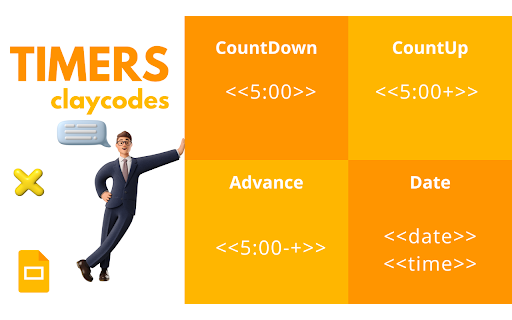
Best I can judge, the instructions lack clarity and examples. "Add $ in a count down or up timer to start it in a paused state." Well, there's no example of this further down, so should I write <<$0:00>> , <<0:00$>>, or some other combination? I'm looking at this because after using the timer once successfully on a slide, it never worked again. Hitting the "e" key indeed resets it to the first value, but that will not start the timer again. Hitting "d" only advances it by one second. It never does a countdown again, despite instructions stating to “Pause and restart timers with the d key.” So either the instructions are poor, or the timer simply does not work more than once. Another irritating feature: as soon as you launch your slideshow, the timer has already started. So if you want a certain countdown time, make sure to add in the extra seconds it takes for the slide to load. If you are trying to present one line at a time and hitting a key to advance your presentation by paragraph, bad news: your timer started already and is finished, and you can't use it any longer. Returning to the timer slide from elsewhere in your presentation does not reactivate it either. Only exiting slideshow mode and refreshing the entire presentation achieves this. And to answer the riddle above about the $? Neither of the forms I tried worked - at least with the instructions I've seen so far. In a review above I see someone has written that we shouldn’t use a text box, but rather a rectangle for this. That seems like a fairly unintuitive step, so instructions are certainly lacking there as well. Great idea, would be a nice feature if I could understand how the developer imagines it is supposed to work.
Doesnt work.
Doesn't work. I see that it used to work for people, but it's not working right now.
Doesn't work at all. Tried installing it a few times. Followed all the instructions in several YouTube videos, however it doesn't work for me. PLEASE fix this because this extension would be very useful. I can't believe that there aren't any other options. This is the only one and it doesn't work =(
Did work but now in Chrome 105.0.5195.125 no work again on PC/Mac :-< Too bad as this was an awesome extension and much needed in Slides!
I REALLY wanted to like and use this extension. Despite following everyone's advice and the instructions on the website and on an article about this extension, it never worked. I will find something else to use.
This does not work!
for some reason, the icon is there but it doesn't work for me.... :(
Nice idea, but doesn't work!
Didn't work.
It didn't work for me for some kind of reason :/
I was excited to use this extension, but it does not work.
I used it for just about everything and then it stopped working on us. Such a shame for it was very helpful with productivity. Best to you in hopes you can repair or replace this extension
This extension does not work at all. The site claims it's compatible with my device. I tried installing it repeatedly. The icon NEVER shows, so apparently it's never available. This was a huge waste of planning time.
Didn't work
It didn't work.
I hate the new update. ADD TIME FORMATTING BACK please. Now I need to change 300 slide's time functions. And the <<time#>> is a lie. It shows the time with AM PM...
Unfortunately I have to uninstall the extension because it is interfering with the ability to use captions with my microphone and meeting the needs of needs of my hearing challenged students beats out having a timer. For those that are trying to get the $ to work, use it like this: : <<15:00-$@>> This timer worked with counting down, not starting until I used the d/e trigger keys and playing a sound at the end of the timer. Its a shame it conflicts with microphone use.
It does not work as it is supposed to, but the codes are easy. I insert in many different codes, but the codes are unable to work.
This worked for a day and then stopped working
Would there be a old version coz i cant even find a way to get a short time, i did <<time^>> which it supposed to be only hour and minute, but it came as hour, minute and second as soon i present. Anyway to fix this?
the command designed to change the slide after a count down ( <<01:00-+>> and <<01:00-->> ) doesn't work. This is a huge downgrade for me. The rest works perfectly, easy to use and to understand. just fix theese 2 commands please :D
The timers do not work and or the clock. I was doing the same thing @ClaytonLawson and it does not work EDIT: For those who are encountering the same issue i have just go into presentation mode
Great. But, I can't get the $ (slide in a paused state) or the d and e keys to work. I would REALLY like them to work! Any advice
I'm having trouble with the d key pausing the timer. The e key works as a reset tool. Also, I'd rather NOT have the timer start as soon as the slide appears. I'd like to be able to start the timer when I want. Thanks.
I used it previously, but cannot get it working now.
The timer worked. I had issues at first, but I had to close Google Chrome browser and reopen it. The only issue I have now is that the slide progression does not work. The timer goes off, but does not move to the next slide like it should. I am using the <<10:05-+>> format.
I can't get this to work in a published presentation shared via the web (we use this method to Chromecast to television monitors in our agency lobbies/stores and staff have requested a clock slide with the current time). If anyone has found a workaround I'd love to learn about it!
Permissions (5)
Permissions
Details
| Version | 2.02 |
| Updated | Mar 26, 2026 |
| Size | 66.79KiB |
| First Seen | Mar 27, 2026 |
More by Clay


Popular in workflow




Popular Extensions
