
✅Highly rated ✅Recently updated
Description
The following features are implemented:
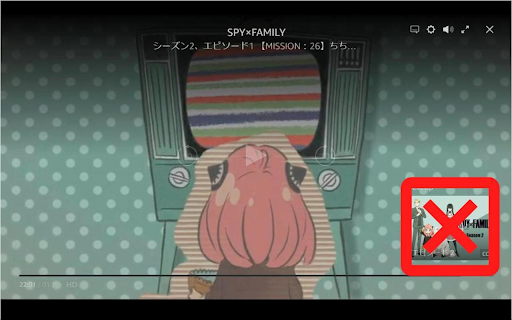
◆Hide next up card
- Disable overlay display for 5 seconds when auto-clicking the hide button
- Prevents darkening in conjunction with next up appears
- You can also make the next up card appear only when the overlay display is enabled
◆Skip ads
◆Hide reactions (like/not for me)
- You can also make the reactions appear only when the overlay display is enabled
◆Hide featured items
◆Hide skip intro button
- You can also make the intro skip button appear only when the overlay display is enabled
◆Hide rating
◆Prevents darkening when overlay display is enabled
- You can also add black outlines for texts and icons
◆Move the center buttons(Play/Pause, Back and Forward) to the bottom
◆Hide X-Ray
◆Hide various text and buttons
- (While holding down the show key and operating the mouse, it will become temporarily visible)
- title
- episode title
- various buttons in the top right
- seek bar
- playback time
- center buttons
- next episode button
◆Monitor and modify network activity
- Force playback at highest resolution
- Remove ad related data
- Change autoplay flag to true
- Disable featured items
- Disable reactions (like/not for me)
- Play the next episode if the video is automatically closed at the end of the video
An options icon will be added in the upper right corner of the video that allows you to open the options dialog.
(It is also possible to open the options dialog from the context menu.)
The options dialog allows you to enable/disable the above features.
The options dialog can also be opened by pressing `Alt + P / Option + P`. (Shortcut keys can be changed)
If you change the options, please reload the page.
This extension runs on primevideo.com and on Amazon in all countries.
However, it has only been tested on amazon.co.jp.
Reviews (1 cached)
★☆☆☆☆2024-03-24
Rory Groves
Didn't do anything
Permissions (2)
Permissions
contextMenusℹ Can add items to the right-click menu storageℹ Can store data locally in your browser
Details
| Version | 2.16.2 |
| Updated | Mar 26, 2026 |
| Size | 52.43KiB |
| First Seen | Apr 1, 2026 |
More by ryo-fujinone

Popular in accessibility

Read&Write for Google Chrome™
by Texthelp
17M
★ 3.44
accessibility
17M
★ 3.44
accessibility

360 Internet Protection
by qihoosafe
17M
★ 4.54
accessibility
17M
★ 4.54
accessibility

Screenshot reader™
by Texthelp
7M
★ 2.57
accessibility
7M
★ 2.57
accessibility

OrbitNote
by Texthelp
7M
★ 2.95
accessibility
7M
★ 2.95
accessibility

Volume Master
by Peta Sittek
6M
★ 4.81
accessibility
6M
★ 4.81
accessibility
Popular Extensions

Adobe Acrobat: PDF edit, convert, sign tools
by Adobe Inc.
331M
★ 4.40
workflow
331M
★ 4.40
workflow

AdBlock — block ads across the web
by AdBlock
63M
★ 4.48
workflow
63M
★ 4.48
workflow

迅雷下载支持
by Shenzhen Xunlei Network Technology Co., Ltd.
59M
★ 2.77
workflow
59M
★ 2.77
workflow

Grammarly: AI Writing Assistant and Grammar Checker App
by Grammarly
42M
★ 4.50
communication
42M
★ 4.50
communication

Adblock Plus - free ad blocker
by eyeo GmbH
41M
★ 4.39
workflow
41M
★ 4.39
workflow