
✅Recently updated
Description
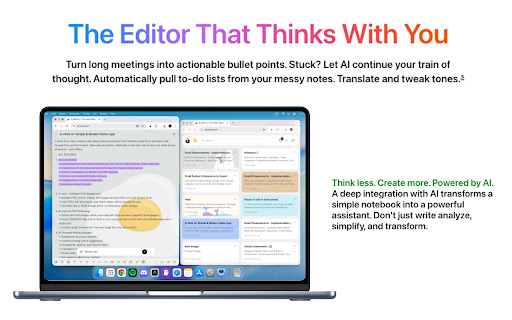
G-Note AI is a free, modern note-taking Chrome extension that combines powerful AI assistance with Google Drive synchronization. Take notes anywhere, collaborate in real-time, and access your notes across all devices - even offline.
🌟 KEY FEATURES:
1. Rich Text Editor
→ Full formatting support: bold, italic, headings, lists, and more.
→ Code blocks with syntax highlighting for 50+ programming languages.
→ Drag & drop images and DPF files.
→ Drawing and handwriting support.
→ Task lists with checkboxes.
→ Markdown import/export.
2. G Vault – Intelligent File Management
→ Manage PDFs, DOCX, Videos, and Images directly within your own Google Drive.
→ View PDFs, edit documents, and watch videos without leaving the app.
→ Your files stay in YOUR Google Drive—no third-party server storage.
3. AI Vision & OCR Technology
→ Extract text from images within your notes with high precision (supports 19 languages).
→ Import PDF/DOCX files from G Vault or your computer and convert them into editable notes with a single click.
→ Instantly insert scanned text from any image into your active editor.
4. AI-Powered Writing Assistant
→ Summarize long notes instantly.
→ Continue writing with AI suggestions.
→ Fix grammar, spelling, and improve clarity.
→ Translate to 30+ languages.
→ Extract tasks automatically from your notes.
→ Ask questions about your content.
→ Change tone, simplify, or extend text.
→ Brainstorm ideas and generate content.
→ Free starter pack: Free credits for new users.
5. Google Drive Sync
→ Automatic synchronization with your Google Drive.
→ Your data stays in YOUR Google Drive - complete privacy.
→ Offline-first: full functionality without internet .
→ Conflict resolution for seamless multi-device usage.
→ Works across desktop, mobile, and tablet.
6. Real-Time Collaboration
→ Share notes with 6-digit room codes.
→ Collaborate with others in real-time.
→ See cursor positions and live edits.
→ Works peer-to-peer for maximum privacy.
7. Multi-Language Support Interface available in 19 languages: English, Vietnamese, Chinese (Simplified/Traditional), Japanese, Korean, French, German, Spanish, Portuguese, Italian, Dutch, Polish, Turkish, Arabic, Hindi, Thai, and Indonesian.
─────────────────────────
▸ PERFECT FOR
→ Students taking class notes and studying.
→ Professionals managing meeting notes and tasks.
→ Writers drafting and editing content.
→ Teams collaborating on documents.
→ Anyone who needs quick, reliable note-taking.
─────────────────────────
▸ PRIVACY & SECURITY
→ Your notes are stored in YOUR Google Drive.
→ No third-party servers store your data.
→ End-to-end encryption for real-time collaboration.
→ Open-source transparency.
─────────────────────────
▸ AVAILABLE ON ALL PLATFORMS
→ Web App: https://gnoteai.com
→ Chrome Extension: Chrome Web Store
─────────────────────────
G-Note AI works everywhere you do. Install once, access anywhere.
Website: www.gnoteai.com



Reviews
Loading reviews...
Permissions (6)
Permissions
activeTabℹ Can access the current tab when you click the extension contextMenusℹ Can add items to the right-click menu identityℹ Can use your Google account identity sidePanel storageℹ Can store data locally in your browser tabsℹ Can see your open tabs and their URLs
Details
| Version | 2.1.1 |
| Updated | Mar 6, 2026 |
| Size | 4.08MiB |
| First Seen | Apr 1, 2026 |
More by Gnoteai.com

Quick Notes: Note Taking
by Gnoteai.com
64
★ 5.00
workflow
64
★ 5.00
workflow

Simple Calculator
by Gnoteai.com
21
★ 5.00
tools
21
★ 5.00
tools

LocalizeAI - AI Translation Testing
by Gnoteai.com
20
★ 5.00
developer
20
★ 5.00
developer

SVGify - PNG to SVG Converter
by Gnoteai.com
18
★ 0.00
tools
18
★ 0.00
tools

Graphos AI Studio
by Gnoteai.com
11
★ 5.00
tools
11
★ 5.00
tools
Popular in workflow

Adobe Acrobat: PDF edit, convert, sign tools
by Adobe Inc.
331M
★ 4.40
workflow
331M
★ 4.40
workflow

AdBlock — block ads across the web
by AdBlock
63M
★ 4.48
workflow
63M
★ 4.48
workflow

迅雷下载支持
by Shenzhen Xunlei Network Technology Co., Ltd.
59M
★ 2.77
workflow
59M
★ 2.77
workflow

Adblock Plus - free ad blocker
by eyeo GmbH
41M
★ 4.39
workflow
41M
★ 4.39
workflow

Chrome Remote Desktop
by Chrome Remote Desktop Release Managers
39M
★ 3.14
workflow
39M
★ 3.14
workflow
Popular Extensions
Adobe Acrobat: PDF edit, convert, sign tools
by Adobe Inc.
331M
★ 4.40
workflow
331M
★ 4.40
workflow
AdBlock — block ads across the web
by AdBlock
63M
★ 4.48
workflow
63M
★ 4.48
workflow
迅雷下载支持
by Shenzhen Xunlei Network Technology Co., Ltd.
59M
★ 2.77
workflow
59M
★ 2.77
workflow

Grammarly: AI Writing Assistant and Grammar Checker App
by Grammarly
42M
★ 4.50
communication
42M
★ 4.50
communication
Adblock Plus - free ad blocker
by eyeo GmbH
41M
★ 4.39
workflow
41M
★ 4.39
workflow