
⚠️Not updated in over 2 years
Description
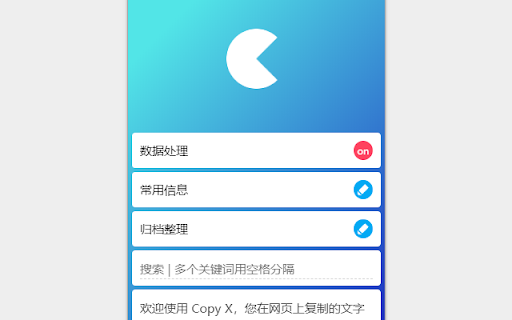
Copy X is a clipboard application that can process data and keep the text information you copied for a long time. The functions are roughly as follows:
「Keep more information」
When you copy text in a web page, Copy X not only saves the selected text, but also saves the web address of the current web page. In addition, click to copy, drag the mouse to the input box to automatically fill. Copy X only saves the contents copied on the current browser webpage by default. If you need to save the contents copied elsewhere, please turn on " Global Mode" in the settings.
「Data preprocessing」
After the copy behavior is detected, operations such as character replacement and character addition can be automatically performed, and the processed result can be copied to the system clipboard again (please open in the processing option). Paste is different content.
「Different editing ability」
When editing the content saved in Copy X, besides the conventional character editing frame, it also supports cutting and extracting the text, and then merging it to make a new text.
「Custom merge」
Select multiple texts and click Merge. At this time, you can replace and add characters to each text first, and then select the connection method between the texts (such as line feed, space or other characters) to finally merge multiple texts into one.
「Common information」
It is inevitable that we need to fill in some commonly used information such as e-mail in web pages or other software. Copy X has a special section for storing such information. You can use it at any time, click it to copy it, right click it to edit and delete it, and also drag the mouse to the input box to automatically fill it in.
「data transfer」
The data in Copy X can be exported as a local file or saved to the cloud. Even if you change your browser or computer, your data can be imported to a new client.
「Picture processing」
Copy X has a certain image processing ability. Right click on the webpage to see the function menu:
1. Get picture links (support preprocessing): You can find pictures and get links at the current position of the mouse. In particular, you can also get links to some pictures loaded in the form of background through this menu (usually right-click on such pictures, the menu provided by the browser by default does not have options about pictures, so you cannot save them as they are or copy them);
2. Crop and shrink: You can directly crop and shrink the pictures in the webpage, display the cropped size in real time and specify the width or height to shrink;
3. Search for pictures: You can search for pictures and identify people in the pictures.
「Find more」
More features to be discovered.


Reviews
Loading reviews...
Permissions (8)
Permissions
clipboardReadℹ Can read from your clipboard clipboardWriteℹ Can write to your clipboard contextMenusℹ Can add items to the right-click menu downloadsℹ Can manage and monitor downloads favicon notificationsℹ Can show desktop notifications storageℹ Can store data locally in your browser unlimitedStorage
Details
| Version | 1.1.4 |
| Updated | Jan 3, 2023 |
| Size | 1.69MiB |
| First Seen | Apr 1, 2026 |
More by KK YUAN


Popular in workflow

Adobe Acrobat: PDF edit, convert, sign tools
by Adobe Inc.
331M
★ 4.40
workflow
331M
★ 4.40
workflow

AdBlock — block ads across the web
by AdBlock
62M
★ 4.48
workflow
62M
★ 4.48
workflow

迅雷下载支持
by Shenzhen Xunlei Network Technology Co., Ltd.
59M
★ 2.77
workflow
59M
★ 2.77
workflow

Adblock Plus - free ad blocker
by eyeo GmbH
41M
★ 4.39
workflow
41M
★ 4.39
workflow

Chrome Remote Desktop
by Chrome Remote Desktop Release Managers
38M
★ 3.14
workflow
38M
★ 3.14
workflow
Popular Extensions
Adobe Acrobat: PDF edit, convert, sign tools
by Adobe Inc.
331M
★ 4.40
workflow
331M
★ 4.40
workflow
AdBlock — block ads across the web
by AdBlock
62M
★ 4.48
workflow
62M
★ 4.48
workflow
迅雷下载支持
by Shenzhen Xunlei Network Technology Co., Ltd.
59M
★ 2.77
workflow
59M
★ 2.77
workflow

Grammarly: AI Writing Assistant and Grammar Checker App
by Grammarly
42M
★ 4.50
communication
42M
★ 4.50
communication
Adblock Plus - free ad blocker
by eyeo GmbH
41M
★ 4.39
workflow
41M
★ 4.39
workflow