
✅Recently updated
Description
What it does
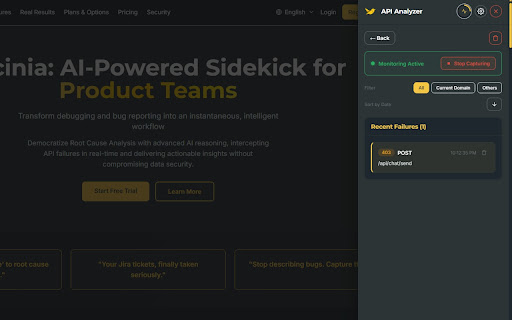
API Analyzer – Captures API failures (failed requests, error responses) from your browsing session and runs instant root cause analysis using AI (Gemini). You get likely causes and fix directions, plus Jira-ready tickets with editable content, full cURL commands, and optional test credentials—all stored locally and encrypted.
Responsiveness Analyzer – Tests the active page at desktop, tablet, and mobile viewports, then uses AI to report layout issues, overflow, touch targets, and other responsiveness problems, with Jira-ready tickets.
Issue Companion – Records screen activity and creates Jira tickets with AI assistance. Capture screen recordings, DOM activity, and screenshots, then use AI to enhance summaries and descriptions before one-click ticket creation.
Surfaces clear, actionable explanations—so developers and QA spend less time triaging and more time fixing.
Fits into your workflow as a lightweight sidekick: no heavy setup, works where you already work.
Who it’s for
Developers debugging APIs and integrations
QA engineers investigating test failures and responsiveness
Product and business analysts who need to understand technical failures and layout issues quickly
Why Luscinia
Luscinia turns “something broke” into “here’s what went wrong and how to fix it,” and “does it work on mobile?” into “here’s what’s broken and how to improve it.” It’s built to be fast, clear, and focused on product teams—so you get from failure to fix with less guesswork.




Reviews
Loading reviews...
Permissions (3)
Permissions
scriptingℹ Can inject scripts into web pages storageℹ Can store data locally in your browser tabsℹ Can see your open tabs and their URLs
Details
| Version | 1.0.9 |
| Updated | Mar 20, 2026 |
| Size | 582KiB |
| First Seen | Mar 30, 2026 |
Popular in developer

GoFullPage - Full Page Screen Capture
by GoFullPage
10M
★ 4.89
developer
10M
★ 4.89
developer

TouchEn PC보안 확장
by 라온시큐어
8M
★ 1.33
developer
8M
★ 1.33
developer

React Developer Tools
by Meta
5M
★ 3.95
developer
5M
★ 3.95
developer

Meta Pixel Helper
by Meta
4M
★ 3.91
developer
4M
★ 3.91
developer

ColorZilla
by colorzilla.com
4M
★ 4.59
developer
4M
★ 4.59
developer
Popular Extensions

Adobe Acrobat: PDF edit, convert, sign tools
by Adobe Inc.
331M
★ 4.40
workflow
331M
★ 4.40
workflow

AdBlock — block ads across the web
by AdBlock
62M
★ 4.48
workflow
62M
★ 4.48
workflow

迅雷下载支持
by Shenzhen Xunlei Network Technology Co., Ltd.
59M
★ 2.77
workflow
59M
★ 2.77
workflow

Grammarly: AI Writing Assistant and Grammar Checker App
by Grammarly
42M
★ 4.50
communication
42M
★ 4.50
communication

Adblock Plus - free ad blocker
by eyeo GmbH
41M
★ 4.39
workflow
41M
★ 4.39
workflow