
⚠️Not updated in over 2 years
Description
Introducing Cy-Fi, the Cypress Code Generator that simplifies automation testing by recording your actions and generating Cypress code for you. This extension allows you to easily record your interactions with web pages and then automatically generates Cypress code that can be used to repeat those actions during automated testing. With this extension, you can quickly and easily create comprehensive test suites that cover all of the functionality of your web application, without the need for manual coding. Try it out today and see the difference it can make in your automation testing workflow.
What are the features?
* Uses cypress commands from @testing-library/cypress for identifying HTML elements to follow best practices in automation.
* User-friendly interface and easy navigation.
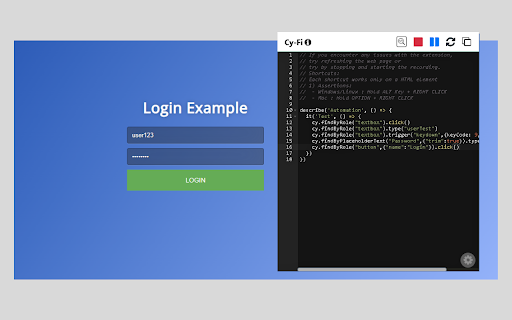
* Records clicks, typing, web navigations and form submissions.
* Automatically generates Cypress code from recorded actions.
* A code editor to edit, delete or reset the actions you performed.
* Pause and resume recording.
* Copy the generated code to your clipboard.
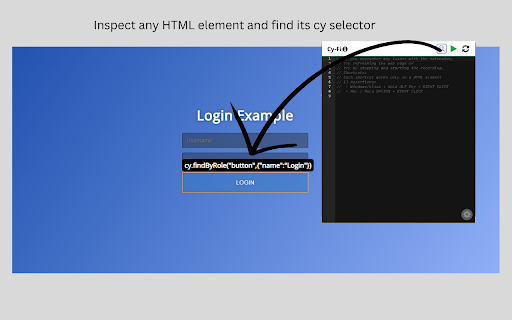
* Find the best selector of an element by inspecting it.
* Provides different cypress commands to play with.
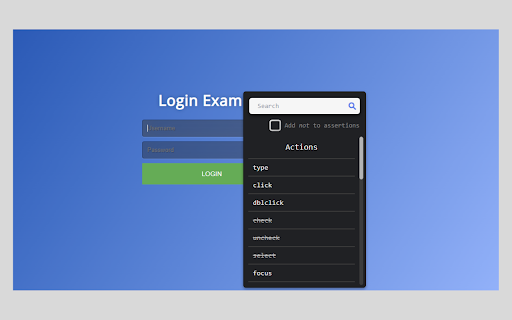
* Add cypress assertions based on the element.
How to use?
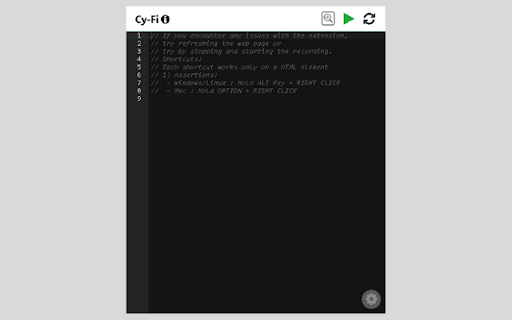
* Open the extension and click on 'Play' button to begin recording actions.
* Check your actions by opening the popup at any time during recording
* Click the 'Stop' button to stop recording.
* Click the 'Resume' button to resume recording.
* You can also reset, or copy the generated code to your clipboard.
* Click on 'Inspect' button to start inspecting an element.
- Click on an HTML element to get it's cy selector.
- Press 'ESCAPE' key to continue the inspection.
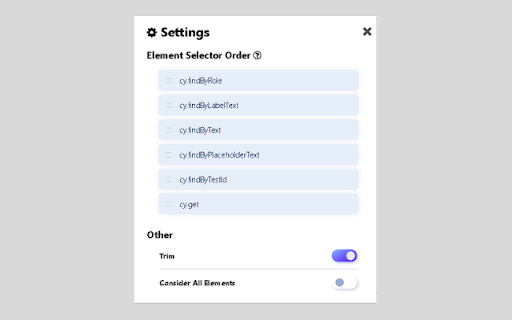
* You can rearrange different cypress commands in the settings tab.
* To use assertions:
- Start the recording by clicking on the play button.
- Hold ALT(Win)/OPTION(Mac) + RIGHT CLICK on any HTML element to get list of
assertions.
- Select one of the assertions and provide any additional input if required to generate cypress
code for that assertion
Reviews (3 cached)
★☆☆☆☆2025-11-04
Ruben Rueda
Doesn't work.
★★☆☆☆2025-12-16
Matt Fletcher
Generates mad code. First of all it assumes you're using testing library and not plain cypress. Second of all, the selectors it creates are illogical, for example: cy.get("div:nth-child(1)>div:nth-child(2)>div:nth-child(1)>label:nth-child(2)>div:nth-child(2)>div:nth-child(1)>select:nth-child(1)").click() No-one in their right mind would ever do it like that. So whilst it technically may work, the cypress spec code it creates is worthless. (also what's up with the clearly botted reviews?)
★★★☆☆2025-06-18
Luiza Mystyk
I'd like to use my special data-cy attributes, but seems to be the recorder can't identify them
Permissions (3)
Permissions
activeTabℹ Can access the current tab when you click the extension storageℹ Can store data locally in your browser webNavigationℹ Can monitor navigation events
Details
| Version | 1.0.2 |
| Updated | Aug 10, 2023 |
| Size | 1.01MiB |
| First Seen | Mar 29, 2026 |
Popular in workflow

Adobe Acrobat: PDF edit, convert, sign tools
by Adobe Inc.
331M
★ 4.40
workflow
331M
★ 4.40
workflow

AdBlock — block ads across the web
by AdBlock
63M
★ 4.48
workflow
63M
★ 4.48
workflow

迅雷下载支持
by Shenzhen Xunlei Network Technology Co., Ltd.
59M
★ 2.77
workflow
59M
★ 2.77
workflow

Adblock Plus - free ad blocker
by eyeo GmbH
41M
★ 4.39
workflow
41M
★ 4.39
workflow

Chrome Remote Desktop
by Chrome Remote Desktop Release Managers
38M
★ 3.14
workflow
38M
★ 3.14
workflow
Popular Extensions
Adobe Acrobat: PDF edit, convert, sign tools
by Adobe Inc.
331M
★ 4.40
workflow
331M
★ 4.40
workflow
AdBlock — block ads across the web
by AdBlock
63M
★ 4.48
workflow
63M
★ 4.48
workflow
迅雷下载支持
by Shenzhen Xunlei Network Technology Co., Ltd.
59M
★ 2.77
workflow
59M
★ 2.77
workflow

Grammarly: AI Writing Assistant and Grammar Checker App
by Grammarly
42M
★ 4.50
communication
42M
★ 4.50
communication
Adblock Plus - free ad blocker
by eyeo GmbH
41M
★ 4.39
workflow
41M
★ 4.39
workflow