
⚠️Not updated in over a year ✅Highly rated
Description
Recurring Emails is a completely *free*, privacy-centric Chrome extension, that allows you to send automatically repeating emails and reminders using your email address, via SMTP. No tracking, no ads, no banners and no bloatware. Works with all email providers, including
- Apple iCloud Mail
- Gmail (for Gmail use https://recurring-emails-for-gmail.com)
- Yahoo! Mail
- Outlook
- AOL
+ many more
🗓️ Complete Schedule
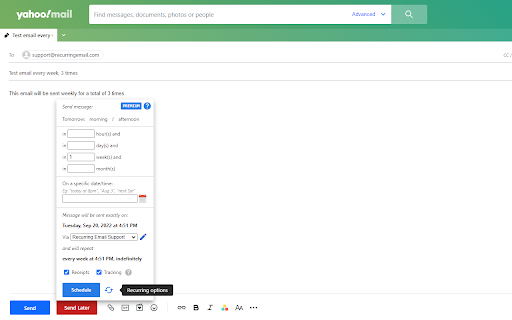
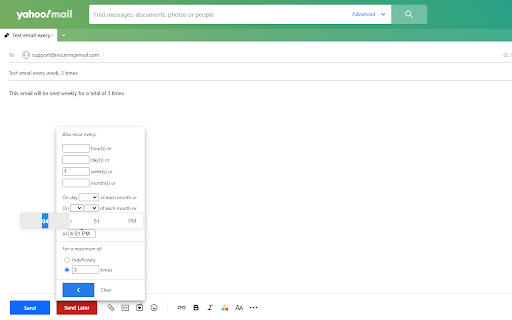
Send your emails one time by setting a later date, or many times by setting a fully customizable recurring schedule. Set the time of day, which days to send on or the number of times to send, all for a convenient schedule.
🪪 Identities
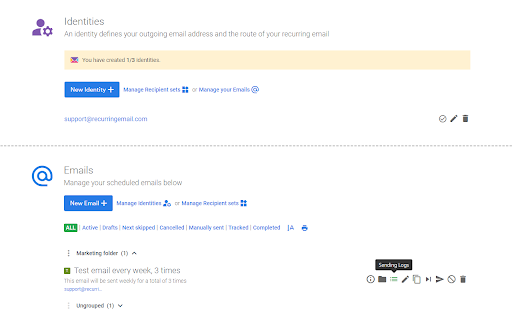
Add multiple email identities and manage all recurring emails for all your email accounts, in a single place. No need to change accounts, all identities are bound to your account.
🆓 Is it free?
Yes! Recurring Emails is a completely free service. And there are no ads, banners, or bloatware.
👥 Contact management & Recipient sets
Contacts immediately become available after use in our powerful inline auto-complete feature. Create recipient sets and organize your contacts in groups or teams so you can select the group directly instead of typing addresses.
🗂️ Folders
Organize your email library in folders, allowing you to manage your emails more effectively. Create archives, trash, recipients folders, or any other folder type that helps you better organize your repeating emails.
🔗 Integration
The extension fully integrates with Yahoo Mail, allowing you to create recurring emails directly from the Yahoo Mail interface. Set it and forget it with minimal disruption to your workflow.
📄 Templates
Use email templates to quickly draft new emails. Clone any of your existing emails in any state to create new emails from them. Any existing email fills the role of a template.
🧾 Receipts
Receive notifications directly in your inbox after an email has been sent giving you more control over your emails and keeping your in the loop.
🐾 Tracking
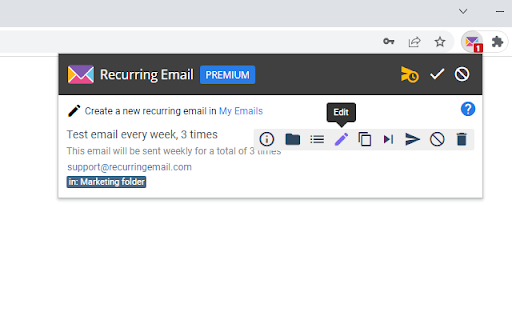
Email tracking notifies you when a sent email has been opened by one of your recipients. You can view those events by clicking the Logs icon in My Emails, or opening the extension popup.
⏩ Skip
Skip the next sending of your email simply by clicking a button. Your email's next sending will be skipped automatically, but the scheduling then continues normally.
🖱️ Manual sending
Instantly send an already saved email without changing its schedule. Create notifications for your clients with a single click!
Reviews
Loading reviews...
Permissions (2)
Permissions
alarmsℹ Can schedule periodic background tasks storageℹ Can store data locally in your browser
Details
| Version | 1.0.0 |
| Updated | Oct 19, 2024 |
| Size | 161KiB |
| First Seen | Mar 30, 2026 |
More by Limelight Software SRL


Popular in workflow

Adobe Acrobat: PDF edit, convert, sign tools
by Adobe Inc.
322M
★ 4.40
workflow
322M
★ 4.40
workflow

AdBlock — block ads across the web
by AdBlock
62M
★ 4.48
workflow
62M
★ 4.48
workflow

迅雷下载支持
by Shenzhen Xunlei Network Technology Co., Ltd.
59M
★ 2.77
workflow
59M
★ 2.77
workflow

Adblock Plus - free ad blocker
by eyeo GmbH
40M
★ 4.39
workflow
40M
★ 4.39
workflow

Chrome Remote Desktop
by Chrome Remote Desktop Release Managers
37M
★ 3.13
workflow
37M
★ 3.13
workflow
Popular Extensions
Adobe Acrobat: PDF edit, convert, sign tools
by Adobe Inc.
322M
★ 4.40
workflow
322M
★ 4.40
workflow
AdBlock — block ads across the web
by AdBlock
62M
★ 4.48
workflow
62M
★ 4.48
workflow
迅雷下载支持
by Shenzhen Xunlei Network Technology Co., Ltd.
59M
★ 2.77
workflow
59M
★ 2.77
workflow

Grammarly: AI Writing Assistant and Grammar Checker App
by Grammarly
42M
★ 4.50
communication
42M
★ 4.50
communication
Adblock Plus - free ad blocker
by eyeo GmbH
40M
★ 4.39
workflow
40M
★ 4.39
workflow