
⚠️Requests 1 sensitive permission ✅Recently updated
Description
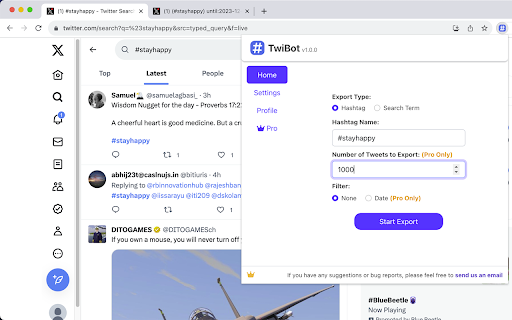
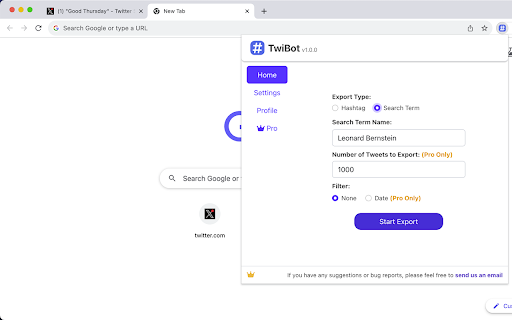
TwiBot chrome extension makes Twitter data a breeze. Choose a hashtag or search term, and you're set. Want more control? You can also decide the number of tweets and set a date range. Make social media analytics work for you!
Please note, TwiBot chrome extension is an automation scrape tool and won't have any impact on your account.
🙂How it works:
1. Enter a hashtag or search term (e.g., hashtag: #stayhappy, search term: World Cup Final ) .
2. Enter the number of tweets you'd like to export (there's no limit to how many you can extract, but be aware that larger quantities could take a while to process. We recommend setting a reasonable number for a quicker export).
3. Optionally set a start and end date, and you're ready to begin the export.
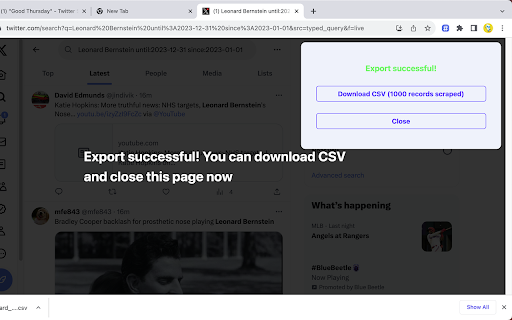
4. Twitter has a rate limit in place, but don't worry, TwiBot automatically manages this and will pause as needed. You don't need to do anything.
🗎Sample CSV:
You can view the sample CSV in the following Google Sheet document:
https://docs.google.com/spreadsheets/d/19XI8zGuU9p5iceKPgR5US2YzvuQ_1S0GqI9ioGIQuf0/edit?usp=sharing
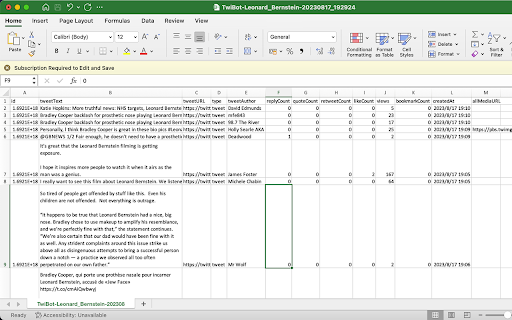
📋The exported CSV file contains the following columns:
1.ID
2.TweetText: The full content of the tweet.
3.TweetURL: The URL of the tweet.
4.TweetType
5.TweetAuthor
6.Handle: Twitter username, starting with @, like @NASA.
7.Geo: Location data showing where a tweet was posted from
8.Mentions: Other users mentioned in the tweet
9.Hashtags: All the hashtags included in the tweet
10.ReplyCount: The number of replies to the tweet.
11.QuoteCount: The number of times the tweet has been quoted.
12.RetweetCount: The number of times the tweet has been retweeted.
13.LikeCount: The number of likes the tweet has received.
14.Views: The number of views the tweet has received.(some tweets does not include views data and will be represented by a "-")
15.BookmarkCount: The number of times the tweet has been bookmarked.
16.CreatedAt: The date and time the tweet was created.
17.AllMediaURL: The URLs of any media (e.g., images, videos) included in the tweet.
18.VideoURL: If the tweet contains a video, this is the source URL for the highest quality version of the video.
19.Bio: The text the user wrote in their Twitter profile’s “Bio” section. It often contains a short personal description, interests, job title, hashtags, or emojis.
20.LinkInBio: Any URL that the user placed in the profile’s “Website” slot. Many creators use this to point to a personal site, a Linktree, a newsletter, or another social account.
21.ProfileURL: The full URL of the user’s public Twitter profile (e.g., https://twitter.com/elonmusk). It’s the page you’d visit to see their tweets, followers, etc.
22.FollowersCount: The total number of Twitter accounts currently following this user. It’s a primary measure of their audience size.
23.FollowingCount: The total number of other Twitter accounts that this user is following. It shows how many accounts they’ve chosen to subscribe to.
24.ConvertsationID: The numeric identifier of the root tweet that starts a discussion thread on Twitter/X. Every reply—no matter how deep—carries the same ConversationID, so you can treat it as the thread’s “bucket ID” for fetching or analyzing the entire conversation in one go.
📝Changelogs:
2023/8/25 version 1.1.0: Fix bug
2023/10/11 version 1.2.0: Fix bug
2024/1/8 version 1.3.0: Add fields 'handle', 'geo', 'mentions', 'hashtags', and 'videoURL' to the exported CSV.
2024/4/11 version 1.4.0: Fix bug
2024/4/30 version 1.4.1: Fix bug
2024/5/18 version 1.4.2: Compatible with X
2024/6/27 version 1.4.4: Fix bug
2025/1/3 version 1.4.7: Fix bug
2025/5/1 version 1.4.8: Fix bug
2025/7/20 version 1.5.2: add 5 fields
2025/7/30 version 1.5.3: add 1 field
2025/10/18 version 1.5.6: Fix bug
2026/2/2 version 1.5.8:Fix bug
2026/2/20 version 1.6.0:Add history feature
🔒Data Privacy:
We place a premium on the security and privacy of user data, and deeply appreciate the trust our users place in us. As such, we strictly follow all privacy laws and guidelines, including but not limited to the General Data Protection Regulation (GDPR) and the California Consumer Privacy Act (CCPA).
📘Disclaimer:
Twitter is a registered trademark of Twitter, Inc. TwiBot operates independently as a browser extension and holds no affiliation with Twitter.
✉️Contact us:
If you have any bug reports, feedback, or suggestions for improvement, please feel free to contact us anytime at xtcodetech@gmail.com.

Reviews
Loading reviews...
Permissions (5)
Permissions
identityℹ Can use your Google account identity identity.email storageℹ Can store data locally in your browser tabsℹ Can see your open tabs and their URLs webRequestℹ Can observe and analyze network traffic
Details
| Version | 1.6.1 |
| Updated | Mar 3, 2026 |
| Size | 1.03MiB |
| First Seen | Mar 22, 2026 |
More by XTCodeTech

Real-Time Bilingual Video & Audio Translation – SonicCaption
by XTCodeTech
3K
★ 4.11
tools
3K
★ 4.11
tools

TwExtract - export anyone's tweets to CSV
by XTCodeTech
2K
★ 3.00
tools
2K
★ 3.00
tools

Real-time Video Translator & Dubbing - DubTab
by XTCodeTech
1K
★ 3.75
tools
1K
★ 3.75
tools

Bulk Twitter/X Tweets Replies Exporter
by XTCodeTech
584
★ 4.00
workflow
584
★ 4.00
workflow
Popular in tools

Monica: All-In-One AI Assist & Smartest AI Agent
by Monica Team
3M
★ 4.89
tools
3M
★ 4.89
tools

Ad Blocker: Stands AdBlocker
by Stands
3M
★ 4.79
tools
3M
★ 4.79
tools

WPS浏览器助手:文档在线阅读编辑
by 金山PDF
2M
★ 2.90
tools
2M
★ 2.90
tools

Pie Adblock - A Powerful Free Ad Blocker
by Pie Extensions
2M
★ 4.90
tools
2M
★ 4.90
tools

Ecosia - The search engine that plants trees
by Ecosia GmbH
1M
★ 4.70
tools
1M
★ 4.70
tools
Popular Extensions

Adobe Acrobat: PDF edit, convert, sign tools
by Adobe Inc.
330M
★ 4.40
workflow
330M
★ 4.40
workflow

Chrome Remote Desktop
by Chrome Remote Desktop Release Managers
38M
★ 3.14
workflow
38M
★ 3.14
workflow

Cisco Webex Extension
by cisco.chromestore
24M
★ 2.34
social
24M
★ 2.34
social

Kami for Google Chrome™
by Kami
17M
★ 4.56
education
17M
★ 4.56
education

Read&Write for Google Chrome™
by Texthelp
17M
★ 3.44
accessibility
17M
★ 3.44
accessibility