
⚠️Not updated in over a year
Description
How to use:
- Step 0: Open DevTools Panel (F12 or Right Click -> select 'Inspect')
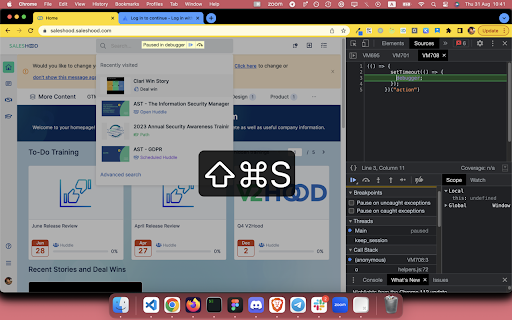
- Step 1: Right Click -> select 'Freeze DOM' or Press Cmd + Shift + Y (on Mac) / Cmd + Shift + Y (on Window, Ubuntu)
Source code for those who's curious: https://github.com/coolcorexix/freedom-on-demand
If you find this useful, please consider donating to support my work. It means a lot to me: https://www.buymeacoffee.com/coolcorexil
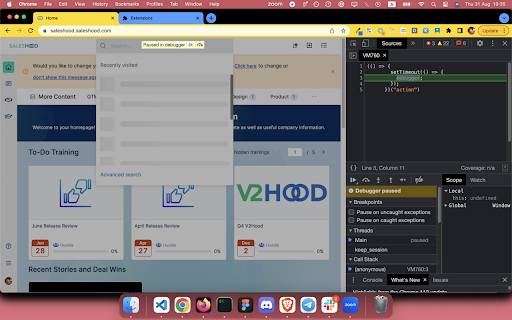
Right click on tab content and choose "Freeze DOM" (while devtool panel is open) to freeze the state of website on demand.
With a frozen DOM, you can:
- Inspect an UI part that only available while hovered / focused (for example: keeping the auto complete dropdown of a text input visible)
- Take a snapshot of an in-progress state (for example: loading state)
🔭 Explore more dev tools at: https://nemothecollector.dev/products
Note: The shortcut might be overridden by built-in settings of some browsers for example Arc and Microsoft Edge. To fix it:
- For Arc: go to arc://extensions/shortcuts and update the shortkeys
- For Microsoft Edge: follow this instruction https://www.webnots.com/how-to-assign-keyboard-shortcut-to-extension-in-microsoft-edge/

Reviews (2 cached)
★☆☆☆☆2024-05-29
Matthew Parker
The latest update added a paywall to an extension that could be written from scratch in 10 lines of code. Find an alternative.
★☆☆☆☆2023-11-02
Michael
Used to work perfectly. Newest update wants permissions to edit data on lemonsqueezy (a payment processor). There is no reason for this permission. Suspicious...
Permissions (3)
Permissions
activeTabℹ Can access the current tab when you click the extension contextMenusℹ Can add items to the right-click menu scriptingℹ Can inject scripts into web pages
Details
| Version | 1.0.1 |
| Updated | Dec 31, 2024 |
| Size | 37.57KiB |
| First Seen | Mar 24, 2026 |
More by Nemo


Popular in developer

GoFullPage - Full Page Screen Capture
by GoFullPage
10M
★ 4.89
developer
10M
★ 4.89
developer

TouchEn PC보안 확장
by 라온시큐어
8M
★ 1.33
developer
8M
★ 1.33
developer

React Developer Tools
by Meta
5M
★ 3.95
developer
5M
★ 3.95
developer

Meta Pixel Helper
by Meta
4M
★ 3.91
developer
4M
★ 3.91
developer

ColorZilla
by colorzilla.com
4M
★ 4.59
developer
4M
★ 4.59
developer
Popular Extensions

Adobe Acrobat: PDF edit, convert, sign tools
by Adobe Inc.
331M
★ 4.40
workflow
331M
★ 4.40
workflow

AdBlock — block ads across the web
by AdBlock
62M
★ 4.48
workflow
62M
★ 4.48
workflow

Grammarly: AI Writing Assistant and Grammar Checker App
by Grammarly
42M
★ 4.50
communication
42M
★ 4.50
communication

Adblock Plus - free ad blocker
by eyeo GmbH
41M
★ 4.39
workflow
41M
★ 4.39
workflow

Chrome Remote Desktop
by Chrome Remote Desktop Release Managers
38M
★ 3.14
workflow
38M
★ 3.14
workflow