Description
Take the notes in your new Tab.
Press CMD + T (Mac) or Ctrl + T (Windows) to take a note.
Let the new tab keep you focused on what you want to do.
Increase your productivity.
What is Tab Notes?
- TabNotes is a Browser Based Notepad
- TabNotes is a Simple Text Editor
- TabNotes is an Online text editor
- TabNotes is an Online notes taking app
Features:
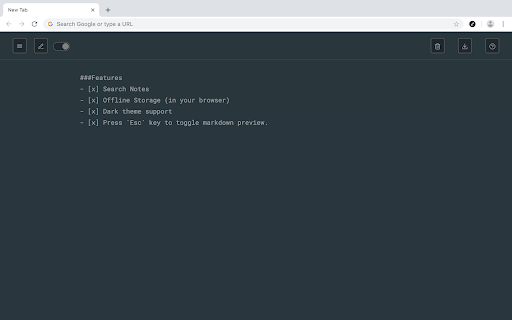
- Markdown Preview
Take notes in markdown, and preview as HTML. Press esc key to toggle HTML Preview.
- Dark mode
Developer loves the dark mode. So we have the one. Default theme is white.
- Auto Save
You don't need to save your text note. When you open new tab start from where you were left.
- Multiple notes.
Chrome allows you to store up to 5MB. It's enough to save 5,000 notes of small size.
- Offline Storage
Notes are stored directly in your browser. So only you can access your notes.
V-1.1.0
- Added HTML Preview of markdown syntax
- Changed Color Scheme of dark theme.
- Fixed some minor issues.



Reviews (2 cached)
★★☆☆☆2025-07-17
Albert G (AlGroot)
Google stopped supporting this extension. I have still notes in this extension. How to get them back?
★★★☆☆2024-09-12
Josep Boncompe Moya
markdown preview automatically? same as slack for instance
Permissions (1)
Permissions
storageℹ Can store data locally in your browser
Details
| Version | 3.0.0 |
| Updated | Jul 18, 2025 |
| Size | 171KiB |
| First Seen | Mar 24, 2026 |
More by BANSAL


Popular in workflow

Adobe Acrobat: PDF edit, convert, sign tools
by Adobe Inc.
331M
★ 4.40
workflow
331M
★ 4.40
workflow

AdBlock — block ads across the web
by AdBlock
62M
★ 4.48
workflow
62M
★ 4.48
workflow

Adblock Plus - free ad blocker
by eyeo GmbH
41M
★ 4.39
workflow
41M
★ 4.39
workflow

Chrome Remote Desktop
by Chrome Remote Desktop Release Managers
38M
★ 3.14
workflow
38M
★ 3.14
workflow

Microsoft Single Sign On
by Microsoft
36M
★ 2.27
workflow
36M
★ 2.27
workflow
Popular Extensions
Adobe Acrobat: PDF edit, convert, sign tools
by Adobe Inc.
331M
★ 4.40
workflow
331M
★ 4.40
workflow
AdBlock — block ads across the web
by AdBlock
62M
★ 4.48
workflow
62M
★ 4.48
workflow

Grammarly: AI Writing Assistant and Grammar Checker App
by Grammarly
42M
★ 4.50
communication
42M
★ 4.50
communication
Adblock Plus - free ad blocker
by eyeo GmbH
41M
★ 4.39
workflow
41M
★ 4.39
workflow
Chrome Remote Desktop
by Chrome Remote Desktop Release Managers
38M
★ 3.14
workflow
38M
★ 3.14
workflow