
Description
Tired of Kantata/Mavenlink not fixing some unbearably painful yet stupidly simple issues? Me too! I kantbotha to deal with it and neither should you. This extension adds quality-of-life improvements to the Kantata OX experience.
Kantbotha adds three quality of life improvements to Kantata:
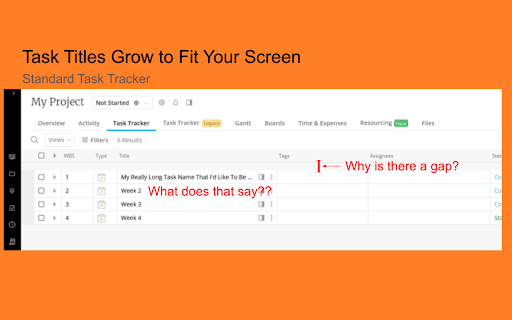
1. Responsive width for task titles in the new task tracker.
Fixes the new task tracker by making the task titles expand with the screen, just like the old task tracker! It also removes that tiny bit of worthless padding between the header and task table. You may not notice this unless you have an ultrawide monitor.
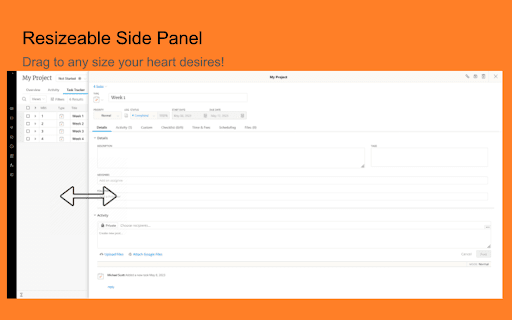
2. Resizable task side panel.
You can drag the left edge of the task side panel with your mouse to make it any size you want!
3. Public mode.
Hide private messages and time sheets from the project/workspace page. Toggle available on the menu bar above the Activity Feed and side panel Activities. Now you can share your screen without exposing any private information!
4. Highlight task tracker rows when hovering over them.
!!!! IMPORTANT !!!!
You MUST grant ALL permissions to Kantbotha after installing. Kantbotha may not request these permissions automatically. You must go into your extension settings, manage the Kantbotha extension, and toggle all of the permissions on.
Not being able to read task titles even though my screen is IMAX size was killing me. Like, I couldn't even use the new task tracker at all because of it. I've submitted feedback on this to Kantata multiple times to no avail. No more!
Maybe I'll add other improvements. Maybe I won't. I don't really know.
Feel free to leave ideas/requests in the comments! I probably won't do any of them because I typically have better things to do and don't get paid for this, but who knows. At the very least, I'd enjoy reading them.





Reviews
Loading reviews...
Permissions (1)
Permissions
scriptingℹ Can inject scripts into web pages
Details
| Version | 1.2.1 |
| Updated | Sep 10, 2025 |
| Size | 13.66KiB |
| First Seen | Mar 21, 2026 |
More by Michael


Popular in workflow

Adobe Acrobat: PDF edit, convert, sign tools
by Adobe Inc.
331M
★ 4.40
workflow
331M
★ 4.40
workflow

AdBlock — block ads across the web
by AdBlock
62M
★ 4.48
workflow
62M
★ 4.48
workflow

迅雷下载支持
by Shenzhen Xunlei Network Technology Co., Ltd.
59M
★ 2.77
workflow
59M
★ 2.77
workflow

Adblock Plus - free ad blocker
by eyeo GmbH
41M
★ 4.39
workflow
41M
★ 4.39
workflow

Chrome Remote Desktop
by Chrome Remote Desktop Release Managers
39M
★ 3.14
workflow
39M
★ 3.14
workflow
Popular Extensions
Adobe Acrobat: PDF edit, convert, sign tools
by Adobe Inc.
331M
★ 4.40
workflow
331M
★ 4.40
workflow
AdBlock — block ads across the web
by AdBlock
62M
★ 4.48
workflow
62M
★ 4.48
workflow
迅雷下载支持
by Shenzhen Xunlei Network Technology Co., Ltd.
59M
★ 2.77
workflow
59M
★ 2.77
workflow

Grammarly: AI Writing Assistant and Grammar Checker App
by Grammarly
42M
★ 4.50
communication
42M
★ 4.50
communication
Adblock Plus - free ad blocker
by eyeo GmbH
41M
★ 4.39
workflow
41M
★ 4.39
workflow