
⚠️Requests 1 sensitive permission ⚠️Very few reviews for its user base
User Count Trend
Loading...
Description
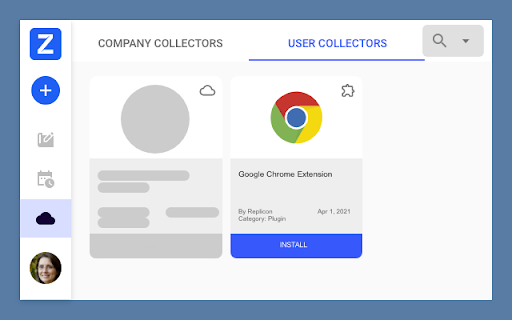
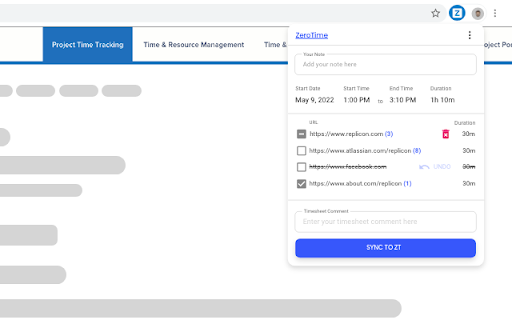
Integrate your Chrome Browser seamlessly with Replicon's ZeroTime™ platform to streamline your daily activities. This browser extension automatically captures your Chrome work activity such as tab name, application name, date, time etc. and creates an accurate timeline of your day. Whether you use Chrome on a Mac or Windows, Our extension will harvest the data and creates a curated view of your events. Leveraging our machine learning and AI capabilities, the ZeroTime platform recommends some of the attributes for your Chrome events such as a "Project" or a "Task" like Magic!. This can be used for automatically populating your timesheets, with minimal to no supervision. We use global standards of encryption and storage practices to keep all your data safe and secure. At Replicon, we believe that privacy is a fundamental right and we build all our applications with user privacy and data protection at the core. You are always in full control of your data. Our goal is to build a prepopulated timesheet of your day, so that you can focus on things that matter and allow Replicon to take care of your timesheets!
Benefits:
- Automatically know when and for how long you used an application on Chrome.
- See useful information such as tab name, application name, duration of usage etc.
- See a pre-populated timesheet created for you based on your usage.
- Continuous learning ML and AI capabilities to help build your time line effortlessly.
- Absolute data privacy and be in full control of your data.
Did you know? This application is free with your Replicon product license. For further details, please contact Replicon Support.
https://www.replicon.com/customerzone/contact-support


Reviews
Loading reviews...
Permissions (9)
Permissions
activeTabℹ Can access the current tab when you click the extension alarmsℹ Can schedule periodic background tasks favicon identityℹ Can use your Google account identity managementℹ Can manage other installed extensions scriptingℹ Can inject scripts into web pages storageℹ Can store data locally in your browser tabsℹ Can see your open tabs and their URLs unlimitedStorage
Details
| Version | 1.2025.1125.26590 |
| Updated | Nov 29, 2025 |
| Size | 1.04MiB |
| First Seen | Mar 21, 2026 |
Ad space
Popular in workflow

Adobe Acrobat: PDF edit, convert, sign tools
by Adobe Inc.
330M
★ 4.40
workflow
330M
★ 4.40
workflow

Microsoft Defender Browser Protection
by Microsoft Corporation
2M
★ 4.15
workflow
2M
★ 4.15
workflow

Pop up blocker for Chrome™ - Poper Blocker
by dingosolutions
2M
★ 4.76
workflow
2M
★ 4.76
workflow

Screen Recorder
by Erich Behrens
2M
★ 3.75
workflow
2M
★ 3.75
workflow

Keep Awake
by extensions@chromium.org
1M
★ 4.00
workflow
1M
★ 4.00
workflow
Popular Extensions
Adobe Acrobat: PDF edit, convert, sign tools
by Adobe Inc.
330M
★ 4.40
workflow
330M
★ 4.40
workflow

Cisco Webex Extension
by cisco.chromestore
24M
★ 2.34
social
24M
★ 2.34
social

Kami for Google Chrome™
by Kami
17M
★ 4.56
education
17M
★ 4.56
education

uBlock Origin
by Raymond Hill (gorhill)
15M
★ 4.70
privacy
15M
★ 4.70
privacy

Custom Cursor for Chrome™
by BLife Team LLC
5M
★ 4.67
fun
5M
★ 4.67
fun