
⚠️Not updated in over a year
Description
Revitalize your browsing experience with GoodPlan: The Ultimate Smart Journaling Extension!
PLEASE NOTE THAT THIS VERSION OF THE EXTENSION DOES NOT REPLACE YOUR HOME PAGE.
Discover an innovative journaling workspace by clicking on the extension icon in your browser. This Chrome Extension is more than just a simple note-taking tool – it's an intelligent, feature-rich system seamlessly integrated into your daily browsing experience.
Explore the potential of organized thought and heightened productivity with this Chrome Extension, which functions as your personal assistant, memory keeper, and planner, all within your browser.
Key Use-Cases:
- Create notes effortlessly at any time, whether during your current day or reflecting on past experiences.
- Capture ideas or information instantly while browsing, directly from the extension icon – ideal for saving insights from videos or articles.
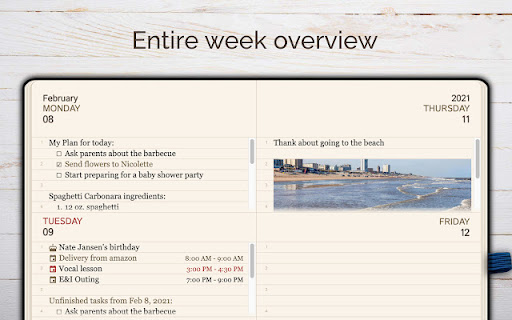
- Review and organize your thoughts with daily and weekly summaries, ensuring no important detail slips through the cracks.
- Plan your day with an intuitive task manager. Unfinished tasks automatically roll over to the next day, helping you stay on track.
Standout Features:
- Date-Specific Pages: Organize your notes with dedicated pages for each date.
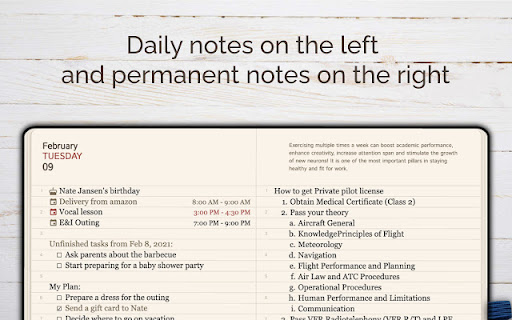
- Dual Note System: Split your screen for date-specific notes on the left and timeless notes on the right.
- Versatile Viewing: Toggle between daily and weekly views to suit your organizational style.
- Quick Access: Open the extension with a simple click on the extension icon.
- Seamless Note Collection: Easily add selected text from any webpage to your journal with the Context Menu (select text on any page, open Context Menu by right-clicking, and add the selected text to the notes).
- Smart Re-scheduling: Unfinished tasks automatically move to the current day.
- Sticky Calendar Navigation: Quickly jump to any date for efficient planning.
- Full-Page Editor: Enjoy an expansive writing and organizing space.
- Dark Layout: Automatically switches to a comfortable dark theme from 9 PM to 8 AM.
- No Account Necessary: Start using immediately without the hassle of account creation.
- Fully Accessible: Keyboard and screen reader friendly, ensuring inclusivity for all users.

Reviews
Loading reviews...
Permissions (2)
Permissions
contextMenusℹ Can add items to the right-click menu storageℹ Can store data locally in your browser
Details
| Version | 2.0.2 |
| Updated | May 16, 2024 |
| Size | 3.38MiB |
| First Seen | Mar 31, 2026 |
More by goodplan.app


Popular in workflow

Adobe Acrobat: PDF edit, convert, sign tools
by Adobe Inc.
331M
★ 4.40
workflow
331M
★ 4.40
workflow

AdBlock — block ads across the web
by AdBlock
62M
★ 4.48
workflow
62M
★ 4.48
workflow

迅雷下载支持
by Shenzhen Xunlei Network Technology Co., Ltd.
59M
★ 2.77
workflow
59M
★ 2.77
workflow

Adblock Plus - free ad blocker
by eyeo GmbH
41M
★ 4.39
workflow
41M
★ 4.39
workflow

Chrome Remote Desktop
by Chrome Remote Desktop Release Managers
39M
★ 3.14
workflow
39M
★ 3.14
workflow
Popular Extensions
Adobe Acrobat: PDF edit, convert, sign tools
by Adobe Inc.
331M
★ 4.40
workflow
331M
★ 4.40
workflow
AdBlock — block ads across the web
by AdBlock
62M
★ 4.48
workflow
62M
★ 4.48
workflow
迅雷下载支持
by Shenzhen Xunlei Network Technology Co., Ltd.
59M
★ 2.77
workflow
59M
★ 2.77
workflow

Grammarly: AI Writing Assistant and Grammar Checker App
by Grammarly
42M
★ 4.50
communication
42M
★ 4.50
communication
Adblock Plus - free ad blocker
by eyeo GmbH
41M
★ 4.39
workflow
41M
★ 4.39
workflow