
Description
Whats new:
2.3.1
- Minor bugfixes
Excalidraw is an awesome tool for creating diagrams, sketches, and other visual representations of your ideas. However, it has one limitation - it only allows you to work on one drawing at a time. If you want to save your work and start a new drawing, you need to copy and paste the image, or download it to your device.
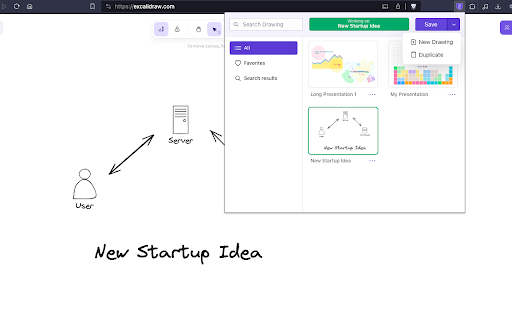
That's where Excalisave comes in! This extension makes it easy to save your Excalidraw drawings with just one click. You no longer have to worry about losing your work or cluttering your computer with multiple image files. With Excalisave, you can store your drawings in the browser storage and access them later whenever you need them.
Here are some key features of Excalisave:
1. One-click saving: Save your Excalidraw drawings with just one click. No need to copy and paste or download the image.
2. Browser storage: Store your drawings in the browser storage. Your drawings are safe and accessible even if you close the Excalidraw tab or restart your computer.
4. Easy retrieval: Access your saved drawings easily from the Excalisave menu. You can preview the image, delete it, or open it in a new tab.
5. Multiple drawings: Save as many drawings as you want. You can organize them by name and date, or search for a specific drawing using keywords.
6. User-friendly interface: Excalisave has a simple and intuitive interface. You don't need any technical skills to use it.
7. How to use Excalisave:
Install the extension from the Chrome Web Store.
Open Excalidraw and create your drawing.
Click on the Excalisave icon in the browser toolbar.
Choose a name for your drawing (optional).
Click "Save" to save your drawing in the browser storage.
To access your saved drawings, click on the Excalisave icon and select "Open Saved Drawings".
From the menu, you can preview, delete, or open your drawings in a new tab.
That's it! With Excalisave, you can enjoy the full benefits of Excalidraw without any limitations. Try it out today and let us know what you think.
Reviews
Loading reviews...
Permissions (5)
Permissions
activeTabℹ Can access the current tab when you click the extension scriptingℹ Can inject scripts into web pages storageℹ Can store data locally in your browser tabsℹ Can see your open tabs and their URLs unlimitedStorage
Details
| Version | 2.3.1 |
| Updated | Dec 21, 2025 |
| Size | 4.02MiB |
| First Seen | Mar 31, 2026 |
More by Atharva Kadlag


Popular in workflow

Adobe Acrobat: PDF edit, convert, sign tools
by Adobe Inc.
331M
★ 4.40
workflow
331M
★ 4.40
workflow

AdBlock — block ads across the web
by AdBlock
63M
★ 4.48
workflow
63M
★ 4.48
workflow

迅雷下载支持
by Shenzhen Xunlei Network Technology Co., Ltd.
59M
★ 2.77
workflow
59M
★ 2.77
workflow

Adblock Plus - free ad blocker
by eyeo GmbH
41M
★ 4.39
workflow
41M
★ 4.39
workflow

Chrome Remote Desktop
by Chrome Remote Desktop Release Managers
39M
★ 3.14
workflow
39M
★ 3.14
workflow
Popular Extensions
Adobe Acrobat: PDF edit, convert, sign tools
by Adobe Inc.
331M
★ 4.40
workflow
331M
★ 4.40
workflow
AdBlock — block ads across the web
by AdBlock
63M
★ 4.48
workflow
63M
★ 4.48
workflow
迅雷下载支持
by Shenzhen Xunlei Network Technology Co., Ltd.
59M
★ 2.77
workflow
59M
★ 2.77
workflow

Grammarly: AI Writing Assistant and Grammar Checker App
by Grammarly
42M
★ 4.50
communication
42M
★ 4.50
communication
Adblock Plus - free ad blocker
by eyeo GmbH
41M
★ 4.39
workflow
41M
★ 4.39
workflow