
⚠️Not updated in over a year
Description
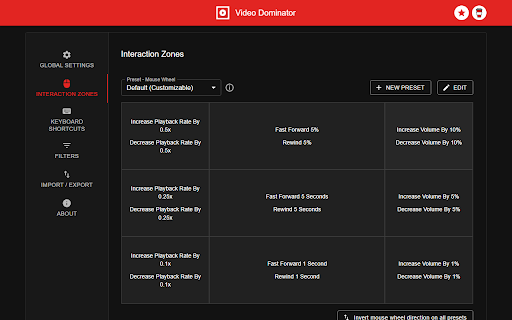
Hover over different areas of any video, hold the activation key down (right mouse button by default), and use mouse wheels or buttons to perform an unlimited number of custom actions such as:
- play/pause the video
- seek by, seek to (units available: second, frame, %)
- adjust or set playback rate (0x to 16x)
- adjust or set volume
- toggle mute
- toggle picture-in-picture mode
- toggle custom player
On some websites, you can also:
- take a video snapshot (save or copy to clipboard)
- open video in new tab
- download video (requires "Downloads" permission)
------------------------------------------------
Control Modes
------------------------------------------------
Overlay Element
- hover over a video, hold the activation key down and use mouse wheels or buttons
- activation key can be the Right Mouse Button, Ctrl, Alt, or Shift
- available on almost any website
Video Element
- hover over a video and use mouse wheels or buttons
- works only when the video is a top-most element (on websites such as YouTube, Odysee, Nebula, CuriosityStream)
------------------------------------------------
Action Info Overlay
------------------------------------------------
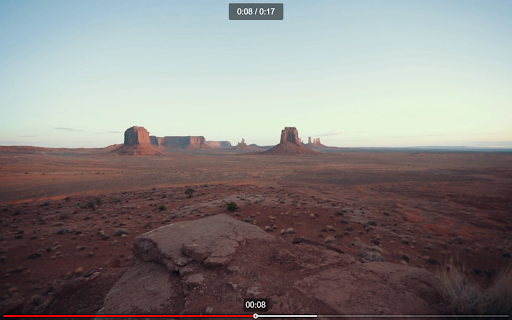
- customizable overlay temporarily shows you info depending on the last action, such as:
- volume
- playback rate
- current time, current time / duration, remaining time
- time can be based on the current playback rate
------------------------------------------------
Custom Player
------------------------------------------------
- a full window or full screen player with minimalist UI and no popups or any other distractions
- you don't need to hold the activation key down while using mouse controls
- unlimited number of custom keyboard shortcuts
- customizable progress bar
------------------------------------------------
Filters
------------------------------------------------
- none - the extension will run on all domains
- blacklist - the extension will not run on listed domains
- whitelist - the extension will run only on listed domains
------------------------------------------------
Permissions
------------------------------------------------
Storage - for storing extension settings
Downloads (optional) - for downloading media files
------------------------------------------------
Privacy Policy
------------------------------------------------
This extension does not collect personal data from users, and it does not send any user data to a remote server. The only data it collects are extension settings, and this is stored locally on your PC.


Reviews (2 cached)
★★☆☆☆2023-05-28
Liam
doesn't work on twitch
★★★☆☆2025-11-02
Θανάσης Αποστόλου
Please update! Mouse controls (wheel) do not work!
Permissions (3)
Permissions
activeTabℹ Can access the current tab when you click the extension downloadsℹ Can manage and monitor downloads storageℹ Can store data locally in your browser
Details
| Version | 2.8.0 |
| Updated | Oct 29, 2024 |
| Size | 477KiB |
| First Seen | Mar 24, 2026 |
More by InzkDev


Popular in workflow

Adobe Acrobat: PDF edit, convert, sign tools
by Adobe Inc.
330M
★ 4.40
workflow
330M
★ 4.40
workflow

Chrome Remote Desktop
by Chrome Remote Desktop Release Managers
38M
★ 3.14
workflow
38M
★ 3.14
workflow

Microsoft Power Automate
by Microsoft Corporation
10M
★ 1.99
workflow
10M
★ 1.99
workflow

Screencastify - Screen Video Recorder
by castify-ext-dev
9M
★ 3.95
workflow
9M
★ 3.95
workflow

LastPass: Free Password Manager
by LastPass
8M
★ 4.26
workflow
8M
★ 4.26
workflow
Popular Extensions
Adobe Acrobat: PDF edit, convert, sign tools
by Adobe Inc.
330M
★ 4.40
workflow
330M
★ 4.40
workflow
Chrome Remote Desktop
by Chrome Remote Desktop Release Managers
38M
★ 3.14
workflow
38M
★ 3.14
workflow

Cisco Webex Extension
by cisco.chromestore
24M
★ 2.34
social
24M
★ 2.34
social

Kami for Google Chrome™
by Kami
17M
★ 4.56
education
17M
★ 4.56
education

Read&Write for Google Chrome™
by Texthelp
17M
★ 3.44
accessibility
17M
★ 3.44
accessibility