Canvas Blocker - Fingerprint Protect icon

Canvas Blocker - Fingerprint Protect

by joue.quroi

v0.2.3 Updated Jan 8, 2026 58.68KiB
CWS
100K
Users
★ 4.02
52 reviews
#342
of 68.3K
developer
#26 of 4.8K

Description

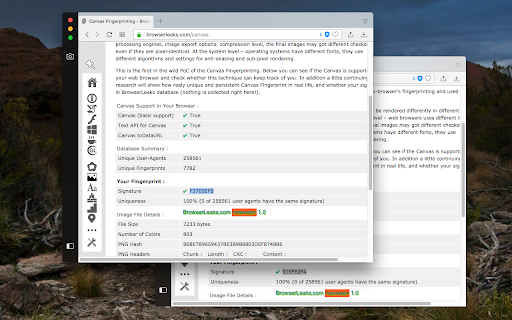
This browser extension safeguards user privacy by preventing malicious scripts from using the HTML canvas element for user fingerprinting. It introduces slight changes to the data generated by the canvas element when specific methods are invoked, rendering it unusable for fingerprinting. In comparison to similar extensions, this one is lighter and employs a more efficient method to obstruct fingerprinting across all frame elements (top and subframes). The extension operates in three modes: 1. Random noise 2. Random noise (per page) to maintain a consistent identity within the current page session 3. Fixed noise to sustain a constant yet unique identity continuously Key Features: 1. Minimal footprint fingerprint defender 2. Ability to block or disable fingerprinting on specific hostnames 3. Notification when canvas fingerprinting is detected 4. Option to disable notification for select or all hostnames 5. Compatibility with cross-origin (CORS) and sandboxed iframes (such as Disqus and Hangouts) Notes: This extension doesn't entirely block the canvas element. Instead, it modifies two methods to prevent the JavaScript engine from creating a unique identification key from this element. What is Canvas Fingerprinting: Canvas fingerprinting is a method among several browser fingerprinting techniques used for tracking online users. It enables websites to identify and monitor visitors by leveraging the HTML5 canvas element rather than browser cookies or similar means. This technique functions by exploiting the HTML5 canvas element. When a user visits a webpage, the fingerprinting script initially writes text using the preferred font and size and adds background colors. Subsequently, the script calls the Canvas API's ToDataURL method to retrieve canvas pixel data in dataURL format, essentially a Base64 encoded representation of binary pixel data. Lastly, the script hashes the text-encoded pixel data, creating a unique fingerprint.
Canvas Blocker - Fingerprint Protect screenshot 1

Reviews (9 cached)

★☆☆☆☆2026-01-31
trading hero

doesnt work; only pretends to work

★☆☆☆☆2022-09-06
Tom Landi

Fixed Fingerprint - This option isn't useful at all. You do NOT get randomnized Fixed Fingerprint by enabling this option. Your Fingerprint is same for ALL chrome based browser run within the same computer. You can test it using Comodo Dragon (chrome based) or portable version of Chrome.

★☆☆☆☆2022-06-22
Crunch Berry

Doesn't work. Still have a unique fingerprint.

★☆☆☆☆2020-11-05
M

Doesn't work against canvas !! Try on this website : 1) Open a private new tab (0 cookie then) then go on https://fingerprintjs.com/demo 2) Close the windows 3) Reopen a new private tab (0 cookie again) then rego on https://fingerprintjs.com/demo Doesnt work, website knows who you are. Try this with CanvasBlocker on Firefox, it won't recognize you. If you use Brave, you can close your browser and reopen it it will reset the hash so the website wont recognize you.

★★☆☆☆2026-01-14
Kjell Ivar Graskopf

It is not really that great. It changes your fingerprint, so you have a second one. It does not randomize it.

★★☆☆☆2024-03-19
GJ

Activating the extension (setting "Random fingerprint") does seem to change the fingerprint on every reload on this site "https://browserleaks.com/canvas". However, on this site "https://fingerprint.com/" it keeps recognizing me. Even in Incognito/Private mode, after closing the browser or tab (and changing public IP-address using VPN). Although I do get the popup from this extension stating that the fingerprint is blocked. So, not sure if this extension is adequate if it only changes the hash in using these very specific steps. Using Brave on Win10, by the way. And fingerprint-setting is set to "Strict"

★★☆☆☆2019-03-10
Amardeep Verma

This Fingerprint canvas blocker does not block most of the websites. For example in Firefox there is a CanvasBlocker extension which blocks canvas fingerprinting on many sites which this extension misses. Further there is no visual indicator when a website is blocked from carrying out Fingerprint blocking.

★★★☆☆2026-03-18
Apekiller

lately it interferes with the cloudflare human verification, meaning you remain stuck there and the website no longer loads

★★★☆☆2021-08-02
Van Tung Tran

First of all, Thanks for making a great tool! But, but if you have multi profiles of Chrome and install this extension to these profiles and using "Fixed Fingerprint" mode in setting of extension, the Fingerprint code is the same on all profiles. Finally, The "Fixed Fingerprint" feature work wrong on multi profiles. Please fix this.

Permissions (5)

Permissions

contextMenus Can add items to the right-click menu declarativeNetRequestWithHostAccess notifications Can show desktop notifications scripting Can inject scripts into web pages storage Can store data locally in your browser

Details

Version 0.2.3
Updated Jan 8, 2026
Size 58.68KiB
First Seen Mar 24, 2026



