
Description



Reviews (9 cached)
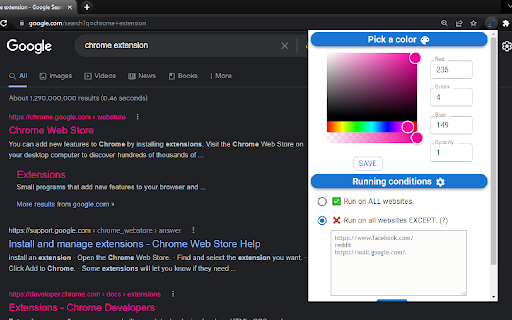
Settings do not work. The standard setting for a visited link is a greenish brown color that I changed to red or purple. But no matter what I tried, it still showed my visited links as that greenish brown color. Bad app, which cannot do what it promises to do. Avoid.
not working
Agreed with RedHunter! Saved -> then it all goes back to the original state. Why then?? What's your point.. Removed and picked up another extension.
Author doesn't answer questions nor does he seem to care about the extension. I therefore don't give a damn about him.
It doesn't remember your settings. It all goes to trash when you reopen Chrome: your custom color, your exclusion list... it sucks to set it all again every time.
app works great! i save my color, then after a few days, the setting color always resets to brown (red 117, green 101, blue 0, opacity 1). i have no idea why this is happening... does any1 have a clue?
Works great- for a while. Settings don't "stick", have to reset2 or 3 times a week. Seems like an easy fix?
Marking visited titles and links is very useful for me and this extension does this ... but with a color so faint that it diminishes its utility. The extension's description claims that we cabn pick our colors, but nowhere in Options can I find this ability. (Windows 11, Vivaldi 7.6)
Changes made will not stay. This is a great extension, but when you pick that first initial color that you want visited links to be, make sure it's exactly the color you want because you won't be able to change it. Sure, it'll look like you're changing it, and while you're browsing in that particular session, visited links will be the color you most recently "saved". But the next time you startup your computer and open Chrome again, the visited links color will have reverted to the very first color you chose. I initially chose a kind of brown color as the visited links color, but it wasn't showing up as well as I'd like, so I changed it to a light blue. The next time I started up Chrome, visited links were brown again. Of course I click 'Save' after changing the color to light blue. But after the computer is shut down and a new day begins, the links are brown again, which is why I put "saved" in quotes; new settings aren't actually saved. I have to change the color back to light blue every time I open Chrome for the day. It's a pain and I hope the makers read this review and fix the problem. Thus far it is the ONLY problem I have with this app; the app is otherwise wonderful.
Permissions (1)
Permissions
Details
| Version | 1.0.1 |
| Updated | Oct 8, 2024 |
| Size | 696KiB |
| First Seen | Mar 30, 2026 |
More by Nathan




Popular in accessibility





Popular Extensions




