
Description


Reviews (49 cached)
Have to click Start multiple time for the timer to start properly. Its starting be very unreliable now.
*Start tracker* stopped working properly - not assigning a highlighted sub-task. Every single time you're tracking time into a *No Issue*.
New version (2.*) doesn't work correctly. I don't want to see and give access for all web sites. But I can't select specific site: 1. If I set specific site via settings, tempo doesn't count time (always 0h 0m 0s). 2. I can't setup specific page. For example: we have corporate jira and confluence with the same host (companyName.atlassian.com/jira and companyName.atlassian.com/confluence) and I want to see widget only for jira.
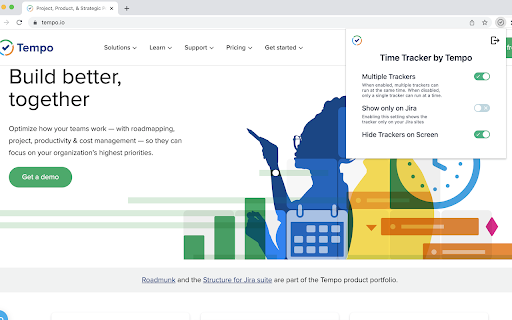
The new update is horrible. I don't want the tracker to be on top of all pages, I only want to see it on Jira. You change the default behaviour with an update without the ability to toggle this setting - awesome UX improvement.
Why is there no option to sort e.g. by favorite tasks any more? I don't find the tasks I want to log my time to!
It used to work, not anymore though. If you press log time, it redirects you to tempo and tempo page says "tracker not found"
To many problems, this show in all tabs/pages without ask for or by configuration. the time doesn't start at creating a new tracker. Doesn't register the time.
Why do you need permission to: download and change all my data on all sites?
Allows you to connect to Jira tempo. After that it's just a shortcut to your projects page. Looks like the old version might have been useful? Current version is useless however.
After the update, it's worthless for me. Please, bring the old tracker back ...
Tempo Team, please fix a critical bug. After a major update on 16/11/2021 EVERY SINGLE TIME when you're stopping a tracker on Chrome plug-in - you should reconnect Tempo plug-in to Jira. Simply EVERY SINGLE TIME.
Even if you delete the tracker, it's not actually deleted, only hidden. Some time later all the hidden trackers would appear again, and you will find yourself with 200+ trackers. The only way to get rid of them is to delete them one by one. But since they aren't being deleted, they will appear later again. In the end you cannot reliably use it, so it's not worth your time.
The update yesterday (1.3.1) deleted all of my open time trackers and won't let me start new trackers.
Version 1.3.1 is not working. Yesterday, version 1.3.1 of the plugin installed itself and now the "start tracking" button is not working any more.
App randomly stopps working, no errors shown. Currently it's not working since a week - we're thinking about to stop using Tempo in general as of the poor quality of jira integration at the moment. Also the "support" page of this extension throws a 404 - good work guys, NOT!
Not working with server version.
Not useful, It will be great if it works like toggle. Will give 5 stars when it useful. At least just a time tracker function.
I used to love this extension, but it has been down for 2 days now? no information on the website too? would like an update please. Feels like the support for the extension was abandoned?
it stopped showing tempo in jira saying tempo needs to be installed in jira. Showing tracker only on tempo subpage in jira
I found the original version so easy to use but it just stops working and have to remove and add it again. The new version is clunky and nowhere near as useful as the old one. Plus the widget(?) at bottom right of the page appears on every page that you're using regardless if it is jira or not and it also masks some status info and other buttons making then difficult to view or click. Now it has stopped working. Trying to enable it again just brings up a blank screen with no useful info at all. Will remove it and look for something else if not fixed in an update soon.
Doesnt sync between the inline track and the track in Jira Dashboard only when starting it, then no sync between pausing and time. At other times my trackers are just gone and I have to make them again, but then I have forgotten the time spent already
Last update completely broke the extension. 1. List of trackers is not updated anymore in the bottom pane. I have to relogin to the extension to update it! 2. I can't select proper account (or just check it's selected) when log time. The prev version opened Tempo log form but now it's completely unuseful.
Used to work, now spamming itself in all browser windows including chrome desktop apps and the timer won't even start anymore; just sits there at 0:00 no matter what I click. My time tracking workflow is ruined. Review Update for v2.0.3 & 2.0.4: - Still opens in all windows/tabs by default; is there anyone that actually wants this to happen? - Setting it to only open on specific sites causes the timer to never start counting when clicked (unusable) - The only extension setting it has (light/dark/system) doesn't even save properly or change appearance Review Update for 2.0.15: - Timer has stopped working again unless I allow access to all sites; which will never happen
Since the update the extension is logging the wrong times. Looks like it's referencing UTC instead of my local time.
Before the latest release it was great. Now it cannot take ticket number from the ticket page automatically, timer sometimes is not starting and being freezed at 0:0:0 and other issues...
The old tracker was great, but the new version is close to unusable. Can i please have the old tracker back??
Used to work fine. New update made it that it shows the tracker on every page, even if it isn't Jira, and doesn't automatically pick the case number if you start tracking on that page
Unfortunately version 1.3.1 does not work anymore, the button "start tracking" does not work
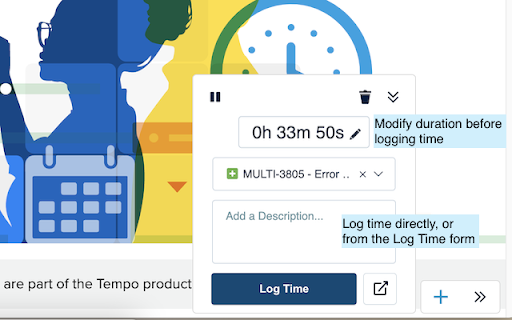
Useful extension but with very poor user experience. When I start a tracker, I'd like others to stop counting (no multitasking). When I want to log time from running tracker I have stop a tracker, then really annoying reditect to tempo page happens (it takes a while and my tracker is in stopped state!), than I can finally log work, but then another annoying (and slow) redirect happens again! Tracker rounds down to full minutes... why? Why tracker stops after clicking log work in tracker since it has to perform slow redirect to different page where I can insert some additional comments? I would expect tracker stop after actually logging time...
Slow, high CPU usage when loading side, it uses an HTML iframe. Sometimes it gets stuck when logging the time.
Reloading page when stopping timer is so annoying! It's 2020, ajax exists! Also I'd like to have possibility to disable multitasking, is it possible? In 2017 you have mentioned that you are working on it. Is it really that big feature? Working in parallel on multiple tasks does not make any sense in most cases!
When I try to log work, it just takes me to a 404 page on JIRA
Tempo extension does not support Jira Server version, but it definitely should support.
Doesnt seem to add anything at all. If the trackers were visble in every tab it might be useful - but as it stands, it's just another unhelpful dev plugin
Starting a tracker used to stop other tracker like in "I'm working on something else". Now multiple trackers can run at the same time? Why is that? I cannot log 16 hours worked when only 8 hours has passed in the _real world_!
This extension doesn't seem to do anything while navigated to a page other than your Atlassian account. In fact it seems for me at least that I have to be on the Tempo page. So, what's the point? This functionality should have simply been incorporated into Tempo itself. I have a Twitter extension that works regardless of what page I'm viewing. There's no reason why this extension can't work the same way.
I really enjoy it, it makes tempo actually usable in my opinion. However, there are just too many bugs. Today I can't even get it to connect to JIRA. I just click the extension, it takes me through all the steps until I'm redirected back to JIRA but there is no tracker. Then I just keep doing that with no luck. I tried uninstalling and reinstalling twice. Sucks when you can't use it.
The Web-Apps former Integration was way better... The Current selected Ticket in a Board-View is not selected for a new started Time-Tracker. On stopping the tracking the detail view for a ticket is loaded before the overlay is displayed... wasted seconds of waiting ;) Mutltitasking IMHO is pointless for enterprise job environments. The overall look&feel isnt as snappy as the old ones... please go back to an integrated version.
Remove this really useless trimming of text we are typing! You are random removing characters. Why?
The new version is really difficult to work with. The main reason is that when logging time you can no longer adjust the Start & Finish time. I then have to go to Tempo, reload the page and then adjust each one accordingly. This just takes up more time. It also seems to take time starting a new task timer and I have ended up with extra ones floating about. Had one that got to 95 hrs over the weekend. It is very clunky and cumbersome now to use. Definitely not an upgrade to 2.* for the better.
I'm not a fan of the over simplified update because of these reasons: 1. I like to edit my start and finish time - it gives me more control over logging my work time (especially if you forget to hit start or stop during your task) Take a look at time tracking app Klokki Slim. when you leave your computer it knows and asks you if you want the timer to stop or keep going from the time you left. Very smart. 2. I also don't like how it appears on all sites by default. I use a lot of screen shots in my work and the times appear all over them. I've tried to turn it off by using the specific site option but the timer then doesn't work. Having this app work with Jira is the best thing, but don't fix what isn't broken. And if you do, you should add more customisation rather than less. You should have done extensive user feedback, user testing and then facilitate a communication plan to implement these changes. I think you've done a downgrade not an upgrade this time.
After the update. I can no longer log time. The Up arrows to log time are now no longer visible unless I click on the ticket number and a new tab opens up where the up arrows are shown briefly (a second or two) to log time. I see no way to modify what is shown on the plugin or adjust length, etc. I'd share a snip of what I see...but can't!
The plugin now for around a week keeps asking to reconnect to jira multiple times a day, that's an introduced bug after latest updates
It doesn't work too often.
Very useful when you want to or need to track time very accurately across multiple tasks in a short time span. The reason I cannot give it 5 stars is due to some strange behaviour at times. 1. Sometimes when I start writing a comment, the textarea loses focus and all manner of JIRA shortcuts get activated before I notice it. (If you are a fast typist, this will be VERY annoying) 2. Seemingly randomly the entire tempo toolbar disappears from the browser until I do an action in JIRA, such as click on a task in Kanban view, after which it reappears. Without those two issues, I would say this tool is perfect.
Pros: - Very useful integration with Jira Tempo - Allows logging time to any task in Jira - Simplifies the process of logging time Cons: - When I start a tracker, I'd like others to stop counting (no multitasking). - It would be very useful to start timer from the Google Chrome extension icon like Toggl does this. - All worklogs are collecting in the footer of the page, and in case you work on 10-15 tasks during the day it becomes hard to manage all of them. It would be great to just hide stopped logs under the icon.
Hi ! Is it possible to have the same plugin for Tempo for Jira server ? It would be great ! :) Thanks
It used to be better when you start one tracker it stops the others. Now you have to click pause on your previous tracker and play on the one you want to start. You should only be able to charge for one task at a time? Also I have to re-install it from time to time because error keeps coming up "Count not retrieve task info" or similar. aFter I uninstall and then re-install it goes awya.
Why do we need extension? Why this cant be just a feature in a web app? Edit: now we can't even have trackers in jira show in here https://support.tempo.io/hc/en-us/articles/234979828-Logging-work-with-trackers we got Tempo Timesheets for Cloud Version: 1.1.45-AC
Permissions (3)
Permissions
Details
| Version | 2.0.18 |
| Updated | Feb 3, 2025 |
| Size | 1.76MiB |
| First Seen | Mar 30, 2026 |
Popular in workflow




Popular Extensions
