Website SEO Checker icon

Website SEO Checker

by Boosta

v4.4.1 Updated Mar 20, 2026 738KiB
CWS
100K
Users
★ 4.57
222 reviews
#1099
of 207.3K
developer
#97 of 18.1K
Highly rated Recently updated

Description

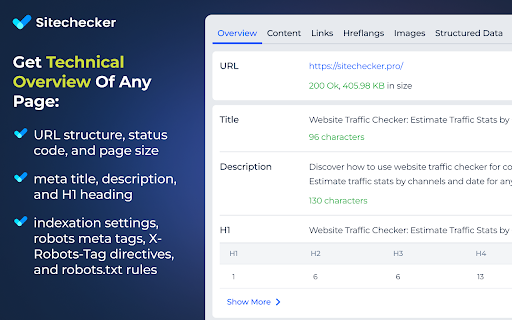
☑️ Overview – quickly check essential SEO data: URL structure, metadata, indexation, and canonical settings. ☑️ Content – analyze headings, keyword density, text length, and text-to-code ratio for better structure. ☑️ Links – identify external, internal, and subdomain links, plus dofollow/nofollow status and anchor text. ☑️ Hreflangs – instantly verify hreflang setup and language targeting for international SEO. ☑️ Images – detect missing alt/title tags, broken images, and check sizes with on-page highlighting. ☑️ Structured Data – instantly identify and validate Schema.org markup for better SEO performance. ☑️ PageSpeed – measure mobile and desktop performance with actionable optimization insights. ☑️ GSC+GA4 Insights – assess search performance & indexing plus user behavior and conversion metrics. ☑️ Issues & Monitoring – detect SEO issues, track technical changes, and monitor page updates over time. Deep dive into Sitechecker Chrome Extension’s capabilities to unlock the full potential of your SEO workflow. 1️⃣ Get a quick technical overview of any page to ensure it meets SEO best practices. • Inspect URL structure, status code, and page size. • Review meta title, description, and H1 heading. • Analyze indexation settings, including robots meta tags, X-Robots-Tag directives, and robots.txt rules. • Validate canonical tag settings to prevent duplicate content issues. 2️⃣ Analyze content structure to improve keyword relevance and readability. • Review heading hierarchy (H1–H6) and highlight them on the page. • Copy the entire heading structure in one click for easy documentation. • Measure text length in words and characters. • Calculate text-to-code ratio to optimize content efficiency. • Get keyword density insights for single, two, and three-word phrases. 3️⃣ Audit all links on a page to improve internal linking and track external references. • Detect external, internal, and subdomain links. • Check dofollow/nofollow status and analyze HTTP response codes. • Review anchor text usage and link destinations. • Search for specific links and highlight them directly on the page. • Copy all detected links in one click for easy analysis and outreach. 4️⃣ Ensure proper hreflang implementation for international SEO. • Detect missing or incorrect hreflang attributes. • Validate language targeting and regional settings. • Check backward links to confirm proper hreflang setup. 5️⃣ Optimize images to improve SEO and user experience. • Identify missing alt and title attributes. • Detect broken images and oversized files. • Highlight image details directly on the page for easy fixes. 6️⃣ Validate structured data for better search visibility. • Detect Schema.org markup and review structured data implementation. • Identify missing or incorrect structured data elements. • Ensure key rich snippet attributes are correctly applied. 7️⃣ Measure page speed and get actionable insights for optimization. • Check page loading speed for desktop and mobile. • Identify slow-loading elements affecting performance. • Get recommendations to improve Core Web Vitals. 8️⃣ Unlock real-time GSC + GA4 insights to track performance, user behavior, and conversions. • View clicks, impressions, CTR, and average position over 7/30/60/90 days. • Analyze top search queries and how they drive traffic. • Inspect URL crawling, indexing status, and mobile usability issues. • Measure user behavior with engagement metrics like bounce rate and average session duration. • Track conversions with key events and key event rate. • Break down performance by traffic source (Google Organic, Direct, Social, Bing, etc.). 9️⃣ Monitor SEO issues and track page changes over time. • Detect technical errors, broken links, and missing metadata. • Track content updates and structural modifications. • Get alerts for critical SEO changes.
Website SEO Checker screenshot 1Website SEO Checker screenshot 2Website SEO Checker screenshot 3Website SEO Checker screenshot 4Website SEO Checker screenshot 5

Reviews (15 cached)

★☆☆☆☆2025-10-07
Oghenetefa Okotete

The spinner was just in a continuous loading state

★☆☆☆☆2024-10-03
sales tool

sucks

★☆☆☆☆2024-09-19
Wizard World Of Vaping

Hi just added this to my chrome but will not allow my to use unless i sign up with them i understood this was a free service ? Thanks

★☆☆☆☆2024-03-12
FGS Ontario

It looks real flashy, dashy, and super good. That is is. Tried the trial version. Spent about an hour with it. Appears to show some good things bang off but when you try to do ANYTHING, like to start, audit a website, I spin for about 10 minutes with no results. My website has a few pages and is brand new. So it is really not complex. This tool should not be like this. If it is going to work, it should give results immediately.

★☆☆☆☆2021-12-14
خدمات تبادل

Unfortunately, it is not real tool to be used for a purpose, nothing to do with this idiot ext. just wasting time

★☆☆☆☆2021-03-08
Marco S

The extension does not check the currently open page but sends the link to a server which then checks the page. Therefore impractical and unnecessary as an extension.I wonder why they bothered to create an overlay here when a simple link to their site would suffice lol.

★☆☆☆☆2018-08-05
Abdul Muqsit

Please work on it, just like moz and other platform have extension you can also develop instead of redirection.

★☆☆☆☆2018-07-11
Charlie Hall

only a web page shortcut no need for an extension

★★☆☆☆2024-11-20
Divyansh Kesharwani

A lot of time it does not fetch page size, title, description, headings, meta tag, robots.txt etc. Fix this issue.

★★☆☆☆2018-04-29
David Heath

It just opens a website, which only lets you make one query before requiring membership. Why does this need access to my browsing history?

★★★☆☆2025-09-10
Valentine Schelstraete

It worked like a charm for years, and now suddenly it stopped working and is very buggy. I thought it was because the extension is now paid, so I tried to log in but that didn't even work. Will look for an alternative.

★★★☆☆2025-03-10
Cam

It's great but i'm unable to use it because i like to copy and paste into a spreadsheet. The formatting doesn't work. Detailed SEO Extension nails it for this part.

★★★☆☆2025-02-01
Brent Herrig

Decent Site, but the I feel the app needs a bit of work.

★★★☆☆2023-07-31
Kumar Gaurav

The plugin is good with speed but isn't really capable of evaluating SPA application, while doing analysis on my angular web app, the plugin is unable to detect title tag, meta description etc. I imagine the reason could be that it simply requests the page from browser and the server returns the home page of the angular app which doesn't has the real content

★★★☆☆2019-11-08
Daniel Ljungqvist

If this website checker and it's extension is to be trusted, about 85% of the websites on the internet is at a terrible state. It always shows below 25-30/100 on all websites. It's a great tool to find even the slightest of mistakes tho.

Permissions (3)

Permissions

activeTab Can access the current tab when you click the extension identity Can use your Google account identity storage Can store data locally in your browser

Details

Version 4.4.1
Updated Mar 20, 2026
Size 738KiB
First Seen Mar 26, 2026