
⚠️Not updated in over 2 years
Description
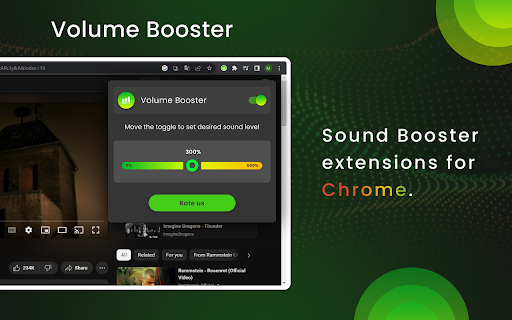
Volume Booster is a handy application designed to enhance the audio output of your Chrome browser. It is a browser extension that can be easily installed and integrated into your Chrome web browser, providing a convenient way to boost the volume of various multimedia content.
The primary purpose of Volume Booster is to amplify the sound levels of online videos, music, podcasts, and any other audio-based content you encounter while browsing the web. It can be particularly useful in situations where the audio output is too low, allowing you to increase the volume and enjoy your media more comfortably.
Once installed, Volume Booster typically adds an icon or a control panel to the Chrome toolbar, giving you quick access to its settings and features. The extension works by applying digital signal processing techniques to increase the volume levels without significantly distorting the audio quality.
With Volume Booster, you can adjust the volume according to your preferences. It often provides a slider or numeric control that allows you to increase or decrease the volume levels incrementally. Some extensions may also offer additional customization options, such as equalizer settings, to fine-tune the audio output to your liking.
It's important to note that while Volume Booster can effectively boost the volume, excessively high volume levels may lead to audio distortion or reduce the overall audio quality. Therefore, it's recommended to use this extension responsibly and avoid pushing the volume levels to their maximum limit.
Overall, Volume Booster is a convenient Chrome extension that enhances the audio output of your browser, ensuring you can enjoy multimedia content with improved clarity and volume.

Reviews (3 cached)
★☆☆☆☆2024-12-03
Synthia L.
(03-12-2024) still not working into Chrome (or Brave) Should be touch from Murphy when read others review or ...🤭
★★★☆☆2025-11-10
HamOzer
The only problem is, it doesn't work with fullscreen. The way the fix it is: 1) Open another chrome tab on a separated window 2) You have to click the icon to enable it. (It opens a seperated window) That's just not worth it.
★★★☆☆2024-01-30
V
Cool. Works. But volume distorts even if I increase a bit like from 100 default to 110. Also, it would be cool if you make the your addon work as popup not a seperate window. Also, please port this to firefox addon store for floorp browser and edge addon store for edge browser (chrome now doesn't allow us to install on edge). Thanks.
Permissions (5)
Permissions
activeTabℹ Can access the current tab when you click the extension storageℹ Can store data locally in your browser system.display tabCaptureℹ Can capture tab audio/video tabsℹ Can see your open tabs and their URLs
Details
| Version | 1.0.0 |
| Updated | May 27, 2023 |
| Size | 173KiB |
| First Seen | Mar 26, 2026 |
Popular in fun

Return YouTube Dislike
by selivano.d
6M
★ 4.49
fun
6M
★ 4.49
fun

Custom Cursor for Chrome™
by BLife Team LLC
5M
★ 4.67
fun
5M
★ 4.67
fun

Stylish - Custom themes for any website
by userstyles.org
2M
★ 4.28
fun
2M
★ 4.28
fun

РуТрекер - официальный плагин (доступ и пр.)
by RuTracker.org
2M
★ 4.07
fun
2M
★ 4.07
fun

Google Meet Enhanced Experience
by niritshlif
1M
★ 3.36
fun
1M
★ 3.36
fun
Popular Extensions

Adobe Acrobat: PDF edit, convert, sign tools
by Adobe Inc.
331M
★ 4.40
workflow
331M
★ 4.40
workflow

AdBlock — block ads across the web
by AdBlock
63M
★ 4.48
workflow
63M
★ 4.48
workflow

迅雷下载支持
by Shenzhen Xunlei Network Technology Co., Ltd.
59M
★ 2.77
workflow
59M
★ 2.77
workflow

Grammarly: AI Writing Assistant and Grammar Checker App
by Grammarly
42M
★ 4.50
communication
42M
★ 4.50
communication

Adblock Plus - free ad blocker
by eyeo GmbH
41M
★ 4.39
workflow
41M
★ 4.39
workflow