Copy as Markdown icon

Copy as Markdown

by Laxman

v25.6.9 Updated Jun 11, 2025 162KiB
CWS
10K
Users
★ 3.89
45 reviews
#5383
of 207.1K
developer
#459 of 18.1K

Description

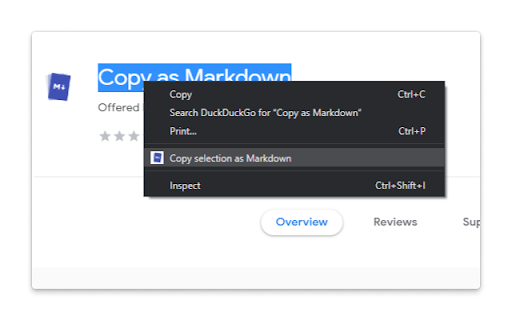
Features: The extension allows you to copy selected text on a page as Markdown with support for features including the following - Ability to copy links, images, and selected text as Markdown. - Linked images, will have options to individually select link or images. - Formatted text such as Italic, bold, strike-through, and inline code. - Unordered and ordered lists, with task lists support. - Tables, with respect to GFM. - Fenced code blocks, with language detection using info strings. Note: When copying links and images, Chrome doesn’t let you extract images alt text or anchors text content to be used in Markdown, instead the links themselves are used as link title. Firefox doesn’t have this limitation though. Permissions: The extension requires the following permission from you for working. 1. `contextMenus`: to show option when right-clicking. 2. `activeTab`: to be able to access content on page. The extension can only write to your clipboard and not read from it in any way. File an issue at https://github.com/notlmn/copy-as-markdown/issues for bug reports or requesting new features.
Copy as Markdown screenshot 1Copy as Markdown screenshot 2

Reviews (10 cached)

★☆☆☆☆2026-03-22
Rodolfo Mortean

it didn't work to me as well on Windows 11. Either its installation instructions are not clear, and I should not have seen this before restarting Chrome, or it simply only works on very specific conditions.

★☆☆☆☆2026-02-03
Bevan Li

I am on Mac, I can click "Copy selection as Markdown" from context menu, but just nothing copied

★☆☆☆☆2025-05-26
Dave Bowman

Instead of copying md performs simple copy action

★☆☆☆☆2025-04-22
GW Add-ons Support

It tried copy using the Context Menu but it simply copies the HTML. I am trying to copy an HTML table from a Gmail Message. It doesn't work as intended

★☆☆☆☆2025-03-13
Julian Harris

Doesn't work. all it does is stick "copy as markdown" into the clipboard.

★☆☆☆☆2025-02-01
Thomas Rosenberg

Does nothing. Nothing on the clipboard

★☆☆☆☆2024-12-23
Vladimir Alexiev

Tried "Copy selection as markdown", nothing is added to the Clipboard

★☆☆☆☆2024-12-13
Alex L.

I just now tried the extension. Made a selection and used the context menu to copy as markdown, the clipboard is not changed and effectively the extension does nothing.

★☆☆☆☆2024-06-25
Jim McD

Installed in chrome then pinned the icon. When I click on the icon, it opens a github page where the extension code lives. So it's useless.

★★★☆☆2026-03-21
Jason Zhang

This tool cann't copy code as markdown format, please update it.

Permissions (2)

Permissions

activeTab Can access the current tab when you click the extension contextMenus Can add items to the right-click menu

Details

Version 25.6.9
Updated Jun 11, 2025
Size 162KiB
First Seen Mar 26, 2026




