
Description
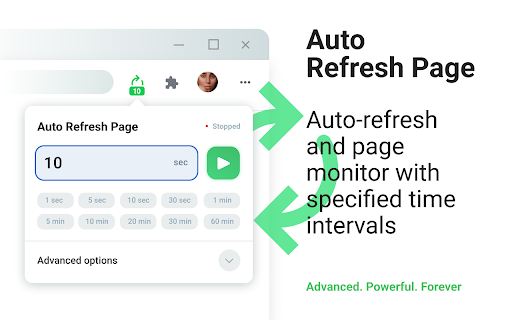
Auto Refresh Page is a convenient and powerful auto refresh chrome extension, specifically designed to automatically refresh and reload any web page or tab after a specified time interval. Simply enter the desired number of seconds for auto refresh chrome and click "Start."
This auto refresh extension is perfect for users who need to automate page refreshes based on fully customizable settings.
Key Features
- Timed Refresh: Pages reload at a specified time interval [auto refresh chrome].
- Randomized Intervals: Pages reload using a random time interval.
- Scheduled Reloads: Pages refresh at specific, set times (e.g., 09:00, 18:20, 9:30pm).
- Bulk Tab Refresh: Refresh all open browser tabs at once.
- List Updating: URLs are updated automatically based on a predefined list.
- Domain-Wide Reload: Common domain name pages refresh automatically.
- Keyword Detection: Search for keywords or regular expressions when using the auto refresh extension.
- Action Automation: Auto-clicking buttons or links during a refresh extension cycle.
- Script Execution: Run script — execute custom JavaScript code when pages refresh to perform custom actions.
How to Use this auto refresh addon chrome:
1) Enter the desired time interval in seconds or choose from preset options, then click "Start."
2) To stop the refresh, click the "Stop" button.
3) For additional settings, open the "Advanced options" dropdown, select your preferences, and click "Start."
Advanced Options
- Clear cache on every automatic page refresh
- Search for text on automatically updated pages
- Display notifications
- Saving the selected parameters on the page
- Automatic clicking on a button or link during a refresh extension
- Display of update counter, time of last and next update
- Run script — execute custom JavaScript code on auto refresh chrome extension
Privacy Assurance
We do not collect, store, or share any personal data from our users. Auto Refresh Page operates entirely locally on your device, ensuring your privacy and data security. All our practices are in full compliance with webstore policies, offering you a safe and reliable browsing experience.


Reviews
Loading reviews...
Permissions (9)
Permissions
browsingDataℹ Can delete browsing history and data contextMenusℹ Can add items to the right-click menu notificationsℹ Can show desktop notifications offscreen scriptingℹ Can inject scripts into web pages sidePanel storageℹ Can store data locally in your browser tabsℹ Can see your open tabs and their URLs userScripts
Details
| Version | 2.0.0 |
| Updated | Dec 12, 2025 |
| Size | 786KiB |
| First Seen | Mar 26, 2026 |
Popular in workflow

Adobe Acrobat: PDF edit, convert, sign tools
by Adobe Inc.
331M
★ 4.40
workflow
331M
★ 4.40
workflow

AdBlock — block ads across the web
by AdBlock
62M
★ 4.48
workflow
62M
★ 4.48
workflow

迅雷下载支持
by Shenzhen Xunlei Network Technology Co., Ltd.
59M
★ 2.77
workflow
59M
★ 2.77
workflow

Adblock Plus - free ad blocker
by eyeo GmbH
41M
★ 4.39
workflow
41M
★ 4.39
workflow

Chrome Remote Desktop
by Chrome Remote Desktop Release Managers
39M
★ 3.14
workflow
39M
★ 3.14
workflow
Popular Extensions
Adobe Acrobat: PDF edit, convert, sign tools
by Adobe Inc.
331M
★ 4.40
workflow
331M
★ 4.40
workflow
AdBlock — block ads across the web
by AdBlock
62M
★ 4.48
workflow
62M
★ 4.48
workflow
迅雷下载支持
by Shenzhen Xunlei Network Technology Co., Ltd.
59M
★ 2.77
workflow
59M
★ 2.77
workflow

Grammarly: AI Writing Assistant and Grammar Checker App
by Grammarly
42M
★ 4.50
communication
42M
★ 4.50
communication
Adblock Plus - free ad blocker
by eyeo GmbH
41M
★ 4.39
workflow
41M
★ 4.39
workflow