
⚠️Not updated in over a year
Description
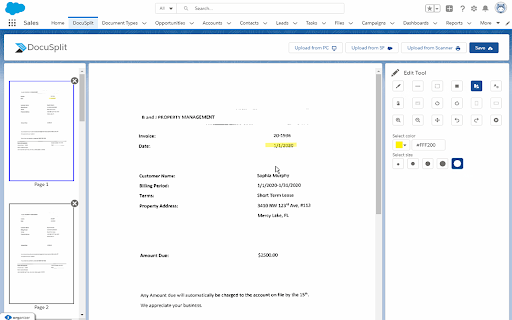
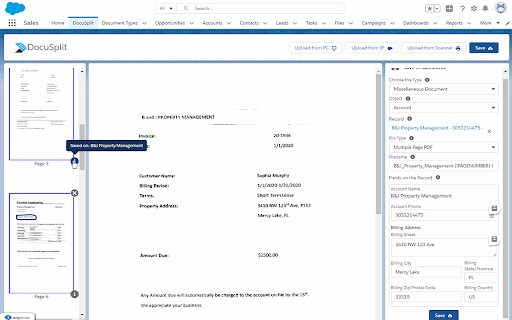
The Docusplit App was developed with the purpose of streamlining and securing document scanning and PDF extraction directly within the Salesforce platform. The App allows users to scan documents or import them from a users PC or Salesforce record, manipulate or annotate each page within the document(s) and save a page or group of pages to a variety of Salesforce records.
The Docusplit App is widely used across a variety of organizations within the Salesforce eco-system. The most common use cases are represented by a need to scan or extract physical or digital documents securely.
Salesforce users who require a high level of security, especially those within the government or medical industry will benefit from Docusplits native functionality. Users can scan physical documents directly into Salesforce, bypassing the requirement to save scanned items to a users local PC. Further, users can manipulate documents by blacking-out or cropping sensitive information while annotating or highlighting other data points within the documents.
Organizations that choose to benefit from the streamlining functions of Docusplit can choose not just from the scanning functions provided, but by its import functions as well. The two import functions, Import from PC and Import from Salesforce are most commonly used by organizations that receive PDF or image (jpg, png, etc) files directly into Salesforce or via email. Those documents can be opened within Salesforce and routed to their corresponding records.
As an example, many organizations, especially loan providers and shipping logistic providers receive due diligence documents and bills/shipping documents from customers and/or vendors via portals. Those documents can be received in Salesforce and channeled within seconds post-review.
The purpose of the Docusplit Chrome Extension is to allow Docusplit users to rasterize PDF's without transmitting the PDF data to external services.


Reviews
Loading reviews...
Details
| Version | 1.0.6 |
| Updated | Sep 13, 2024 |
| Size | 2.09MiB |
| First Seen | Mar 26, 2026 |
Popular in workflow

Adobe Acrobat: PDF edit, convert, sign tools
by Adobe Inc.
331M
★ 4.40
workflow
331M
★ 4.40
workflow

AdBlock — block ads across the web
by AdBlock
62M
★ 4.48
workflow
62M
★ 4.48
workflow

迅雷下载支持
by Shenzhen Xunlei Network Technology Co., Ltd.
59M
★ 2.77
workflow
59M
★ 2.77
workflow

Adblock Plus - free ad blocker
by eyeo GmbH
41M
★ 4.39
workflow
41M
★ 4.39
workflow

Chrome Remote Desktop
by Chrome Remote Desktop Release Managers
38M
★ 3.14
workflow
38M
★ 3.14
workflow
Popular Extensions
Adobe Acrobat: PDF edit, convert, sign tools
by Adobe Inc.
331M
★ 4.40
workflow
331M
★ 4.40
workflow
AdBlock — block ads across the web
by AdBlock
62M
★ 4.48
workflow
62M
★ 4.48
workflow
迅雷下载支持
by Shenzhen Xunlei Network Technology Co., Ltd.
59M
★ 2.77
workflow
59M
★ 2.77
workflow

Grammarly: AI Writing Assistant and Grammar Checker App
by Grammarly
42M
★ 4.50
communication
42M
★ 4.50
communication
Adblock Plus - free ad blocker
by eyeo GmbH
41M
★ 4.39
workflow
41M
★ 4.39
workflow