
⚠️Requests 1 sensitive permission
Description
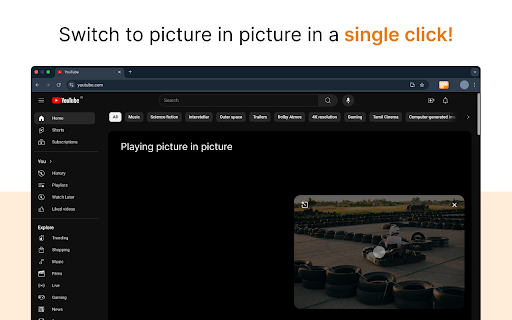
When activated, the video pops out into a floating player that remains visible as you browse other sites, work in different tabs, or scroll through content. Compatible with YouTube, Netflix, Twitch, and most websites with video.
Key Features:
🖵 Seamless Picture in Picture Mode: Watch videos from any platform in a mini, resizable window that stays on top of other apps, allowing you to multitask with ease.
🖵 Works on All Video Sites: Whether you’re streaming from YouTube, Netflix, or your favorite video site, the PiP mode supports them all. Simply click on the extension to pop the video out of its original window.
🖵 Always On Top: The PiP window stays visible no matter what you’re doing, so you can keep watching videos while working, browsing, or even gaming.
🖵 Lightweight & Fast: The extension is lightweight, ensuring it doesn’t slow down your browser or take up unnecessary resources.
🖵 User-Friendly Interface: One-click activation and smooth transitions ensure that PiP mode is easy for anyone to use.
Why Install?
🔆 Boost Your Productivity: Multitask like a pro! Watch tutorials, webinars, or live streams while handling emails, browsing the web, or working on documents.
🔆 Watch Anywhere: PiP mode allows you to continue watching videos even when you switch tabs or minimize your browser.
🔆 Convenient for All Users: Whether you're a student, professional, or casual user, Picture in Picture mode improves your video-watching experience without interruptions.
How It Works:
⭐ Open any video from any site.
⭐ Click on the "Picture in Picture Extension for Chrome" icon on your Chrome toolbar.
⭐ The video will pop out into a floating, resizable window.
⭐ Continue browsing, working, or gaming while watching your video!
Why Picture in Picture?
If you’re tired of switching tabs to keep an eye on your favorite videos, this extension is for you. It’s perfect for staying productive while keeping up with the latest content. Whether you’re a multitasking enthusiast or just looking for a more convenient way to watch, our PiP extension brings flexibility to your video experience. No more interruptions – just seamless viewing!
Install now and unlock the power of multitasking with Picture in Picture mode!


Reviews
Loading reviews...
Permissions (5)
Permissions
activeTabℹ Can access the current tab when you click the extension historyℹ Can read and modify your browsing history scriptingℹ Can inject scripts into web pages storageℹ Can store data locally in your browser tabsℹ Can see your open tabs and their URLs
Details
| Version | 0.2 |
| Updated | Feb 11, 2026 |
| Size | 17.58KiB |
| First Seen | Mar 27, 2026 |
More by UserJourney

IDM - Trial Reset Tool 2026
by UserJourney
10K
★ 5.00
tools
10K
★ 5.00
tools

ᐈ TeraBox Viral Video Link Saver ✓
by UserJourney
145
★ 5.00
tools
145
★ 5.00
tools

Color Picker for Chrome
by UserJourney
50
★ 5.00
developer
50
★ 5.00
developer

Google Search Console Enhancer
by UserJourney
31
★ 0.00
tools
31
★ 0.00
tools

MP3 Cut - Audio Trimmer
by UserJourney
30
★ 0.00
entertainment
30
★ 0.00
entertainment
Popular in workflow

Adobe Acrobat: PDF edit, convert, sign tools
by Adobe Inc.
331M
★ 4.40
workflow
331M
★ 4.40
workflow

AdBlock — block ads across the web
by AdBlock
63M
★ 4.48
workflow
63M
★ 4.48
workflow

迅雷下载支持
by Shenzhen Xunlei Network Technology Co., Ltd.
59M
★ 2.77
workflow
59M
★ 2.77
workflow

Adblock Plus - free ad blocker
by eyeo GmbH
41M
★ 4.39
workflow
41M
★ 4.39
workflow

Chrome Remote Desktop
by Chrome Remote Desktop Release Managers
38M
★ 3.14
workflow
38M
★ 3.14
workflow
Popular Extensions
Adobe Acrobat: PDF edit, convert, sign tools
by Adobe Inc.
331M
★ 4.40
workflow
331M
★ 4.40
workflow
AdBlock — block ads across the web
by AdBlock
63M
★ 4.48
workflow
63M
★ 4.48
workflow
迅雷下载支持
by Shenzhen Xunlei Network Technology Co., Ltd.
59M
★ 2.77
workflow
59M
★ 2.77
workflow

Grammarly: AI Writing Assistant and Grammar Checker App
by Grammarly
42M
★ 4.50
communication
42M
★ 4.50
communication
Adblock Plus - free ad blocker
by eyeo GmbH
41M
★ 4.39
workflow
41M
★ 4.39
workflow