Enable Copy Paste & Right Click icon

Enable Copy Paste & Right Click

by Webvoom

v1.0 Updated Feb 25, 2022 892KiB
CWS
10K
Users
★ 4.00
23 reviews
#5382
of 207.1K
workflow
#1645 of 31.8K
⚠️Not updated in over 2 years

Description

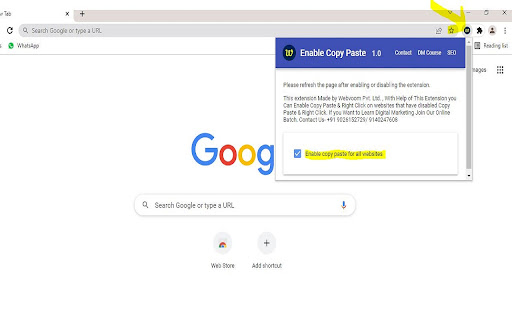
Enable Copy Paste & Right Click on websites that have disabled copy paste & Right Click. How to use this Extension: - Click on the extension icon - Pin Icon For Easy Use - After a popup is opened, use the “Enable copy paste for all websites” checkbox. - Refresh the page and see if the extension has successfully enabled copy paste & Right Click functionality on the website. Step for Disable Extension- - Click on the extension icon. - After a popup is opened, UNTICK checkbox “Enable copy paste for all websites”. This Extension Made for Enable Copy Paste and Right Click from Disabled Copy Paste & Right Click Website. For any Doubt & More Digital Marketing Tricks Visit Our YouTube Channel - webvoom . Where We Explains How to Use Our Extension and Many More Interesting Tricks I hope you like it, and please review it if you're happy with it!
Enable Copy Paste & Right Click screenshot 1Enable Copy Paste & Right Click screenshot 2Enable Copy Paste & Right Click screenshot 3Enable Copy Paste & Right Click screenshot 4

Reviews (5 cached)

★☆☆☆☆2024-10-10
Crystal Identity

This extension has been abandoned (last update Feb 2022). Also, I find it breaks websites if I keep the extension on. It is annoying to have to turn it on and off all the time. I am uninstalling this. I have switched to Browser Boost - Extra Tools for Chrome (which includes turning on right-click/select, amongst other things).

★☆☆☆☆2024-09-05
Owr

Doesn't work on Reddit

★☆☆☆☆2024-07-31
Yan F

Does not work on ebtedge.com

★☆☆☆☆2023-03-24
IR MacGuyver

This is pretty broken. It disables using the curser keys for playback on youtube.com. They also seem to be hampering interactions with the chrome store because three times I've tried to rate this extension and I've been redirected to one of their other extensions instead. I removed it to get around it but then I couldn't review it cause I didn't have it installed. I had to use the URL directly to leave this review instead of being able to use the normal extension page.

★★★☆☆2025-01-09
Jacob M

this extension makes it so you cannot skip ahead in youtube videos.

Permissions (1)

Permissions

storage Can store data locally in your browser

Details

Version 1.0
Updated Feb 25, 2022
Size 892KiB
First Seen Mar 26, 2026