
VisitMark - Highlight visited links with custom colors
by SQ Tech
v1.0.13 Updated Apr 3, 2026 182KiB
⚠️Requests 1 sensitive permission ✅Recently updated
Description
VisitMark
─────────
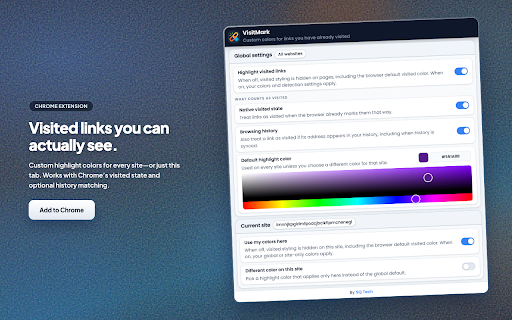
VisitMark highlights links you have already visited using colors you control. Set a default style for all sites, then override individual sites when you need a different color or want styling turned off for that page only. If you use Chrome with sync, your choices stay available across signed-in devices.
The extension can treat a link as visited when Chrome’s native visited state applies, and optionally when the URL appears in your browsing history (including synced history). Highlights update as you move between pages, including sites that change the URL without a full reload.
────────────────────────────────────────────────────────────
Key features
────────────
• Custom colors for visited links on standard HTTP and HTTPS pages.
• Global defaults plus per-site options: enable or disable highlighting for the current site, and optionally assign a color used only on that site.
• Two detection modes, usable together or separately: browser visited state, and history-based matching for cases where visited styling alone is not enough.
• A single global switch to restore the browser’s default visited appearance everywhere when you do not want VisitMark active.
────────────────────────────────────────────────────────────
Getting started
───────────────
1. Open the VisitMark popup from the Chrome toolbar.
2. Under All sites, enable Visited link colors and pick a default highlight color.
3. Under Detection, turn on Browser visited state and/or Browsing history according to how you want links qualified as visited.
4. On a site you use often, open the popup again. Under This site, choose whether highlighting applies there; use Site-specific color if you want a color that applies only to that host.
5. Use Restore defaults for global settings, or Remove site settings to clear saved options for the site you have open.
────────────────────────────────────────────────────────────
Who it helps
────────────
Anyone who scans long pages of links—search results, documentation, forums, directories—and wants consistent, easy-to-see distinction between visited and unvisited destinations without opening history or relying on faint default styling.
────────────────────────────────────────────────────────────
Privacy
───────
VisitMark applies your saved preferences locally in the browser. It uses extension APIs to read settings, observe navigation, and when you enable history-based detection, to read history as needed for that feature. It does not send your browsing data to publisher-operated servers for highlighting. See the linked privacy policy for full detail.
Reviews
Loading reviews...
Permissions (5)
Permissions
historyℹ Can read and modify your browsing history scriptingℹ Can inject scripts into web pages storageℹ Can store data locally in your browser tabsℹ Can see your open tabs and their URLs webNavigationℹ Can monitor navigation events
Details
| Version | 1.0.13 |
| Updated | Apr 3, 2026 |
| Size | 182KiB |
| First Seen | Mar 26, 2026 |
More by SQ Tech

Skip Wait — Bypass Timers & Countdowns
by SQ Tech
279
★ 0.00
tools
279
★ 0.00
tools

Prevent Duplicate Tabs
by SQ Tech
273
★ 5.00
tools
273
★ 5.00
tools

HistoryGuard Pro
by SQ Tech
40
★ 0.00
privacy
40
★ 0.00
privacy

Auto Group Tabs
by SQ Tech
18
★ 0.00
workflow
18
★ 0.00
workflow

WhatsApp Direct Message
by SQ Tech
16
★ 0.00
communication
16
★ 0.00
communication
Popular in functionality

Hola VPN - Your Website Unblocker
by Hola VPN LTD.
4M
★ 4.84
functionality
4M
★ 4.84
functionality

Video Speed Controller
by igrigorik
3M
★ 4.54
functionality
3M
★ 4.54
functionality

SponsorBlock for YouTube - Skip Sponsorships
by Ajay
2M
★ 4.65
functionality
2M
★ 4.65
functionality

OneTab
by OneTab
2M
★ 4.45
functionality
2M
★ 4.45
functionality

VPN Chrome extension - Best VPN by uVPN
by uVPN
900K
★ 4.52
functionality
900K
★ 4.52
functionality
Popular Extensions

Adobe Acrobat: PDF edit, convert, sign tools
by Adobe Inc.
322M
★ 4.40
workflow
322M
★ 4.40
workflow

AdBlock — block ads across the web
by AdBlock
62M
★ 4.48
workflow
62M
★ 4.48
workflow

迅雷下载支持
by Shenzhen Xunlei Network Technology Co., Ltd.
59M
★ 2.77
workflow
59M
★ 2.77
workflow

Grammarly: AI Writing Assistant and Grammar Checker App
by Grammarly
42M
★ 4.50
communication
42M
★ 4.50
communication

Adblock Plus - free ad blocker
by eyeo GmbH
40M
★ 4.39
workflow
40M
★ 4.39
workflow