Present icon

Present

by Mindful Suite

v4.6 Updated Mar 18, 2026 2.75MiB
CWS
5K
Users
★ 4.50
273 reviews
#1417
of 31.8K
workflow
#397 of 4K
Recently updated

Description

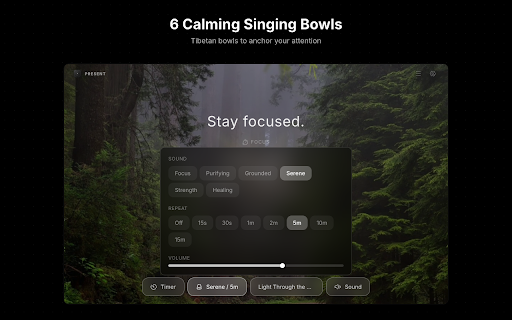
You open Chrome to work. An hour later, you’re deep in Reddit. That’s not just a willpower issue. Browsers are designed to pull attention: endless scroll, recommendations, and one-click “just checking” tabs. A lot of blockers respond with a blank error page, which is easy to ignore, override, or resent. Present takes a different approach: it limits or blocks distracting sites, and when you hit the limit it routes you to a Focus Room instead of a dead end. Here’s how it works: 1. Set rules once - 12 categories, 2,700+ mapped domains (social, video, news, gaming, shopping, crypto, and more) - For each category: `Allow` (no limits), `Limit` (daily time cap), or `Protect` (hard block) - Add your own sites and set exceptions (whitelist domains) 2. Stay aware while you browse - On limited sites, a live timer banner shows how much time you have left 3. When time’s up, use the Focus Room - Instead of an error page, you land in a Focus Room with 133 ambient scenes (video + synced audio) - Built-in timers (standard sessions or Pomodoro) - Optional bells, plus a place to write what you’re focusing on 4. Check your patterns - Daily totals, 7-day trends, category breakdowns - One-click reset if you want to start fresh Also: - Optional New Tab override (new tabs can open the Focus Room) - Timer durations from 5 minutes to 3 hours, plus custom - 6 bell sounds with repeat intervals you choose - Rotating focus quotes and saved focus history - Timer state can persist even if you close the Focus Room - No account required; data stays local in your browser From the maker of TimeWarp (2013, 15,000+ users). Rebuilt from scratch. Present is a website blocker plus a focus space, designed to make “time’s up” feel like a redirect, not a punishment.
Present screenshot 1Present screenshot 2Present screenshot 3Present screenshot 4Present screenshot 5

Reviews (18 cached)

★☆☆☆☆2016-11-13
Vsevolod Morozov

Adding ads on pages!!!

★☆☆☆☆2016-01-18
Andrew Krusanov

You can't set redirect to chrome://newtab :(((

★☆☆☆☆2014-09-24
Robert Kohut

This extension does more than it claims. I don't recall when this extension was first installed. After advertisements started popping up on advertisement-free pages, I suspected I had been hit by malware. As noted by previous reviews, after removing this extension, the ads stopped.

★☆☆☆☆2014-09-06
TehMad Pyro

Abusive extension, will inject ads into websites you view.

★☆☆☆☆2014-03-05
Liv H

Doesn't work for me. Added a time warp and nothing happens, I can still access the site and everything.

★☆☆☆☆2013-07-16
Matthew Kent-Baldwin

after installing this app my right mouse click no longer works, nor does my settings button in chrome, makes me have to delete and re-install chrome just to get it rid of this rubbish

★★☆☆☆2024-06-17
Vivian Ye

Doesn't work on Twitter (x.com) but suddenly pops up for any unrelated website that contains "x.com" in the URL. Timers mess with page content and social media buttons are irritating.

★★☆☆☆2023-05-07
Sue

Can you please allow us to remove social media buttons and also add a dark mode, too much white and it's burning my eyes.

★★☆☆☆2022-12-13
Avi Parshan

the update blocks me from clicking on the settings... no way t import sites or export... really a shame because i have been using timewarp for a while... i emailed the dev with no response aswell!

★★☆☆☆2016-08-09
Raven X

Whilst I liked the general idea behind this extension I personally just could not get it to work. I'm using Vivaldi so that might be the reason but every other chrome plugin has worked so far... The idea is good but the execution definitely needs some work.

★★☆☆☆2015-09-23
Evan Guthrie

I'm sure it works fine for other things, but i tried to make a homepage redirect me to a subpage in the same site but it wouldn't let me.

★★★☆☆2022-03-22
Dan Ef

I cannot turn off the social buttons in the options? I see the toggle in there, but I cannot click it in the options on brave browser.

★★★☆☆2017-06-23
Lasha Kadagishvili

remove the ad when you are redirected and its fine

★★★☆☆2016-05-13
Tony Baumann

Sadly it doesn't allow me to partially block sites.

★★★☆☆2015-10-12
Bryan Schreiner

I would like to be able to see my stats per day/week. I would want to know how long I am spending on social media per day.

★★★☆☆2014-09-06
Andreas Moser

The timer used to count DOWN and then lock the page. Now it's just counting UP and I can't set a time limit anymore. What's the point of a timer, if I can't block the page after a certain time?

★★★☆☆2013-08-24
陳楓晴

It'd be nicer to record the times spent on the sites and view in reports. "If it could store the timer totals.+1"

★★★☆☆2013-07-17
Steve Hoffman

It's a great idea, and very good implementation. However, it needs a serious tweak to supplant other similar systems. If you simply reduce the browser window to the task bar, or lock your computer, it still counts time on the active website, which overstates the time spent there. Address this, and it will get 5 stars.

Permissions (8)

Permissions

activeTab Can access the current tab when you click the extension alarms Can schedule periodic background tasks declarativeNetRequest Can block or redirect network requests notifications Can show desktop notifications scripting Can inject scripts into web pages storage Can store data locally in your browser tabs Can see your open tabs and their URLs webNavigation Can monitor navigation events

Details

Version 4.6
Updated Mar 18, 2026
Size 2.75MiB
First Seen Mar 22, 2026



