Kee - Password Manager icon

Kee - Password Manager

by Kee Vault Ltd

v4.0.6 Updated Jun 17, 2024 2.53MiB
CWS
80K
Users
★ 4.43
93 reviews
#272
of 29.8K
privacy
#13 of 301
⚠️Not updated in over a year ⚠️Requests 1 sensitive permission

Description

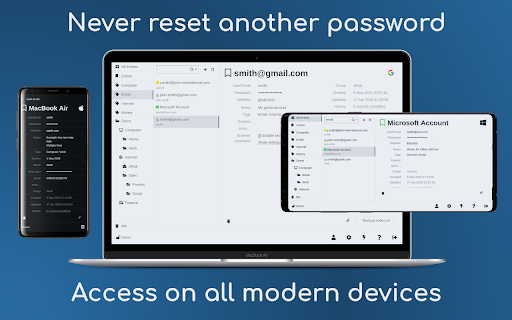
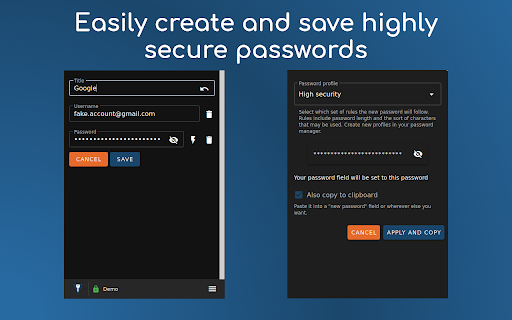
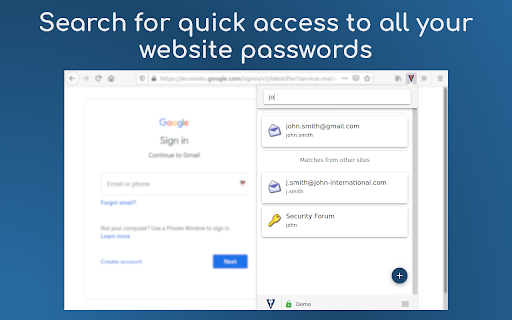
Save time, sign in easily to websites and avoid the hassle of forgotten password resets. Protect yourself and people you know from the nightmare of your accounts being hacked. ➤ Secure and automatic sign in to all your favourite websites ➤ Protect your personal and financial data by letting Kee create and remember high security passwords for you ➤ Your passwords stay under your control, protected by the most popular and thoroughly tested open source secure password storage system ➤ Open source with no adverts ★ No payment required Kee offers an easy and cheap password management solution via the Kee Vault service. This is available for a free trial period with no credit card required. If you decide that's not for you, the add-on can instead work with the free KeePass Password Safe 2 software and we offer step by step instructions for how to install and configure that to work on your Windows machine (and it can also be made to work on Mac and Linux with a bit more effort, with multiple guides existing to help in that endeavour) ★ Who we are Kee has been the most highly rated Mozilla Firefox password management extension for nearly 10 years! We have recently changed our icon to coincide with the launch of the Chrome version of the extension and the announcement of the Kee Vault password manager service. You can look forward to even more improvements this year and join the discussion on the community forum at https://forum.kee.pm/ to let us know what features you'd most like to see developed next. ★ Having trouble? If you would like to try Kee and it is not working for you, please use the help resources at https://forum.kee.pm/t/help-and-support/24 since requests for support within review comments will remain un-noticed for a year or longer. You should pay particular attention to the full detailed installation instructions at https://forum.kee.pm/t/installing-kee-instructions/23, the getting started tutorial at https://tutorial-addon.kee.pm/ and any advice at the top of that page. ★ Permissions Kee needs a variety of permissions to deliver it's functionality to you. We maintain a page that details these permissions and why we require them at https://www.kee.pm/extension-permissions/. The built-in Chrome password manager will no longer prompt you to save passwords after you install this add-on. Any existing data will not be affected but you are strongly advised to delete any stored passwords from your Chrome password store in order to increase the security of your personal data and to avoid possible confusion in future.
Kee - Password Manager screenshot 1Kee - Password Manager screenshot 2Kee - Password Manager screenshot 3Kee - Password Manager screenshot 4Kee - Password Manager screenshot 5

Reviews (8 cached)

★☆☆☆☆2021-11-22
Daniel Kiernan

Charged me multiple times with no way to cancel membership. They also don't have any support outlets because its a security issue. I ended up chargingback a payment and they still charge my card the next month. Ended up switching to a temp cc, so they can't keep billing me for a service I don't even use..

★☆☆☆☆2021-03-12
Michal Súkup

extremely annoying notifications, asks for password from keepass again and again even if you denied it several times. would be nice if i was let change the settings but no, give me password user...

★★★☆☆2021-03-05
Stefan Lobbenmeier

Worked fine for 2 years so I was very happy with it. Yesterday it stopped working though, it now says "Open Key Vault or KeePass to enable Kee". It is started and I do not remember changing anything yesterday, so maybe some certificate expired? So far I tried reinstalling the plugin and setting the database has the Home Group as found in the KeePass forum, but did not work. Would be good to hear if the issue only affects me or also others.

★★★☆☆2021-01-13
Venator

Alright.

★★★☆☆2020-11-30
Mats Sibelius

I keep getting ``` Error in event handler: TypeError: _a.toLowerCase is not a function at ConfigManager.isFormInteresting (<URL>) at FormFilling.findMatchesInThisFrame (<URL>) at <URL> ```

★★★☆☆2020-08-27
Eddie Parker

Updated: a couple months (years?) in: It really sucks at filling out forms now. It doesn't detect, and the 'filter' combobox doesn't do a good job filtering, so it's getting less and less useful. Good so far for chrome - works well with Keepass! My only issue so far is that it doesn't seem to respect 'reference' entries in keepass and instead puts the {REF:...} as the entry versus doing the lookup. Mildly annoying, hopefully they can fix it?

★★★☆☆2019-04-09
Sepp Mayer

Does not resolve username and password references from keepass files. Instead insert the reference placeholder.

★★★☆☆2018-06-11
Unknown Unknown (Unknown)

Uses a lot of CPU on Chromium on Linux and sometimes stops working. Besides that it is quite nice.

Permissions (15)

Permissions

activeTab Can access the current tab when you click the extension alarms Can schedule periodic background tasks clipboardWrite Can write to your clipboard contextMenus Can add items to the right-click menu idle Can detect when you're away from the computer notifications Can show desktop notifications offscreen privacy Can change privacy-related browser settings scripting Can inject scripts into web pages storage Can store data locally in your browser tabs Can see your open tabs and their URLs unlimitedStorage webNavigation Can monitor navigation events webRequest Can observe and analyze network traffic webRequestAuthProvider

Details

Version 4.0.6
Updated Jun 17, 2024
Size 2.53MiB
First Seen Mar 22, 2026

