
⚠️Not updated in over 2 years
Description
Introducing TypeGenieAI, the ultimate Chrome extension for anyone looking to improve their content creation, analysis, and productivity skills. With its advanced natural language processing algorithms, TypeGenieAI helps you generate polished and professional content effortlessly. Whether you're a blogger, marketer, or business owner, this extension is the perfect solution for anyone looking to improve their content creation and analysis skills.
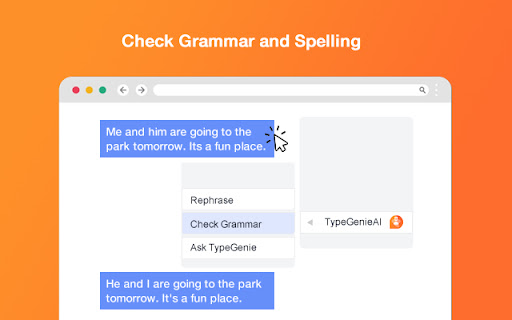
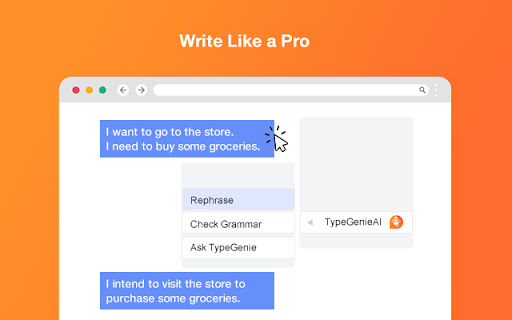
With TypeGenieAI, you can quickly and easily improve the clarity and professionalism of your written content. Simply right-click on any text edit box and choose from three convenient options: Rephrase, Check grammar, and Ask TypeGenieAI. The "Rephrase" option generates alternative phrasing for your text, while the "Check grammar" option ensures your content is polished and professional. With "Ask TypeGenieAI," you can access our powerful natural language processing technology directly from the text edit box, allowing you to generate compelling content with ease.
TypeGenieAI is a powerful browser-based tool that provides users with advanced natural language processing capabilities directly within text editors. By simply right-clicking on any text edit box, users can access a convenient menu that provides three options: Rephrase, Check grammar, and Ask TypeGenieAI. This means that whether you are writing an email, drafting a blog post, or analyzing data, you can use TypeGenieAI to quickly and easily improve your content's clarity, professionalism, and accuracy. And because TypeGenieAI is browser-based, you can use it on any website and get results directly inside the textarea. The possibilities are endless, from language translations to code creation and beyond.
So why wait? Start using TypeGenieAI today and experience a new level of productivity. And with the added bonus of being able to easily write cover letters and compose email replies, TypeGenieAI is the perfect tool for streamlining your workday. Try it today and see the difference for yourself!

Reviews
Loading reviews...
Permissions (4)
Permissions
contextMenusℹ Can add items to the right-click menu storageℹ Can store data locally in your browser
Host Permissions
https://www.google.com/*ℹ Can access www.google.com websites https://www.googleapis.com/*ℹ Can access www.googleapis.com websites
Details
| Version | 1.1.0 |
| Updated | Mar 7, 2023 |
| Size | 163KiB |
| First Seen | Mar 22, 2026 |
Popular in workflow

Adobe Acrobat: PDF edit, convert, sign tools
by Adobe Inc.
330M
★ 4.40
workflow
330M
★ 4.40
workflow

Chrome Remote Desktop
by Chrome Remote Desktop Release Managers
38M
★ 3.14
workflow
38M
★ 3.14
workflow

Screencastify - Screen Video Recorder
by castify-ext-dev
9M
★ 3.95
workflow
9M
★ 3.95
workflow

Microsoft Defender Browser Protection
by Microsoft Corporation
2M
★ 4.15
workflow
2M
★ 4.15
workflow

Pop up blocker for Chrome™ - Poper Blocker
by dingosolutions
2M
★ 4.76
workflow
2M
★ 4.76
workflow
Popular Extensions
Adobe Acrobat: PDF edit, convert, sign tools
by Adobe Inc.
330M
★ 4.40
workflow
330M
★ 4.40
workflow
Chrome Remote Desktop
by Chrome Remote Desktop Release Managers
38M
★ 3.14
workflow
38M
★ 3.14
workflow

Cisco Webex Extension
by cisco.chromestore
24M
★ 2.34
social
24M
★ 2.34
social

Kami for Google Chrome™
by Kami
17M
★ 4.56
education
17M
★ 4.56
education

Read&Write for Google Chrome™
by Texthelp
17M
★ 3.44
accessibility
17M
★ 3.44
accessibility