
⚠️Not updated in over a year
Description
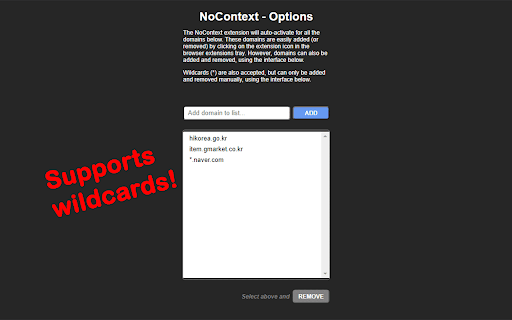
Clicking on this extension will bring back your right-click context menu and ability to select text on websites that may have mangled its true purpose. When active for the current tab's domain, you'll see a red "!" badge on the corner of the icon. It will remember the domains you've activated previously and automatically activate when returning to those domains. (Some websites use multiple domains, so you may need to activate it for each of the subdomains, or use wildcards in the Options menu!) You can always click on the icon again to deactivate when visiting the current domain.
Updates:
1.0.13 -- Better iframe handling. Settings now carry over into incognito/private tabs.
1.0.12 -- Convert past version domain lists to newer version.
1.0.11 -- Rollback due to missing back-compatible features.
1.0.10 -- Added advanced options to limit event overriding per domain.
1.0.9 -- Fixed issue with continued browsing on same tab.
1.0.8 -- Handles pages that lazy-load elements.
1.0.7 -- Domains list sorted. DOM body included in user-select restoration.
1.0.6 -- Some elements use CSS to disable user-select. This update re-enables them.
1.0.5 -- Updates to the Options page.
1.0.4 -- More functionality restored for websites using iframes.
1.0.3 -- Now works with web files from local files (URLs starting with "file://") and re-enables selection of text.

Reviews
Loading reviews...
Permissions (4)
Permissions
activeTabℹ Can access the current tab when you click the extension scriptingℹ Can inject scripts into web pages storageℹ Can store data locally in your browser tabsℹ Can see your open tabs and their URLs
Details
| Version | 1.0.13 |
| Updated | Aug 30, 2024 |
| Size | 34.34KiB |
| First Seen | Mar 22, 2026 |
Popular in accessibility

Read&Write for Google Chrome™
by Texthelp
17M
★ 3.44
accessibility
17M
★ 3.44
accessibility

SYTools
by wasaby
4M
★ 3.16
accessibility
4M
★ 3.16
accessibility

Screenshot Tool - Screen Capture & Editor
by screenshot-tool.app
1M
★ 4.70
accessibility
1M
★ 4.70
accessibility

Помощник диагностики
by kontur.extension
1M
★ 3.00
accessibility
1M
★ 3.00
accessibility

WebCRX
by webcrx
1M
★ 4.87
accessibility
1M
★ 4.87
accessibility
Popular Extensions

Adobe Acrobat: PDF edit, convert, sign tools
by Adobe Inc.
330M
★ 4.40
workflow
330M
★ 4.40
workflow

Chrome Remote Desktop
by Chrome Remote Desktop Release Managers
38M
★ 3.14
workflow
38M
★ 3.14
workflow

Cisco Webex Extension
by cisco.chromestore
24M
★ 2.34
social
24M
★ 2.34
social

Kami for Google Chrome™
by Kami
17M
★ 4.56
education
17M
★ 4.56
education
Read&Write for Google Chrome™
by Texthelp
17M
★ 3.44
accessibility
17M
★ 3.44
accessibility