
✅Recently updated
Description
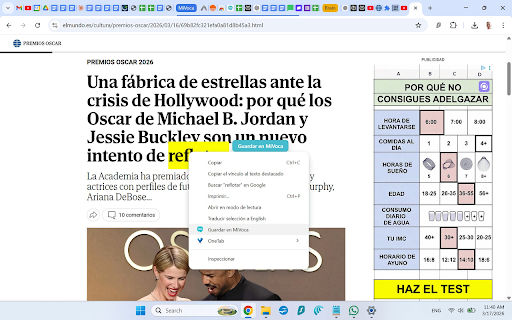
Save to MiVoca makes it effortless to build your vocabulary while reading anything on the web.
How it works:
Select any word or phrase on a webpage
Click the "Save to MiVoca" button that appears (or right-click → "Save to MiVoca")
The word opens in the MiVoca Translator where you can review, edit, and save it
You're automatically returned to your reading
Features: • Floating save button appears next to selected text • Right-click context menu for quick access • Long phrase detection with confirmation dialog • Daily word counter badge • Automatic return to your reading tab after saving • Available in 11 languages
Requirements: A free MiVoca account at https://mivoca.app
MiVoca is a vocabulary learning platform with flashcards, sentence exercises, AI-generated stories, pronunciation practice, and more.

Reviews
Loading reviews...
Permissions (3)
Permissions
activeTabℹ Can access the current tab when you click the extension contextMenusℹ Can add items to the right-click menu storageℹ Can store data locally in your browser
Details
| Version | 2.1.1 |
| Updated | Mar 24, 2026 |
| Size | 31.91KiB |
| First Seen | Mar 28, 2026 |
Popular in education

Kami for Google Chrome™
by Kami
19M
★ 4.56
education
19M
★ 4.56
education

EndNote Click
by EndNote Click
5M
★ 4.06
education
5M
★ 4.06
education

Promethean® Screen Share
by classflow
4M
★ 2.98
education
4M
★ 2.98
education

Language Reactor
by Dioco
2M
★ 4.20
education
2M
★ 4.20
education

Mote for Google Chrome™
by Mote Technologies, Inc.
2M
★ 4.55
education
2M
★ 4.55
education
Popular Extensions

Adobe Acrobat: PDF edit, convert, sign tools
by Adobe Inc.
331M
★ 4.40
workflow
331M
★ 4.40
workflow

Grammarly: AI Writing Assistant and Grammar Checker App
by Grammarly
42M
★ 4.50
communication
42M
★ 4.50
communication

Chrome Remote Desktop
by Chrome Remote Desktop Release Managers
38M
★ 3.14
workflow
38M
★ 3.14
workflow

Microsoft Single Sign On
by Microsoft
36M
★ 2.27
workflow
36M
★ 2.27
workflow

Cisco Webex Extension
by cisco.chromestore
23M
★ 2.34
social
23M
★ 2.34
social