
BuyFast - Amazon Flipkart Auto Checkout
v2.6.6 Updated Mar 31, 2026 286KiB
✅Recently updated
Description
🔰How use BuyFast extension in mobile ❓
1️⃣ Install Quetta Browser and make it default browser in phone setting
2️⃣ Go to extension setting in Quetta, Search & Add Buyfast & user-agent-switcher both.
3️⃣ In user-agent-switcher extension, select chrome & microsoft option so it will open link in desktop mode everytime automatically.
4️⃣ Turn off "In-App Browser" setting in telegram chat option. ( Must require to open link Quetta Browser directly) .
🔥 Key Features:
1. 🛒 Instant Checkout Magic:
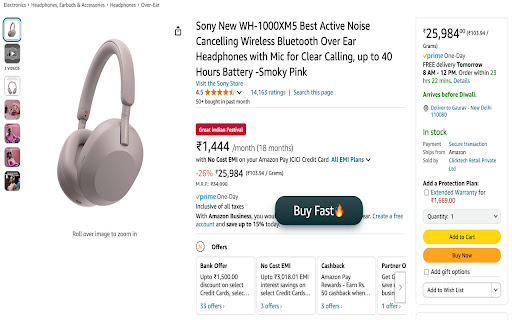
Amazon: Click the 🚀 “Buy Fast” button to skip cart reviews, address selections, and payment steps. Done in seconds!
Flipkart: Toggle the 🔄 “Fast Switch” to auto-fill details and place orders instantly.
2. Auto-apply coupons and select the fastest delivery option by default.
Get a confirmation pop-up with order summary before finalizing.
3. Compatibility: Works on browsers (Chrome, Edge, Brave, Arc) + Q Browser for Android/iOS & Lightweight design 🪶 – zero lag, even on slow connections. It works on Amazon, Flipkart, Myntra, AJIO & Shopsy.
🛡️ Trusted by Thousands:
4.8/5 ⭐ ratings from users who’ve saved 1000+ hours annually.
Save time and money while shopping online with us. Whether you're hunting for the latest tech gadgets, fashion must-haves, or everyday essentials, this Chrome extension ensures you never overpay again.
Add us to your Browser and take control of your online shopping experience. Start making smarter purchases and enjoy incredible savings on all your favorite products. Happy shopping!
Dedicated support team 🧑💻 to troubleshoot or customize settings.
Disclaimer : To support development, some links may earn us a small commission at no extra cost to you. Your privacy and trust remain our priority.
📥 Ready to Revolutionize Shopping?
Install now and turn tedious checkouts into a one-click victory! 🏆
Leave Feeback at the end :)



Reviews (2 cached)
★☆☆☆☆2024-09-14
GIRISH S
HOW TO SELECT PAYMENT MODE
★★☆☆☆2025-09-18
bharat
"Your checkout has no items" getting error from today and unable to add available product in flipkart
Permissions (1)
Permissions
storageℹ Can store data locally in your browser
Details
| Version | 2.6.6 |
| Updated | Mar 31, 2026 |
| Size | 286KiB |
| First Seen | Mar 22, 2026 |
More by Gaurav Kushwaha


Popular in shopping

Keepa™ - Amazon Price Tracker
by Keepa.com
4M
★ 4.68
shopping
4M
★ 4.68
shopping

Coupert - Automatic Coupon Finder & Cashback
by Coupert.com
3M
★ 4.73
shopping
3M
★ 4.73
shopping

Smarty
by cesarlambino58
800K
★ 4.16
shopping
800K
★ 4.16
shopping

Buyhatke: Price History & Tracker, Spend Lens
by Buyhatke
800K
★ 4.74
shopping
800K
★ 4.74
shopping

The Camelizer
by camelcamelcamel.com
800K
★ 4.31
shopping
800K
★ 4.31
shopping
Popular Extensions

Adobe Acrobat: PDF edit, convert, sign tools
by Adobe Inc.
322M
★ 4.40
workflow
322M
★ 4.40
workflow

AdBlock — block ads across the web
by AdBlock
62M
★ 4.48
workflow
62M
★ 4.48
workflow

迅雷下载支持
by Shenzhen Xunlei Network Technology Co., Ltd.
59M
★ 2.77
workflow
59M
★ 2.77
workflow

Grammarly: AI Writing Assistant and Grammar Checker App
by Grammarly
42M
★ 4.50
communication
42M
★ 4.50
communication

Adblock Plus - free ad blocker
by eyeo GmbH
40M
★ 4.39
workflow
40M
★ 4.39
workflow