
Description
>>> DONATE! <<<
If you LIKE THIS EXTENSION, please consider a DONATION (LINK is on RIGHT CLICK over extension ICON!). A coffee will be just fine! :)
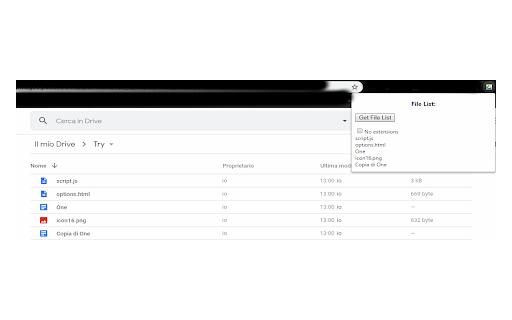
Creates a list of entries that are visible in the folder you are currently viewing in your Google Drive browser page. It's not just an element counting, but a real enumeration with full names.
The option for excluding the file extensions may be used to create a list with just the "names": this is useful when the file names (minus the extensions) may represent a list of "something" (or "someone")! I've put it in the features list because I need this myself (but the "no extensions" flag box is unchecked by default, as you can see, so the normal behavior will include the file extensions).
===========================================
IMPORTANT: THE "50 ITEMS AT A TIME" LIMIT
===========================================
Google Drive just loads 50 elements at a time, and the first time you land in a folder you'll obviously see only the first 50! There's no way to know in advance how many objects a folder contains, when there are more than 50: that's the default behavior of Google Drive's web pages, it's not my extension's fault! :)
So, if we want to know the full count of a more-than-50-elements folder, Google Drive forces us to:
1) scroll down (the page will continue rendering 50 more items each time you reach the end)
2) scroll down again and again, until you reach the last element
3) open the extension and get the full list of names + the real total count
Enjoy! :D
IMPORTANT NOTE
--------------------------------
Please ensure to have a recent version of Chrome, otherwise the updates inctroduced for Manifest V3 may lead to a non-working extension, due to your Chrome's version beeing too old.
Changelog
=======================
- v1.0.0: hello, world! :)
- v1.1.0: the list is now printend with both "grid" and "list" view types.
- v1.2.0: added file count. Restyling of the file list (now more "pleasant").
- v1.2.1: bug fixing
- v1.2.2: Google was not happy I used their logo and name... so I've changed logo and name. But extension is still the same! :)
- v1.2.3: upgrade to Manifest V3 (Google requirement for 2023)
- v1.2.4: revert to Manifest V2 version - V3 extension not working :(
- v1.3.0: final update to Manifest V3, working and faster! Yay!!! :D
- v1.4.0: added donation link... ^^
- v1.4.1: bug fix caused by Google css change
- v1.4.2: bug fix caused by me XD


Reviews (3 cached)
★☆☆☆☆2024-09-26
Beverly McDonald
First time trying this I will let you know after I see how it works
★★★☆☆2026-01-17
William Hazel
For some reason I am only getting the first 50 file names, I have over 200 files in the folder. Cannot find any way to change the default to more than 50.
★★★☆☆2020-11-23
tsururun
liked it but It'd be great if it could create something like a tree list for the files inside folders too
Permissions (3)
Permissions
activeTabℹ Can access the current tab when you click the extension contextMenusℹ Can add items to the right-click menu scriptingℹ Can inject scripts into web pages
Details
| Version | 1.4.2 |
| Updated | Jan 20, 2026 |
| Size | 34.8KiB |
| First Seen | Mar 22, 2026 |
Popular in workflow

Adobe Acrobat: PDF edit, convert, sign tools
by Adobe Inc.
330M
★ 4.40
workflow
330M
★ 4.40
workflow

Chrome Remote Desktop
by Chrome Remote Desktop Release Managers
38M
★ 3.14
workflow
38M
★ 3.14
workflow

Screencastify - Screen Video Recorder
by castify-ext-dev
9M
★ 3.95
workflow
9M
★ 3.95
workflow

Microsoft Defender Browser Protection
by Microsoft Corporation
2M
★ 4.15
workflow
2M
★ 4.15
workflow

Pop up blocker for Chrome™ - Poper Blocker
by dingosolutions
2M
★ 4.76
workflow
2M
★ 4.76
workflow
Popular Extensions
Adobe Acrobat: PDF edit, convert, sign tools
by Adobe Inc.
330M
★ 4.40
workflow
330M
★ 4.40
workflow
Chrome Remote Desktop
by Chrome Remote Desktop Release Managers
38M
★ 3.14
workflow
38M
★ 3.14
workflow

Cisco Webex Extension
by cisco.chromestore
24M
★ 2.34
social
24M
★ 2.34
social

Kami for Google Chrome™
by Kami
17M
★ 4.56
education
17M
★ 4.56
education

Read&Write for Google Chrome™
by Texthelp
17M
★ 3.44
accessibility
17M
★ 3.44
accessibility