Page Manipulator icon

Page Manipulator

by Ruud14

v0.5.5 Updated Jan 11, 2023 2.17MiB
CWS
9K
Users
โ˜… 3.63
40 reviews
#8208
of 207.3K
developer
#711 of 18.1K
โš ๏ธNot updated in over 2 years

Description

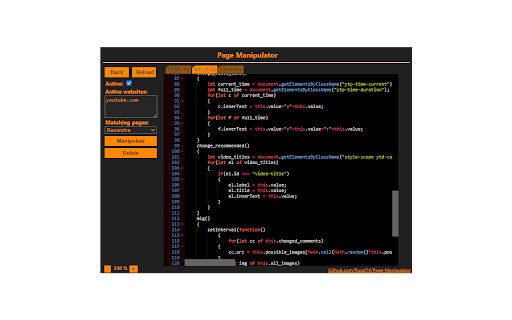
๐‚๐ฎ๐ฌ๐ญ๐จ๐ฆ๐ข๐ณ๐ž ๐š๐ฅ๐ฆ๐จ๐ฌ๐ญ ๐š๐ง๐ฒ ๐ฐ๐ž๐›-๐ฉ๐š๐ ๐ž ๐›๐ฒ ๐ข๐ง๐ฃ๐ž๐œ๐ญ๐ข๐ง๐  ๐œ๐ฎ๐ฌ๐ญ๐จ๐ฆ ๐‡๐“๐Œ๐‹, ๐‚๐’๐’, ๐จ๐ซ ๐‰๐š๐ฏ๐š๐’๐œ๐ซ๐ข๐ฉ๐ญ. ๐‡๐š๐ฏ๐ž ๐ญ๐ก๐ž ๐œ๐ก๐š๐ง๐ ๐ž๐ฌ ๐ฒ๐จ๐ฎ ๐ฆ๐š๐ค๐ž ๐›๐ž ๐ฌ๐š๐ฏ๐ž๐ ๐š๐ง๐ ๐š๐ฉ๐ฉ๐ฅ๐ข๐ž๐ ๐ž๐ฏ๐ž๐ซ๐ฒ ๐ญ๐ข๐ฆ๐ž ๐ฒ๐จ๐ฎ ๐ฏ๐ข๐ฌ๐ข๐ญ ๐ญ๐ก๐ž ๐ฌ๐ฉ๐ž๐œ๐ข๐Ÿ๐ข๐ž๐ ๐ฐ๐ž๐›๐ฌ๐ข๐ญ๐ž๐ฌ. ๐๐ž๐ญ๐ญ๐ž๐ซ ๐ญ๐ก๐š๐ง '๐ข๐ง๐ฌ๐ฉ๐ž๐œ๐ญ ๐ž๐ฅ๐ž๐ฆ๐ž๐ง๐ญ' ๐›๐ž๐œ๐š๐ฎ๐ฌ๐ž ๐œ๐ก๐š๐ง๐ ๐ž๐ฌ ๐ฐ๐ข๐ฅ๐ฅ ๐ฌ๐ญ๐š๐ฒ ๐š๐Ÿ๐ญ๐ž๐ซ ๐ซ๐ž๐ฅ๐จ๐š๐๐ข๐ง๐ . Functionalities: - Automatically inject custom HTML, CSS, and/or JavaScript into the pages you specify. - Run custom CSS before the page is fully loaded so you won't see the original page first. - Inject JavaScript on the go. - Add/Remove/Change the HTML and CSS on the go. - Right click on any element on a page to get the full CSS path. - Automatically saves the changes you make. - Files that contain less than 8000 characters are synced across your Google account. - Files that contain 8000 or more characters are stored locally. Fun use cases: - Cheat simple games like the T. rex game. - Make your own dark-theme for any website. - Test a website you're working on. - Whatever you can imagine, be creative ;) How to use: - Simple, First open the extension. - Choose 'JavaScript', 'CSS' or 'HTML'. - Create a new file by pressing 'new'. - Write your own code or get some from the examples here: https://github.com/Ruud14/Page-Manipulator/tree/master/examples - Press the 'manipulate' button to test your code. - To make sure your code is run every time you visit a specific page do the following: - Put the URLs of the websites in the 'active websites' input. - Check the 'active' checkbox. - Button functionalities: - The 'Reload' Button: - Will Reload the current page. - The 'Active' checkbox: - on > The code will be run automatically on the pages specified in the 'Active websites' textarea. - off > The code will only run when you press the 'Manipulate' button. - The 'Active Websites' textarea: - You can specify the websites you want your code to run on here. - The 'Matching Pages' dropdown: - 'Exact' > The code will only run when the URL of the page is exactly the same as one of the URLs in the 'Active Websites' textarea. (Including slashes at the end!) - 'Recursive' > The code will also run on all sub-pages of the specified URLs in the 'Active Websites'. - The 'Position on page' dropdown (only with HTML): - 'Top' > The HTML will be added to the top of the page. - 'Bottom' > The HTML will be added to the bottom of the page. - 'Replace' > The HTML will replace the entire body HTML of the page. - The 'Manipulate' or 'Update Manip.' button: - Injects the code into the page or updates the injection. - **This button also works when the 'Active' checkbox is unchecked.** - The 'Remove Manip.' Button: - Removes the manipulation from the page. - If the "Auto โŸณ" checkbox is checked, the page will automatically reload after pressing the 'Remove Manip.' button. The 'active' checkbox will also be unchecked. - The 'Delete' button: - Deletes the current file from the storage. - You can right-click any element on a page to get the CSS path of that element. It doesn't work, what now?: - If the extension button in the top right corner is greyed-out, you can't use it on that page. - Make sure the 'active' checkbox is checked. And the 'active websites' input contains the correct URLs. - For JavaScript: - Make sure your code is run at the right moment. Maybe try adding a delay. - Check the browser console for error messages. - For CSS: - Make sure you are manipulating the right element by using "inspect element". - Try using '!important'. - For HTML: - Make sure you haven't accidentally set the 'position' dropdown to the wrong position. - Removing and updating JavaScript manipulations might not work the way you expect it to. Removing your JavaScript manipulation from a page only removes the <script> element, so dynamic changes made to the page will stay there even when you remove the manipulation. To completely remove everything the manipulation did, you must reload the page. This extension works on most sites, but there are some exceptions! If you'd like to see any specific improvements or found any bugs, let me know here: https://github.com/Ruud14/Page-Manipulator/issues The editor I used since release v0.2.0-alpha is Ace editor. Check it out here: https://ace.c9.io/
Page Manipulator screenshot 1Page Manipulator screenshot 2Page Manipulator screenshot 3

Reviews (13 cached)

โ˜…โ˜†โ˜†โ˜†โ˜†2025-07-02
s f

Either not working or inefficacious UI. There is no "Active" checkbox to check. It never came on no matter which webpage was loaded. The active checkbox is consistently absenst across a large number of sites (including google.com used in the example) that I loaded for testing. The video on the github page leans too much on the "marketing" rather than explaining with a short tutorial. Probably I am doing something wrong, but the UI and the help provided aren't all that much useful to get users going with this extension.

โ˜…โ˜†โ˜†โ˜†โ˜†2025-04-02
Tim Somethin

When I open it, the scrollbars dont even work and the text is halfway off the screen unreadable, no way to scroll left or right, buttons simply broken. Totally useless broken extension.

โ˜…โ˜†โ˜†โ˜†โ˜†2024-05-14
Floyd Lindquist

was working awesome for years. now, not working at all. the code gets saved - then becomes blank. one star, only because. . . it does not work at all. hopefully, it is worth it to the dev to keep this extension going. was such a helpful tool!

โ˜…โ˜†โ˜†โ˜†โ˜†2024-03-24
ะ’ะฐะดะธะผ ะ’ะปะฐะดะธะผะธั€ะพะฒะธั‡

Not working on the Facebook

โ˜…โ˜†โ˜†โ˜†โ˜†2024-03-19
Kev T

EXTREMELY un-intuitive UI, tiny "active" button you need to click that is not obvious at all. Also just doesn't work, can't even do something simply like change the background color. A simply 2 minute YouTube tutorial would be nice, but of course that would make things too easy right?

โ˜…โ˜†โ˜†โ˜†โ˜†2024-02-08
Massimo Buonaiuto

it does not work. I installed it and use it in a wordpress page and it was saying I was in about: page.

โ˜…โ˜†โ˜†โ˜†โ˜†2023-02-07
Cuplikan Yang Mengalir

Not work its still off Error handling response: Error: Failed to execute 'createElement' on 'Document': The tag name provided ('page-manipulator-Template Artikel Blog') is not a valid name. at manipulate (chrome-extension://mdhellggnoabbnnchkeniomkpghbekko/content.js:351:45) at load_data_from_storage_and_manipulate (chrome-extension://mdhellggnoabbnnchkeniomkpghbekko/content.js:100:13) at chrome-extension://mdhellggnoabbnnchkeniomkpghbekko/content.js:175:13 at check_for_js_file (chrome-extension://mdhellggnoabbnnchkeniomkpghbekko/content.js:162:13) at chrome-extension://mdhellggnoabbnnchkeniomkpghbekko/content.js:168:9

โ˜…โ˜†โ˜†โ˜†โ˜†2022-03-28
Sandroo

on every page it says cant bee manipulated

โ˜…โ˜†โ˜†โ˜†โ˜†2020-09-29
1992

Does not manipulate when refreshed

โ˜…โ˜…โ˜†โ˜†โ˜†2023-08-11
T L

Doesn't work on content within iFrames embedded in the page

โ˜…โ˜…โ˜†โ˜†โ˜†2021-10-21
Maddox Bouldin

It looked really useful but every website I go to says "this website can't be manipulated"

โ˜…โ˜…โ˜…โ˜†โ˜†2024-05-30
AlphaLeoli

If you're writing code and then you click like delete or if you press enable before you write anything, then clicking 'ok' on the javascript popup before closing the extension will make it so that you can't open the extension after that.

โ˜…โ˜…โ˜…โ˜†โ˜†2021-02-05
BRY402

I like it and it's really useful, but whenever I click "Remove manip", it refreshes the page and I lose all my progress, please add a checkbox that, when unchecked, does not update the page

Permissions (4)

Permissions

activeTabโ„น Can access the current tab when you click the extension contextMenusโ„น Can add items to the right-click menu storageโ„น Can store data locally in your browser unlimitedStorage

Details

Version 0.5.5
Updated Jan 11, 2023
Size 2.17MiB
First Seen Mar 28, 2026




